Navigation
-
-
Standalone Tebex Templates & themes Websites Pterodactyl Themes Addons Eggs NamelessMC Templates Modules XenForo Themes Addons Invision Community Themes Plugins Translations WHMCS Themes Modules Paymenter Themes Extensions Calagopus Themes Extensions Eggs LeaderOS themes Ghost themes Shopify themes Wix themes Squarespace themes Other webstores CraftingStore templates MineStore themes PayNow templates Other
-
-
-
Install the app
More options
You are using an out of date browser. It may not display this or other websites correctly.
You should upgrade or use an alternative browser.
You should upgrade or use an alternative browser.
Youtube Banner Resolution?
- Thread starter alt69
- Start date
- Status
- This thread has been locked.


PebbleHost
High performance, consistent uptime and fast support. Minecraft hosting that just works.
Thank you.2560 x 1440


wait so what?I retract my post because Youtube definitely resizes it
So yeah just go with Google's guidelines
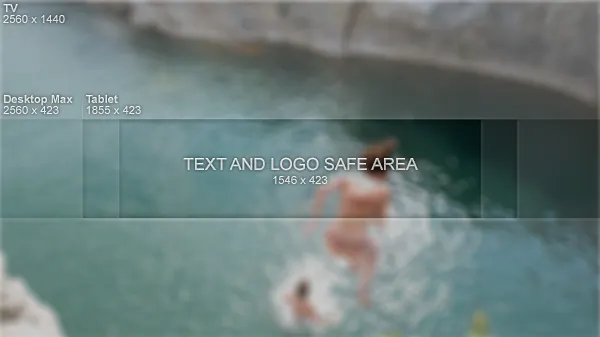
what resolution do I use then?
To answer your "Why do you need it then" question, I'm making a lil thing for a friend.Why do you need it then and no I
am not here to faerm posts.
I also think that youtube adjusts it by itself. I had a high resolution backround and well it fit in fine.

To answer your "Why do you need it then" question, I'm making a lil thing for a friend.
Yeah make the canvas size 2560x1440, then just shrink that banner content into an area in the middle that is 1546x423
This is looking greatYeah make the canvas size 2560x1440, then just shrink that banner content into an area in the middle that is 1546x423


i would crop out the banner part and then resize it to 1546x423, which should look far more natural than trying to resize it that way. not sure how it'll look cause i dunno how big your file you're working with is.
then crop it back out to the big size it needs to be.
then just make a new layer underneath and it looks like there's just a pretty simple radial gradient for the background.
then crop it back out to the big size it needs to be.
then just make a new layer underneath and it looks like there's just a pretty simple radial gradient for the background.
I'd re-open Photoshop and show you how I sorted it but I cba and I'm about to go off.i would crop out the banner part and then resize it to 1546x423, which should look far more natural than trying to resize it that way. not sure how it'll look cause i dunno how big your file you're working with is.
then crop it back out to the big size it needs to be.
then just make a new layer underneath and it looks like there's just a pretty simple radial gradient for the background.
Saved the image doe if you really want to see it, lol.


You should be able to find banner templates for PhotoShop if you look around a bit. They usually show banner sizes for various devices as well (tv, phones, etc).
Thing is, I'm making my own template.You should be able to find banner templates for PhotoShop if you look around a bit. They usually show banner sizes for various devices as well (tv, phones, etc).
It's just the sizes withought the graphics.Thing is, I'm making my own template.
Like this:
http://i.ytimg.com/vi/DvpoQigx1CQ/maxresdefault.jpg
(not sure if updated)
Last edited:
- Status
- This thread has been locked.
