TaleDialogues
Branching NPC Dialogues for Hytale
Typewriter UI | Custom Portraits | Conditions & Placeholders | In Game Editor | Developer API
Built in & PlaceholderAPI Placeholders | Works With Any Plugin | TaleQuests Integration
TaleDialogues is a configuration first dialogue framework for Hytale servers.
A clean native dialogue box with a typewriter effect, circular NPC portraits, and clickable branching responses, all driven by simple YAML or a full in game editor.
Build talking NPCs, quest givers, lore keepers, and shop greeters that react to permissions, placeholders, and player choices.
Branching NPC Dialogues for Hytale
Typewriter UI | Custom Portraits | Conditions & Placeholders | In Game Editor | Developer API
Built in & PlaceholderAPI Placeholders | Works With Any Plugin | TaleQuests Integration
TaleDialogues is a configuration first dialogue framework for Hytale servers.
A clean native dialogue box with a typewriter effect, circular NPC portraits, and clickable branching responses, all driven by simple YAML or a full in game editor.
Build talking NPCs, quest givers, lore keepers, and shop greeters that react to permissions, placeholders, and player choices.
Overview
TaleDialogues turns plain text into living conversations:- Branching Dialogues: Every response can open another dialogue, run a command, or close the conversation. Chain dialogues into full trees with no limit on depth.
- Conditions: Show, grey out, or hide responses based on permissions and placeholders, with comparison operators and AND / OR logic.
- Custom Portraits: Drop a PNG in a folder and your NPC has a face. Hot reloaded live, shown in a clean circular frame.
- In Game Editor: Create and edit dialogues, responses, conditions, actions, and NPCs from a full GUI. No YAML required.
- Developer API: Open dialogues for players from your own plugin, register custom placeholders, and build dialogues in code.
/td <id> <player> and the conversation begins.
Key Features

Cinematic Dialogue UI
A polished, bottom centered dialogue box designed to feel native:- Typewriter effect: Text reveals character by character with a soft typing sound and subtle pitch variation.
- Click to skip: Click anywhere to instantly reveal the full text, then the responses appear.
- Circular NPC portrait: Each NPC shows a custom portrait in a clean framed avatar.
- NPC name plate: The speaker's name sits above the text in a styled header.
- Clickable responses: Up to a full column of response buttons, each one a branch in the conversation.
- One conversation at a time: Per player sessions with automatic cleanup, safe across many players at once.

Branching & Actions
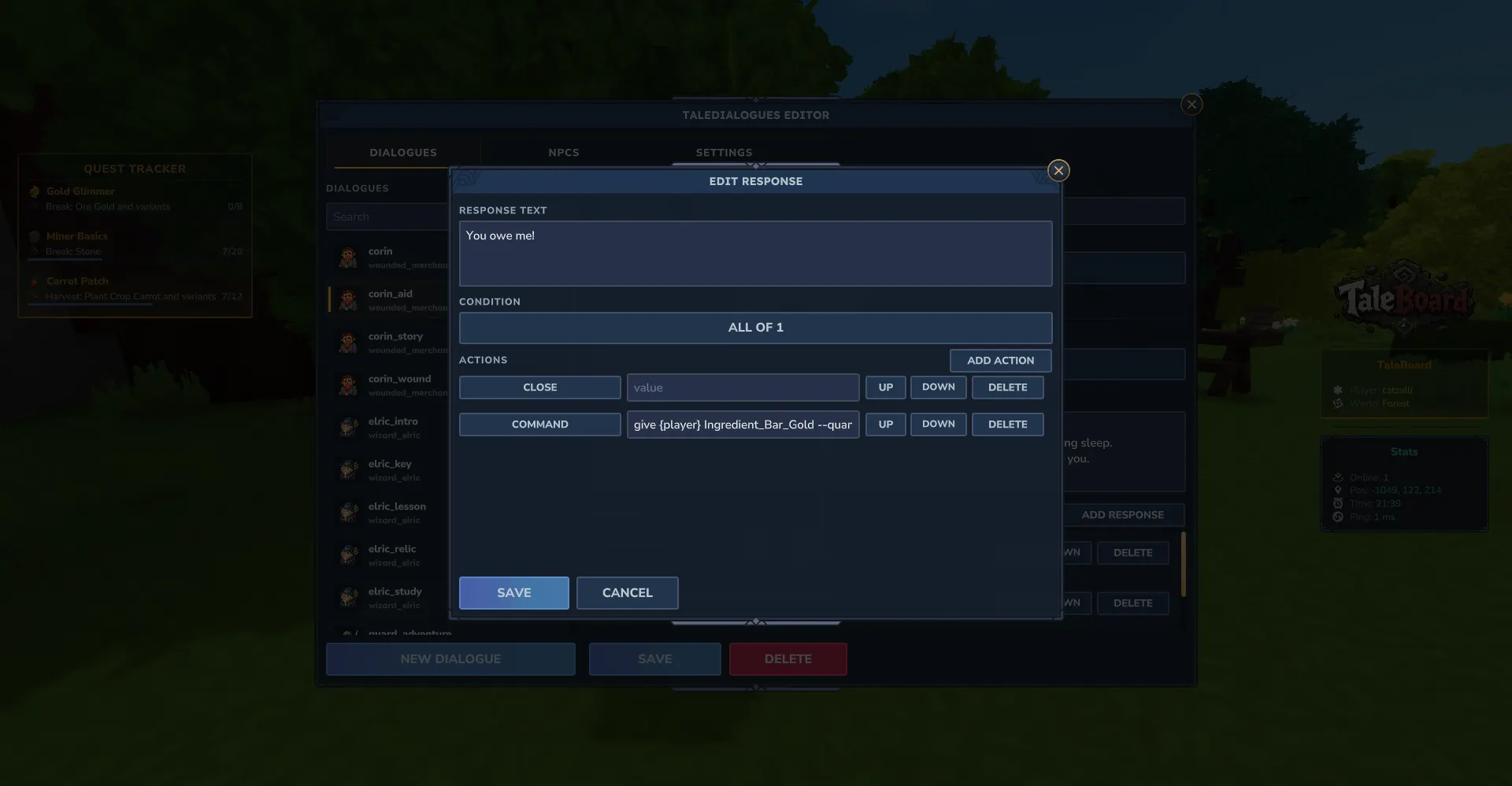
Every response runs a list of actions, top to bottom:open: Jump to another dialogue, building branching trees and questlines.close: End the conversation.command: Run any command, as console or as the player. Short form for console, long form to choose the executor.
{player_name}, so a response can open a shop, start a quest, give a reward, or broadcast a message.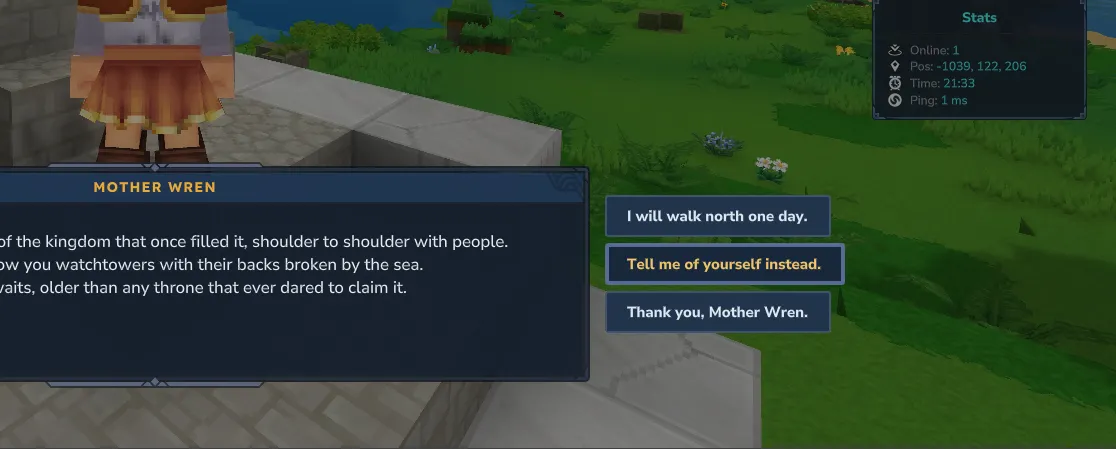
Conditions
Make dialogues react to the player. Conditions apply per response (and per dialogue):- Permission: Show a response only to players with a permission node.
- Placeholder: Compare a placeholder value with an operator:
>>=<<===!== - AND / OR: Nest conditions into composite logic of any depth.
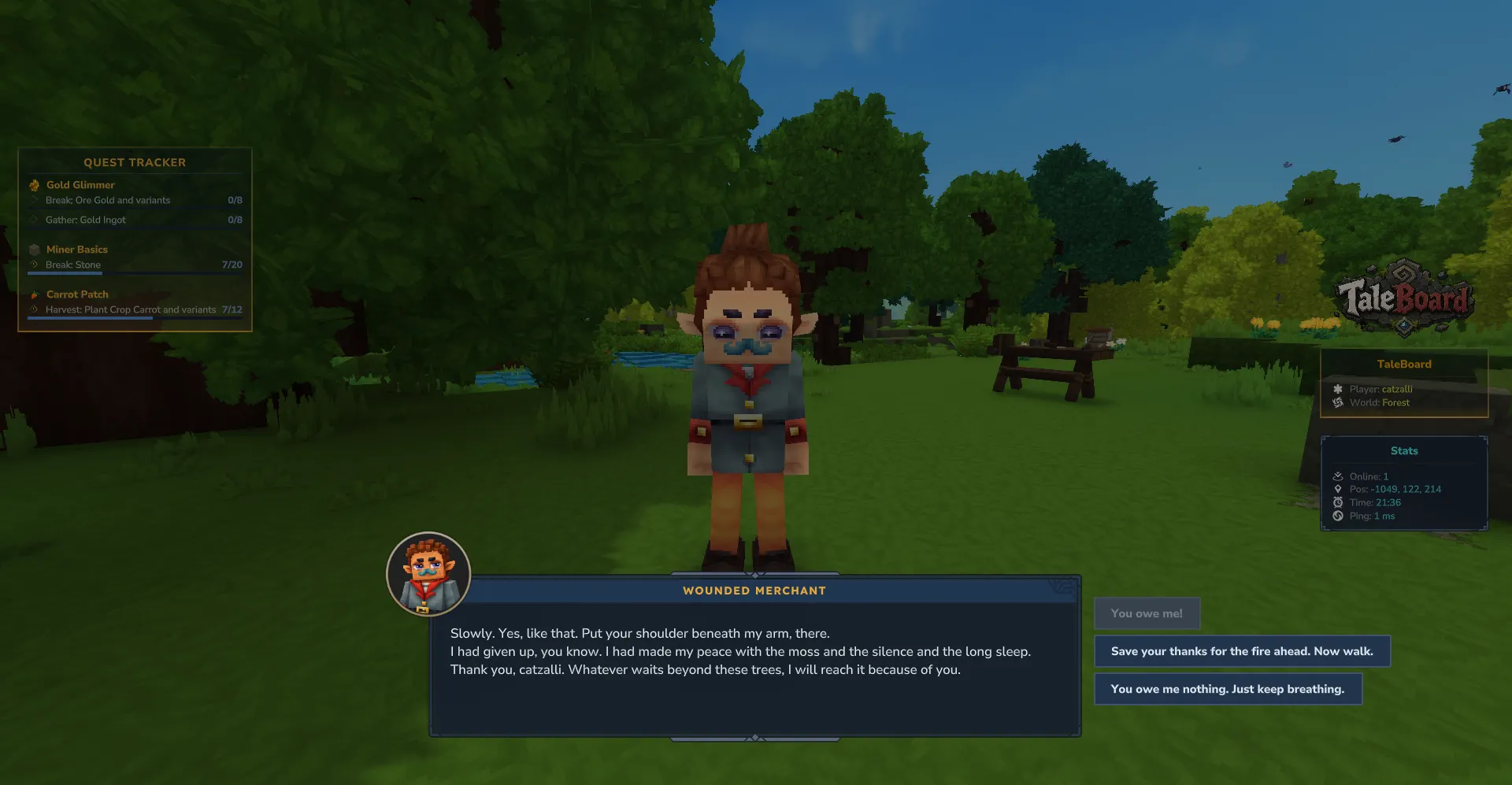
show_unmet:true: the response shows as greyed out and unclickable (the player sees it exists)false: the response is hidden entirely
Placeholders
Use placeholders in dialogue text, response text, conditions, and command actions.Built in (no extra plugin needed):
{player_name}{player_uuid}{npc_name}{npc_id}{dialog_id}{permission:NODE}= resolves to true or false{random:1-100}= a random number in a range{session_seconds}= seconds the player has been in this dialogue
%player_level%) and the brace form ({player_level}) resolve, so you can use any registered placeholder from any plugin. WiFlow PlaceholderAPI is supported as a fallback.Custom Portraits
- Drop and go: Put a
.pngin the portraits folder and reference it innpcs.yml. - Live hot reload: New or changed portraits are picked up while the server runs, no restart needed.
- Circular frame: Portraits render in a clean avatar frame. Square images work best.
- Bundled examples: Ships with a ready made cast so you can see it working out of the box.
- Safe fallback: A missing portrait falls back to a default image instead of breaking.
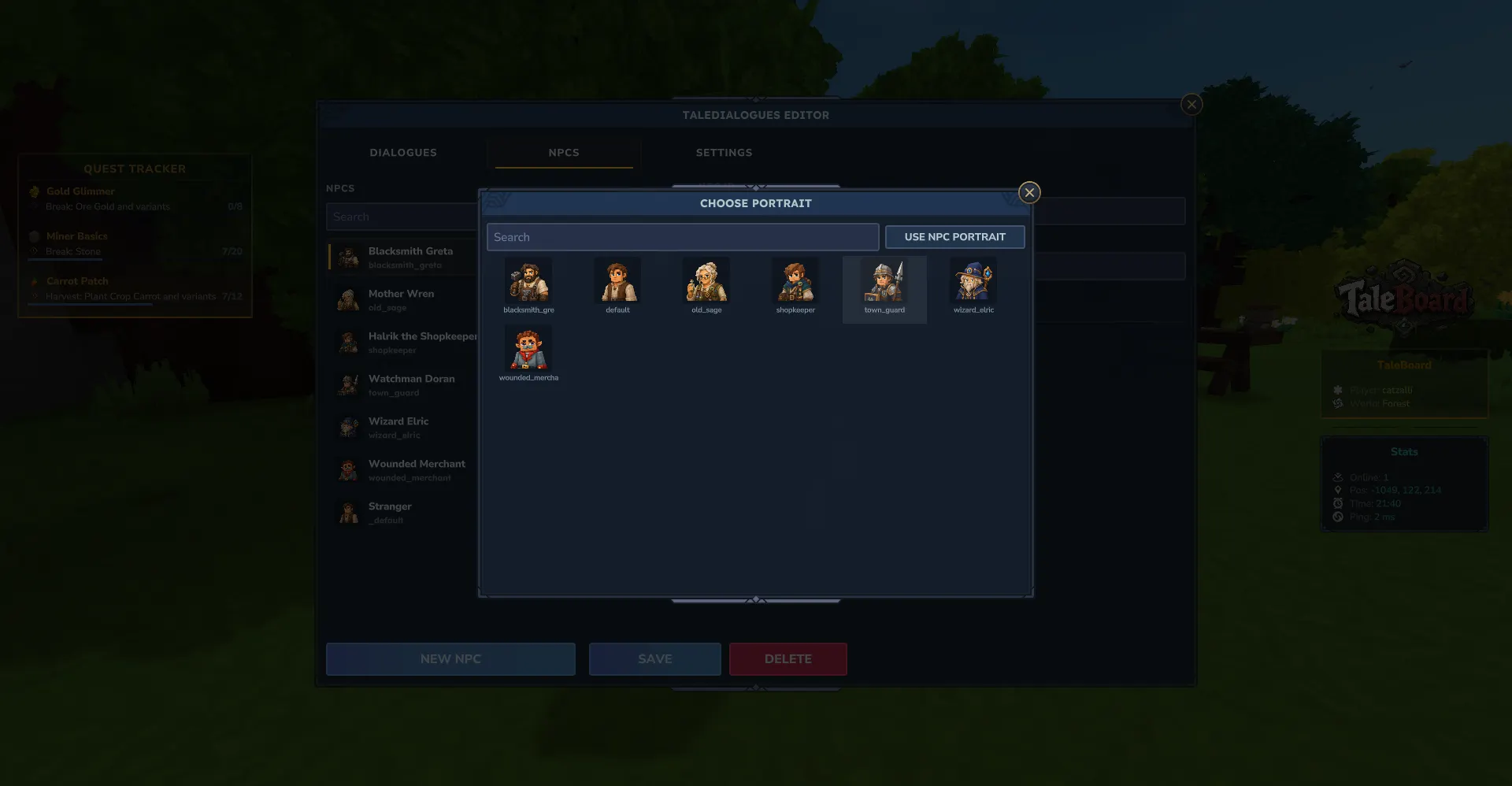
In Game Editor
Build entire dialogue trees without touching a file. Open with/td editor:- Dialogue editor: Edit the NPC, the text, and the full list of responses.
- Response editor: Add responses, set their text, reorder them, and attach actions.
- Action rows: Add open / command / close actions and pick the command executor.
- Condition builder: Add permission and placeholder conditions with the operator and value split into clean fields.
- Portrait picker: Choose an NPC portrait from a visual grid of every PNG in your folder.
- NPC and dialogue pickers: Searchable modal lists, no need to memorize IDs.
- Save and continue: Saving is careful and explicit, with no data loss when you move between pages.

Typewriter & Sound
Tune the feel of every conversation in config:- Speed: Milliseconds per character (
ms_per_char). - Sound: A bundled custom typing SoundEvent, or any Hytale sound id, or silence.
- Texture of sound: Play every N characters, with randomized pitch for an organic feel.
- Volume: Independent volume control for the typing sound.
Integrations
All optional, detected automatically. If a plugin is not present, the related feature is simply skipped.- Any NPC plugin: TaleDialogues does not include an NPC creator by design. Point any NPC's click command at
/td <id> <player>and it just works. - Any command plugin: Response command actions can run anything, so a dialogue can open a shop, start a quest, grant a kit, or run your own commands.
- TaleQuests: With TaleDialogues installed, TaleQuests delivers NPC quest messages as real dialogue boxes with the NPC name and portrait, instead of plain chat.
- HelpChat PlaceholderAPI and WiFlow PlaceholderAPI: Resolve any registered placeholder inside dialogues.
Commands & Permissions
Permission: taledialogues.admin (server operators have it by default)/td <dialogueId> <player>= Open a dialogue for a player. (aliases: /taledialogues, /dialogue)/td editor= Open the in game dialogue editor/td reload= Reload config, NPCs, and all dialogues from disk/td cancel <player>= Force close a player's active dialogue
Developer API
TaleDialogues exposes a clean public API so other plugins can integrate:- Open dialogues: Open a registry dialogue or an in memory, ad hoc dialogue for any player from your plugin.
- Dialogue builder: Build dialogues and responses in code with a fluent builder, no YAML needed.
- On close hook: Run your own logic when a dialogue ends (any close path), safe to open another page from it.
- Custom placeholders: Register your own placeholder provider and use your tokens anywhere in dialogues.
Configuration
Code:
settings:
  # Verbose logging for dialogue loading and action execution.
  debug: false

typewriter:
  # Milliseconds between each character. Lower is faster.
  ms_per_char: 45
  # A bundled custom SoundEvent. Use any Hytale sound id, or "" to disable sound.
  sound_id: "SFX_Tale_Typewriter"
  # Play the typing sound every N rendered characters.
  sound_every_n_chars: 1
  sound_volume: 0.5
  # Random pitch range so the typing feels organic.
  sound_pitch_min: 0.85
  sound_pitch_max: 1.15

responses:
  # How to treat a response whose condition is not met.
  #   true  -> shown greyed out and unclickable
  #   false -> hidden entirely
  show_unmet: true
Code:
wizard_elric:
  name: "Wizard Elric"
  portrait: "wizard_elric.png"

old_sage:
  name: "Mother Wren"
  portrait: "old_sage.png"

# Fallback used when a dialogue points at an unknown npc. Keep this entry.
_default:
  name: "Stranger"
  portrait: "default.png"
Code:
id: elric_intro
npc: wizard_elric

text: |
  Ah, {player_name}. The tower has been quiet without a visitor.
  Tell me, what brings you to my door?

responses:
  - text: "I came to learn. Teach me something."
    actions:
      - open: elric_lesson

  - text: "Open the vault. I have earned it."
    condition:
      and:
        - permission: taledialogues.scholar
        - placeholder: "{random:1-100} >= 50"
    actions:
      - command:
          as: console
          run: "broadcast {player_name} has entered the wizard's vault."
      - open: elric_vault

  - text: "Just passing through."
    actions:
      - close


