- Worm Hunter System - Worms chase players inside target zones, move through tower paths, kill on touch, and can be adjusted per worm with simple settings like speed and sound.
- Money System - Players earn money from rewards and use it to buy gears, tools, and other items in the game.
- Shop Gear System - Ready-to-use gear shop with item name, price, description, order, and automatic item display.
- 17 Gears / Tools - Includes multiple playable tools such as slap tools, speed coils, FreezeRay, BananaPeel, LandMine, GrappleHook, InvisibilityCloak, Jetpack, and more. Each tool can be adjusted with simple settings.
- Tool Giver System- Lets players collect temporary tools from giver parts, useful for mini obbies, challenges, or special reward areas.
- Claim Money System - Reward zones where players can claim money after reaching certain parts of the tower.
- Free Reward System - Timed free rewards that encourage players to stay longer and claim bonus items.
- Friend Boost System - Gives players extra money rewards when their friends are in the same server.
- Free Morph System - Lets players change their avatar or outfit in-game using simple morph models, with a reset zone to return to normal.
- Puzzle Door System - Simple number puzzle doors for mini games, obbies, or tower challenges.
- KillZone / Fallback Zone - Sends players back to a safe point if they fall from an obby or leave the playable area.
- Clicky Keyboard ASMR System - Interactive keyboard keys with press animation, sound feedback, and optional visual color modes.
- UI System - Includes shop UI, reward UI, offer UI, spin UI, menu reminder UI, hover/click sounds, and simple open/close effects.
- Data Save System - Saves important player progress such as money, owned gear, gamepass items, and reward data.
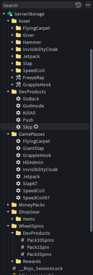
- Easy GamePass and DevProduct Setup - GamePasses and DevProducts are set up with simple Configuration objects in ServerStorage. You can edit IDs, rewards, item names, and product settings without changing lots of code.
- Shop and Offer Support - Monetisation items can be shown through the shop UI, item stands, and offer UI, depending on how you want to sell them in the game.
- Automatic Price Display - ItemShelf can show the real GamePass price from Roblox, including localized price display when Roblox supports it for the player.
- Gear GamePasses - Sell permanent gears or tools such as SpeedCoil, Slap, Jetpack, GrappleHook, FlyingCarpet, and InvisibilityCloak.
- HD Admin GamePass Rank - Give players an HD Admin rank through GamePass ownership.
- ItemShelf GamePass Stands - Place GamePass stands around the map so players can buy the same pass from multiple locations.
- OfferItem Display - Show GamePass items inside offer UI or limited-time promotion areas.
- Simple Setup - Add or edit GamePasses by setting the GamePass ID, reward type, item name, and related settings.
- Money Packs - Sell repeatable money packs for players who want faster progress.
- Skip - Let players pay to skip ahead to the reward/end area.
- God Mode- Give temporary protection for a limited time.
- Kill All - Let players buy a one-time effect that eliminates other players.
- Go Back - Let players return to a safer or previous position when needed.
- Push - Let players buy a prank-style push action to knock another player away.
- Simple Setup - Add or edit DevProducts with the product ID, reward type, and product settings.