
Custom Discord Bot's!
Strum's Discord Bots
Get your own Discord Bot for your server! Strum's Discord Bots
Hello there, are you interested in a Custom Discord Bot for your Minecraft server? If so, you've come to the right place!
Product
- Minecraft Discord Bot
- Price: Discussed Via Discord.
- Features:
- ‣ The bot will be hosted directly off of the Minecraft server.
- ‣ Ability integrate API's to get informations about player to Discord, such as to find out in which Faction a player is.
- ‣ Custom Prefix.
- ‣ Ability to ban, kick, teleport, message or whatever you desire do to a player..
-Via forum private messages.
-Discord: Strum#7830 (Preferred).
Previous Work Examples:
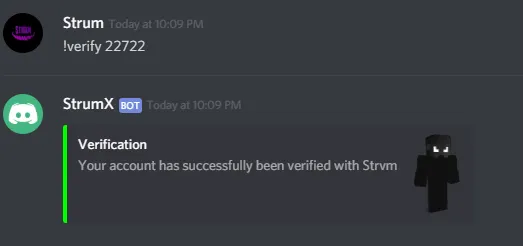
Link Minecraft Accounts to Discord Accounts:



Getting a player's clicks per second:

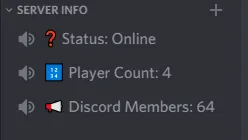
Dynamic server info:
Getting informations on a player using a Faction API:

Getting information about a Faction:

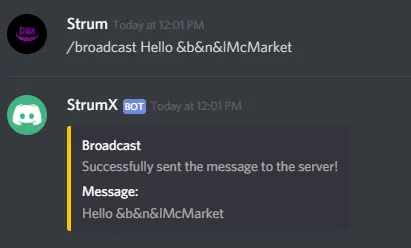
Broadcasting messages from Discord to the Minecraft server:

Getting basic informations about a player:

Getting a player's clicks per second:
Dynamic server info:
Getting informations on a player using a Faction API:
Getting information about a Faction:
Broadcasting messages from Discord to the Minecraft server:
Getting basic informations about a player:
FAQ
Q: Do I have to pay for extra hosting?
- A: As said in the thread, with this bot you won't have to pay for extra hosting since it will be directly hosted off your Minecraft server to prevent you from purchasing extra hosting and to ease the communication between Minecraft and Discord.
- A: Prices will only be discussed privately and will be determined depending on what you need and on your budget.
- A: I will be able to integrate any API you wish to be inside of your bot.
- A: When your order has been completed you will receive your plugin in the form of a Jar (like a plugin) which you will then have to put in your plugins folder of your Minecraft server. After having run it once it will generate a config file. Inside of that file will contain a key called "token", inside of this you will insert your Bot's token (make sure to keep it secret). Restart your server and your bot will be running!
Click this https://discordapp.com/developers/applications/ link.


Q: How can I invite my bot to my server?
- A :


Last edited:



