- Auto start and KOTH Scheduler
- Fully automatic
- Faction support
- Custom support
- Has a custom API
- All messages are customizable
- Very flexible
- Knock delay
- Award players with loot or commands
- Unlimited KOTHs
- Auto broadcast at certain times
- Loot chests
- Lag free
- Updated nearly every single day of the week
- Add a command cool down for donators
- 15+ commands

- /koth help <PAGE>
- /koth start <KOTH> <SECONDS> [anon]
- /koth recreate <KOTH>
- /koth create <KOTH>
- /koth end <KOTH> [anon]
- /koth remove <KOTH>
- /koth times (ADD/REMOVE) <KOTH> <SECONDS>
- /koth autostart <KOTH> <PLAYERS> <CAPTURETIME>
- /koth setlootlocation
- /koth setloot
- /koth loot
- /koth setreward (INVENTORY/KEY)
- /koth schedule <KOTH> <DAY_OF_MONTH> <MONTH> <TIME_OF_DAY> <DURATION>
- /koths
- /koth reload
- /koth daily create <KOTH> <TIME_OF_DAY> <DURATION> [players]
- /koth daily remove <KOTH>
- /koth time

- KOTH.* (Access to every command).
- KOTH.SETLOOTLOCATION (Sets the loot locations).
- KOTH.TIMES (Add or remove a KOTH time to broadcast a message).
- KOTH.VIEWLOOT (View the set loot).
- KOTH.SETLOOT (Sets the KOTH loot).
- KOTH.SETKOTH (Set a KOTH locations).
- KOTH.REMOVE (Remove a chosen KOTH).
- KOTH.END (End a chosen KOTH).
- KOTH.END.ANON (End a KOTH anonymously).
- KOTH.START (Start a chosen KOTH).
- KOTH.START.ANON (Start a KOTH anonymously).
- KOTH.HELP (View the KOTH help command).
- KOTH.REWARDTYPE (Change the current reward type).
- KOTH.AUTOSTART (Set a auto starting KOTH).
- KOTH.SCHEDULER (Schedule a KOTH).
- KOTH.LISTKOTHS (View the list of KOTHs).
- KOTH.DAILYSCHEDULE (Schedule daily KOTHs).
- KOTH.VIEWTIME (View the times of the scheduled KOTHs).
- KOTH.RECREATE (Reset the zone of an existing KOTH).
- KOTH.COOLDOWNBYPASS (Bypass the cool down feature).
This plugin supports either FactionUUID, HCFFactions or the normal Factions with the plugin MassiveCore (version 2.8.2 or above). This is not a requirement, more of an option to allow you to broadcast Faction names or display them in a scoreboard.
This plugin requires WorldEdit to create a KOTH. This is not necessary if your KOTH zones are already set. You can download WorldEdit from this link...
http://dev.bukkit.org/bukkit-plugins/worldedit/
If you would like to use place holders for any of the plugins listed within this plugins description then you require this plugin on your server...
https://www.spigotmc.org/resources/mvdwplaceholderapi.11182/
List of timezones for this plugins automatic scheduler and daily scheduler...
https://en.wikipedia.org/wiki/List_of_tz_database_time_zones
Viewing the loot chest -
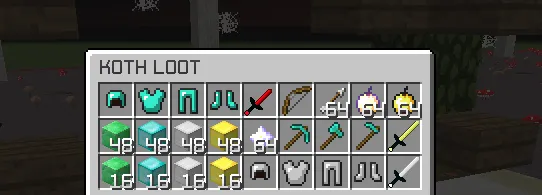
Player capturing KOTH -

Starting/Ending a KOTH -

Config.yml -

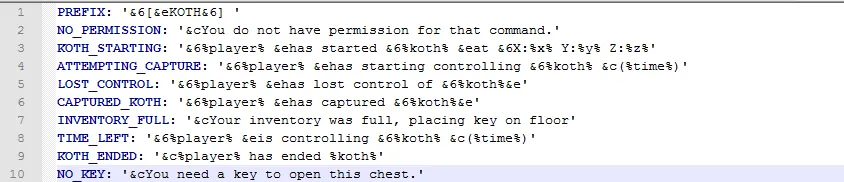
Lang.yml file -

Scoreboard -

World Edit API -

Player capturing KOTH -
Starting/Ending a KOTH -
Config.yml -
Lang.yml file -
Scoreboard -
World Edit API -
Please note all these messages are configurable these are just the default ones.
Upon purchase of this plugin,
1) You do not have permission to resell or give this plugin to other person.
2) This plugin can only be used on your own server.
3) You cannot decompile or modify the source of the plugin without my permission.
4) There are absolutely no refunds.
1) You do not have permission to resell or give this plugin to other person.
2) This plugin can only be used on your own server.
3) You cannot decompile or modify the source of the plugin without my permission.
4) There are absolutely no refunds.
/koth schedule <kothname> <day_of_month> <month> <time_of_day> <koth_duration>
First of all it requires a KOTH name, very simply just enter the name of the KOTH you would like to be scheduled.
Day of month -
Next you would need to enter the day of the month. So if it was the 21st you would need to enter 21 if you wanted it to be that day. If I wanted it to be on the 30th, I would simply enter 30.
Month -
Now you will need to enter the month so for example 8 would be august. Just enter an integer of the month of which you would like the KOTH to be scheduled for.
Time of day -
Then it's the time of the day which is simply the time of day you would like the KOTH to be hosted, this is on a 24 hour clock. So if you would like it to be at 6pm you would have to enter 18:00. If you would like it to be at 6am you would just enter 6:00 and so on.
KOTH duration -
Finally you need to enter the KOTH duration in seconds (how long it would take for a player to capture it).
KOTH name -First of all it requires a KOTH name, very simply just enter the name of the KOTH you would like to be scheduled.
Day of month -
Next you would need to enter the day of the month. So if it was the 21st you would need to enter 21 if you wanted it to be that day. If I wanted it to be on the 30th, I would simply enter 30.
Month -
Now you will need to enter the month so for example 8 would be august. Just enter an integer of the month of which you would like the KOTH to be scheduled for.
Time of day -
Then it's the time of the day which is simply the time of day you would like the KOTH to be hosted, this is on a 24 hour clock. So if you would like it to be at 6pm you would have to enter 18:00. If you would like it to be at 6am you would just enter 6:00 and so on.
KOTH duration -
Finally you need to enter the KOTH duration in seconds (how long it would take for a player to capture it).
If you need any further help, feel free to private message me or put a post in the discussion section.
ElizaPancakes
public void onKOTHStart(KOTHStartEvent e) {
if (e.getPlayer().getName().equalsIgnoreCase("benzimmer123")) {
e.setCancelled(true);
e.getPlayer().sendMessage(ChatColor.RED + "You are currently not allowed to start KOTHs.");
}
}
ElizaPancakes
public void onScoreboardUpdate(ScoreboardUpdateEvent e) {
e.setCancelled(true);
//load custom scoreboard adding methods from this event
}
public void onKOTHStart(KOTHStartEvent e) {
if (e.getPlayer().getName().equalsIgnoreCase("benzimmer123")) {
e.setCancelled(true);
e.getPlayer().sendMessage(ChatColor.RED + "You are currently not allowed to start KOTHs.");
}
}
ElizaPancakes
public void onScoreboardUpdate(ScoreboardUpdateEvent e) {
e.setCancelled(true);
//load custom scoreboard adding methods from this event
}
More KOTH events and methods will be added shortly.
Scoreboard Variables:
- %x% Shows the KOTHs X location.
- %y% Shows the KOTHs Y location.
- %z% Shows the KOTHs Z location.
- %world% Shows the KOTHs world name.
- %timeleft% Shows the time remaining for the KOTH.
- %player% Shows the current capper.
- %koth% Shows the active koth.
- %faction% Shows the capper's faction name.
Place holders:
- {koth_x_location} Shows the KOTHs X location.
- {koth_y_location} Shows the KOTHs Y location.
- {koth_z_location} Shows the KOTHs Z location.
- {koth_world} Shows the KOTHs world name.
- {koth_time_left} Shows the time remaining for the KOTH.
- {koth_capper} Shows the current capper.
- {koth_name} Shows the active koth's name.
Servers Using the plugin:
- s19.minespan.com:26169
- play.factionnary.fr
- Ask me to be added to this list!
Total Downloads:
- 5 downloads ✔
- 10 downloads ✔
- 25 downloads ✔
- 50 downloads ✔
- 100 downloads ✔
- 150 downloads ✖
- %x% Shows the KOTHs X location.
- %y% Shows the KOTHs Y location.
- %z% Shows the KOTHs Z location.
- %world% Shows the KOTHs world name.
- %timeleft% Shows the time remaining for the KOTH.
- %player% Shows the current capper.
- %koth% Shows the active koth.
- %faction% Shows the capper's faction name.
Place holders:
- {koth_x_location} Shows the KOTHs X location.
- {koth_y_location} Shows the KOTHs Y location.
- {koth_z_location} Shows the KOTHs Z location.
- {koth_world} Shows the KOTHs world name.
- {koth_time_left} Shows the time remaining for the KOTH.
- {koth_capper} Shows the current capper.
- {koth_name} Shows the active koth's name.
Servers Using the plugin:
- s19.minespan.com:26169
- play.factionnary.fr
- Ask me to be added to this list!
Total Downloads:
- 5 downloads ✔
- 10 downloads ✔
- 25 downloads ✔
- 50 downloads ✔
- 100 downloads ✔
- 150 downloads ✖
Last edited: