Change Resource Moderator Icon

Status

Pyr0

Unique Server Specialist
Premium
Feedback score
11
Posts
133
Reactions
58
Resources
0
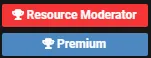
So, a small suggestion, I've recently noticed that the banner icons for Resource Moderator & Premium are the exact same. (Or 99% similar)
I'm suggesting a simple change to another icon. ;)
c9eb98292ddaab88bb7f1a7bc5efe20f.png
 
Type
Suggestion
Status
Implemented
PebbleHost
High performance, consistent uptime and fast support. Minecraft hosting that just works.

Clyde

Premium
Feedback score
44
Posts
1,574
Reactions
1,220
Resources
0
It's hard to tell what that's really supposed to be I think.


That would make more sense for a developer or system admin rank I think, the resource mods don't really code anything so I don't think it'd be a good fit.
Justis does.
 

Pyr0

Unique Server Specialist
Premium
Feedback score
11
Posts
133
Reactions
58
Resources
0
https://fontawesome.com/cheatsheet Got any recommendations for what to change it to?
In all reality, if it were me, I'd make the administrator gavel, the resource moderator's icon.
Then put the code icon as the administrator icon.

If that's not a possibility, I have a few suggestions to pick from:
Cloud upload:
https://fontawesome.com/icons/cloud-upload-alt?style=solid
Check mark circle:
https://fontawesome.com/icons/check-circle?style=solid
Cog wheels
https://fontawesome.com/icons/cogs?style=solid
Edit:
https://fontawesome.com/icons/edit?style=solid
Empire icon:
https://fontawesome.com/icons/empire?style=brands (Heh, I kid, I kid)
File upload: (I like this one a lot)
https://fontawesome.com/icons/file-download?style=solid
File code:
https://fontawesome.com/icons/file-code?style=solid
 

buildblox

Entrepreneur
Deactivated
Feedback score
16
Posts
471
Reactions
429
Resources
0
Yeah, I like this one the most too I think!

If you choose that one, it may require you to update the FontAwesome stylesheet you currently have installed through the PixelExit theme as the icon is on FA 5. That might also then lead to other things breaking if the entire stylesheet isn’t accurately changed (you may already have FA 5, I haven’t checked as I’m on mobile while writing this).

I must say I like this following one—it’s pre-FA 5 and it directly represents the content the resource moderator is moderating, which is downloadable and often purchasable items: https://fontawesome.com/v4.7.0/icon/cart-arrow-down
 

Mick

BuiltByBit Owner
Management
Feedback score
28
Posts
6,412
Reactions
7,667
Resources
0
If you choose that one, it may require you to update the FontAwesome stylesheet you currently have installed through the PixelExit theme as the icon is on FA 5. That might also then lead to other things breaking if the entire stylesheet isn’t accurately changed (you may already have FA 5, I haven’t checked as I’m on mobile while writing this).

I must say I like this following one—it’s pre-FA 5 and it directly represents the content the resource moderator is moderating, which is downloadable and often purchasable items: https://fontawesome.com/v4.7.0/icon/cart-arrow-down
This has been implemented now.


Thank you for the suggestion, I'll move this to accepted!
 
Status
Top

