Feedback?

Chetnike

Banned
Feedback score
0
Posts
8
Reactions
7
Resources
0
Hey!

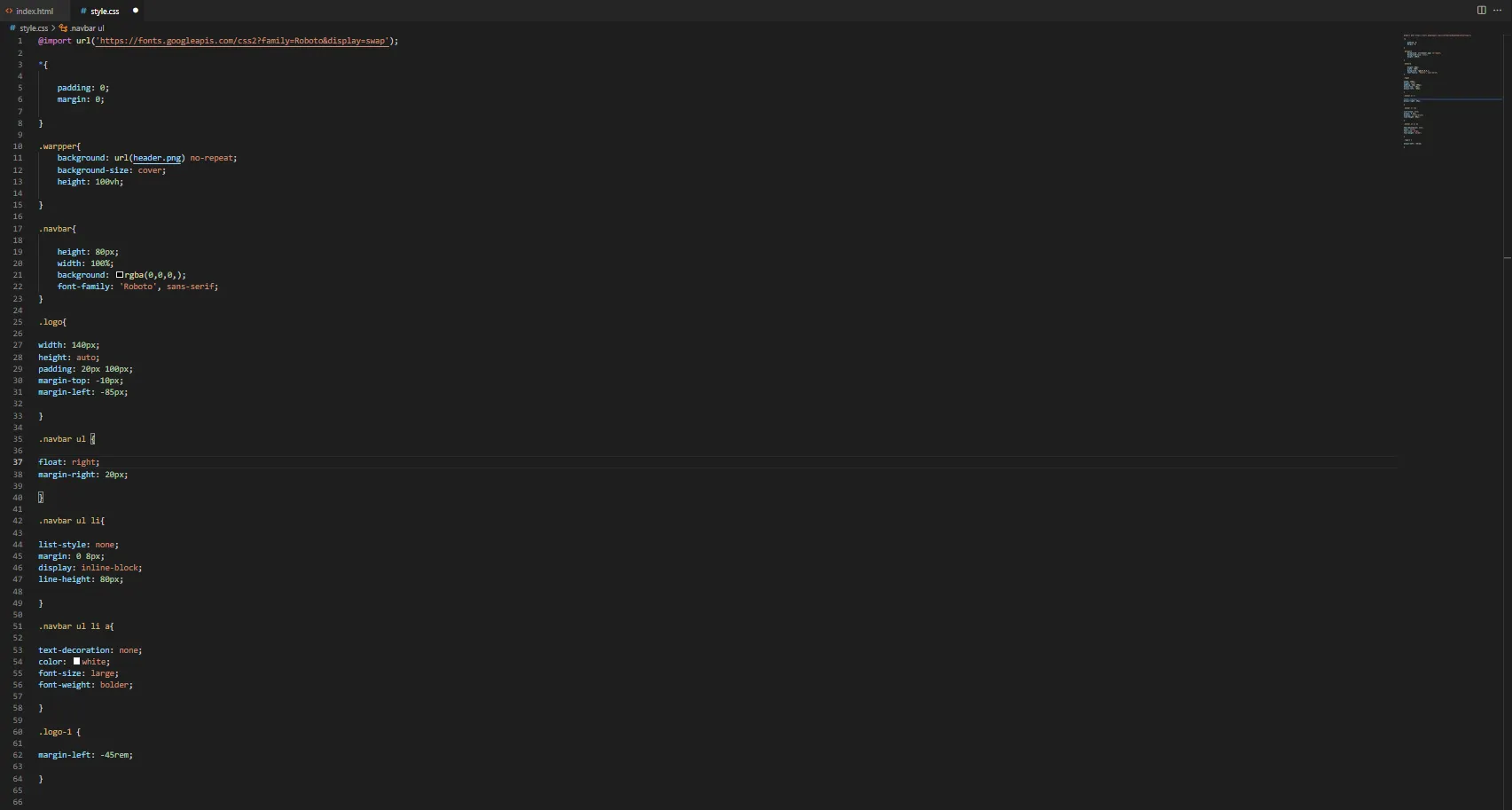
Just started learning HTML and CSS would love some feedback.
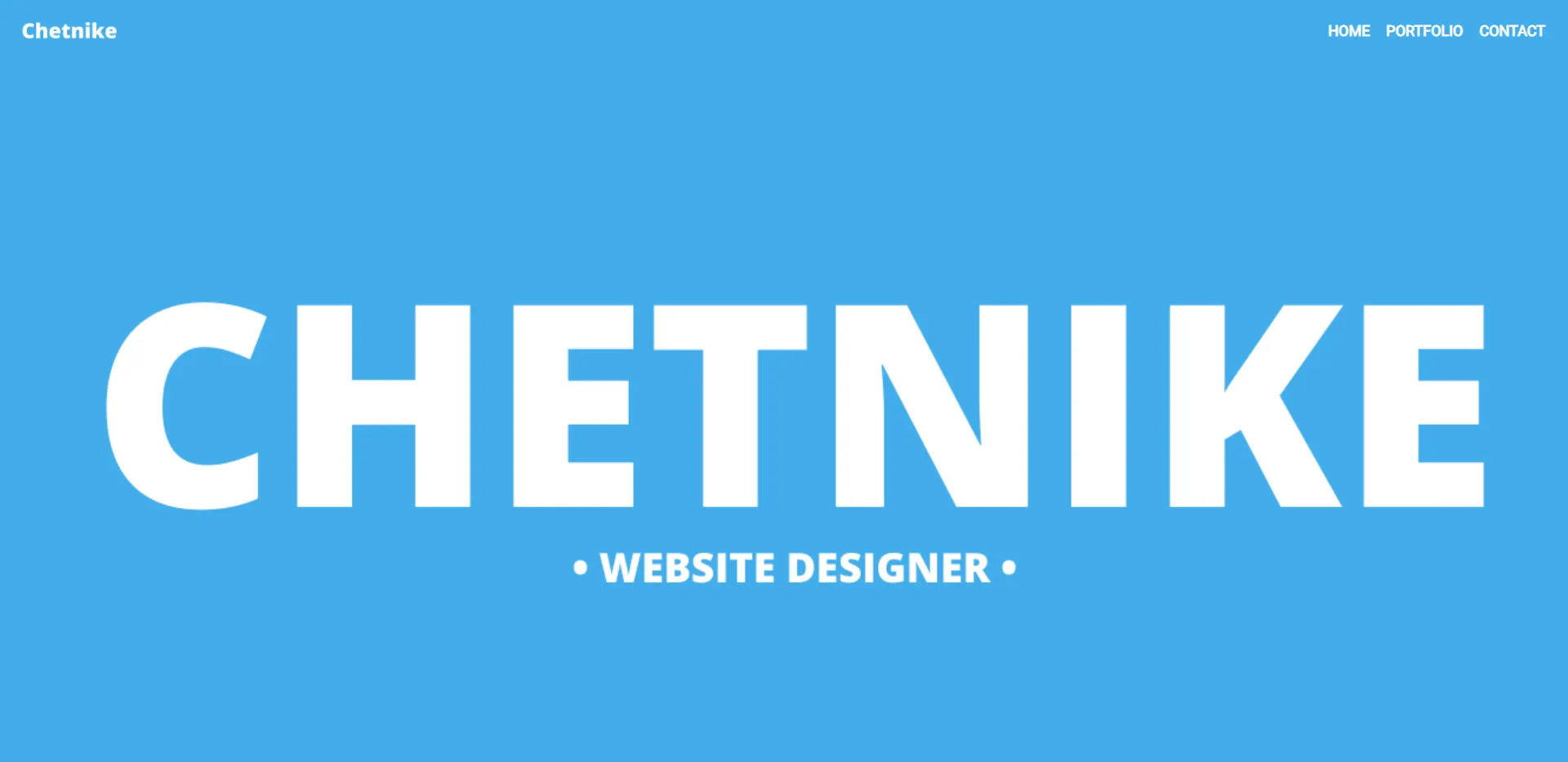
492873d0112351b1c7cffff939ab4ca6.png

7491445f72c54db8ef5d867ed753a10f.png

P.S (Just started, so please don't have a go @me)​
 
Type
Requesting
Last edited:
PebbleHost
High performance, consistent uptime and fast support. Minecraft hosting that just works.

Corf

Premium
Feedback score
3
Posts
241
Reactions
93
Resources
0
Looks awesome homie!
 

VidaNova

goncalomedeiros.com
Premium
Feedback score
2
Posts
96
Reactions
17
Resources
0
Hey Chetnike! I love what you're doing, keep it up!

Now, for code etics, I don't recommend you space things up like you're currently spacing, do something more like:

Code:
.navbar ul {
(tab) float: right;
(tab) margin-right: 10px;
}


And try to keep with this code style all around your css file, this will help other future developers understand your code and will help you understand your own code! But ey, you're just learning and did something awesome, keep collecting feedback and improving more and more each day! You got this!

*The (tab) means that you should press tab once.
 

Chetnike

Banned
Feedback score
0
Posts
8
Reactions
7
Resources
0
Hey Chetnike! I love what you're doing, keep it up!

Now, for code etics, I don't recommend you space things up like you're currently spacing, do something more like:

Code:
.navbar ul {
(tab) float: right;
(tab) margin-right: 10px;
}


And try to keep with this code style all around your css file, this will help other future developers understand your code and will help you understand your own code! But ey, you're just learning and did something awesome, keep collecting feedback and improving more and more each day! You got this!

*The (tab) means that you should press tab once.

Thanks for your honesty, will be taking this into consideration <3
 
Banned forever. Reason: Ban Evading (TypicalAristois, https://builtbybit.com/members/typicalaristois.183481/)

Shaun

Web Developer, owner of Syncore LLC
Supreme
Feedback score
20
Posts
622
Reactions
408
Resources
0
I'm going to comment on the code seeing not a lot of people above have.

For starters, do not import your font family in your CSS. Instead, load in your fonts in the head of your HTML. This is to prevent "flash of unstyled text" or FOUT since your font family will resolve AFTER your HTML has loaded (since CSS files are processed after HTML files by the browser). During the time your font family is loading the text on the browser will appear unstyled.

In your global reset, make sure to include box-sizing: border box;. This makes the behaviour if margin and padding a lot more consistent among all the HTML elements.

Your .logo class makes use of padding and marging for positioning, which is not ideal. Consider using absolute positioning and top/right/left/bottom to position the logo. Padding should be used to add space INSIDE an element whereas margin should be used to add space OUTSIDE and element. To know the difference of when to use padding and margin comes with intuition and experience, for now it's okay to use one for the other purpose just to space things out but conventionally speaking you want to stick with what I mentioned before.

Lastly, float is an old way to do layouts in the browser. The common approach to aligning and positioning items is to use flex-box. The sooner you look into it the easier it'll become for you to build layouts.


That's my two cents.
 

VidaNova

goncalomedeiros.com
Premium
Feedback score
2
Posts
96
Reactions
17
Resources
0
I'm going to comment on the code seeing not a lot of people above have.

For starters, do not import your font family in your CSS. Instead, load in your fonts in the head of your HTML. This is to prevent "flash of unstyled text" or FOUT since your font family will resolve AFTER your HTML has loaded (since CSS files are processed after HTML files by the browser). During the time your font family is loading the text on the browser will appear unstyled.

In your global reset, make sure to include box-sizing: border box;. This makes the behaviour if margin and padding a lot more consistent among all the HTML elements.

Your .logo class makes use of padding and marging for positioning, which is not ideal. Consider using absolute positioning and top/right/left/bottom to position the logo. Padding should be used to add space INSIDE an element whereas margin should be used to add space OUTSIDE and element. To know the difference of when to use padding and margin comes with intuition and experience, for now it's okay to use one for the other purpose just to space things out but conventionally speaking you want to stick with what I mentioned before.

Lastly, float is an old way to do layouts in the browser. The common approach to aligning and positioning items is to use flex-box. The sooner you look into it the easier it'll become for you to build layouts.


That's my two cents.

Very very very good advice to take into consideration!

Agreed with every single thing you said, besides the logo.
I do agree with the padding, because it obviously should be used to space things inside an element, but using position absolute in here wouldn't be the ideal.

The ideal play here, would be for you to create a wrapper, that has display flex and contains two divisions, one for the logo and another for the items. This would also have justify-content space-between as you want the logo to be on the left and the items to be on the right. And then, to space your items from the border, use padding on this main division (wrapper).

Do you agree with me Shaun?

Thank you,
Goncalo :)
 

Shaun

Web Developer, owner of Syncore LLC
Supreme
Feedback score
20
Posts
622
Reactions
408
Resources
0
Very very very good advice to take into consideration!

Agreed with every single thing you said, besides the logo.
I do agree with the padding, because it obviously should be used to space things inside an element, but using position absolute in here wouldn't be the ideal.

The ideal play here, would be for you to create a wrapper, that has display flex and contains two divisions, one for the logo and another for the items. This would also have justify-content space-between as you want the logo to be on the left and the items to be on the right. And then, to space your items from the border, use padding on this main division (wrapper).

Do you agree with me Shaun?

Thank you,
Goncalo :)

This approach is also valid.
 

Benliam12

Feedback score
0
Posts
31
Reactions
6
Resources
0
Don't know if you have the required stuff for but, uploading your creation on some kind of web hosting could be nice. A screen shot is pretty limiting when it comes to give a feed back because people will see your final product onto a web browser (full screen) and not really on a screen shot.
The style looks nice though, well done!
 
Top