Gaming Laptop Help!!! Stuck on 50 fps

Status
This thread has been locked.

SuperCoolMomo

CEO of Canvas [Ex-Admin on VanityMC & Archon]
Premium
Feedback score
25
Posts
1,063
Reactions
392
Resources
0
Hey, guys I wonder if you can help me — I took this gaming laptop which only costed me £900 (I know it’s cheap it’s only to take on holidays), so I take this for the first time and holiday and download badlion client, my frames are stuck on 50fps and goes lower when i full screen.

Gaming Laptop I bought:

Hopefully you guys can help!

 
PebbleHost
High performance, consistent uptime and fast support. Minecraft hosting that just works.

Fire

Always DM me here before dealing via Discord.
Supreme
Feedback score
74
Posts
3,045
Reactions
1,745
Resources
0
Check which GPU the game is running on (Can see this in task manager). I bought a gaming laptop a few months back, however quickly realised that by default it was running games on the onboard graphics instead of the GTX 1050.
 

SuperCoolMomo

CEO of Canvas [Ex-Admin on VanityMC & Archon]
Premium
Feedback score
25
Posts
1,063
Reactions
392
Resources
0
Check which GPU the game is running on (Can see this in task manager). I bought a gaming laptop a few months back, however quickly realised that by default it was running games on the onboard graphics instead of the GTX 1050.

Do you have discord? Not a computer guy ;)[DOUBLEPOST=1534080288][/DOUBLEPOST]
Check which GPU the game is running on (Can see this in task manager). I bought a gaming laptop a few months back, however quickly realised that by default it was running games on the onboard graphics instead of the GTX 1050.

It’s not on the GeForce how do I change it? It’s on Intel HD graphics
 
Last edited:

Fire

Always DM me here before dealing via Discord.
Supreme
Feedback score
74
Posts
3,045
Reactions
1,745
Resources
0
Do you have discord? Not a computer guy ;)[DOUBLEPOST=1534080288][/DOUBLEPOST]

It’s not on the GeForce how do I change it? It’s on Intel HD graphics
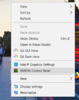
Right click on your desktop, and open the Nvidia control panel:

upload_2018-8-12_14-27-46.png


You should then see this setting:

upload_2018-8-12_14-28-21.png


Make sure it says the same as above. Not integrated graphics, then close the window, and it will ask if you want to save changes. Press yes, close your game. Then start it up again, and it should be using the GTX graphics card you have instead :)
 

Attachments

  • upload_2018-8-12_14-27-46.png
    upload_2018-8-12_14-27-46.png
    83.1 KB · Views: 95
  • upload_2018-8-12_14-28-21.png
    upload_2018-8-12_14-28-21.png
    13.5 KB · Views: 97

SuperCoolMomo

CEO of Canvas [Ex-Admin on VanityMC & Archon]
Premium
Feedback score
25
Posts
1,063
Reactions
392
Resources
0
Check which GPU the game is running on (Can see this in task manager). I bought a gaming laptop a few months back, however quickly realised that by default it was running games on the onboard graphics instead of the GTX 1050.

Worked your a legend
 

SuperCoolMomo

CEO of Canvas [Ex-Admin on VanityMC & Archon]
Premium
Feedback score
25
Posts
1,063
Reactions
392
Resources
0
Right click on your desktop, and open the Nvidia control panel:

View attachment 145975

You should then see this setting:

View attachment 145976

Make sure it says the same as above. Not integrated graphics, then close the window, and it will ask if you want to save changes. Press yes, close your game. Then start it up again, and it should be using the GTX graphics card you have instead :)

Ok now it’s stuck at 30 FPS...
 
Status
This thread has been locked.
Top