Help on Easy Ease on AE [Server Trailer]

Status
This thread has been locked.

loltayber

귀여운
Banned
Feedback score
8
Posts
1,298
Reactions
304
Resources
0
36988-ac671ecdc48a787a6c2859fab5c8affa.jpg


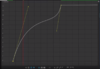
So i was trying to do this line on AE To get the best Smooth Clip on Server Trailers. But everytime i do that line its terrible. On the half of the clip the clip just stops and goes fast, which i don't want. I want the clip to keep moving and the first part is basically just messed up idk what to do. Help?
 

Attachments

  • ac671ecdc48a787a6c2859fab5c8affa.png
    ac671ecdc48a787a6c2859fab5c8affa.png
    215.1 KB · Views: 18
PebbleHost
High performance, consistent uptime and fast support. Minecraft hosting that just works.

loltayber

귀여운
Banned
Feedback score
8
Posts
1,298
Reactions
304
Resources
0
Go one way or the other with easy ease, example below:
5g2C2V.png

or
2n348z.png

I usually use example #1 :p
Can you show me how to do the #1 With the thing going fast on the end?[DOUBLEPOST=1477021032][/DOUBLEPOST]I mean like, Fast in the beginning normal in the center and fast again in the last.
 
Banned forever. Reason: Scamming (https://builtbybit.com/threads/loltayber-scam-report.425219/)

AquaRaider

Feedback score
0
Posts
128
Reactions
32
Resources
0
Can you show me how to do the #1 With the thing going fast on the end?[DOUBLEPOST=1477021032][/DOUBLEPOST]I mean like, Fast in the beginning normal in the center and fast again in the last.
Sorry I'm a noob, but what software is this?
 

y0jJJyeDYzRTYomFX

Deactivated
Feedback score
16
Posts
209
Reactions
616
Resources
0
Sorry I'm a noob, but what software is this?
Adobe After Effects.

As for OP,


36988-ac671ecdc48a787a6c2859fab5c8affa.jpg


So i was trying to do this line on AE To get the best Smooth Clip on Server Trailers. But everytime i do that line its terrible. On the half of the clip the clip just stops and goes fast, which i don't want. I want the clip to keep moving and the first part is basically just messed up idk what to do. Help?


Are you trying to speed up the clip/slow down or moving the clip along a path?
 
Last edited:
Status
This thread has been locked.
Top
