How do I get the text in my design to be in good quality?

Status
This thread has been locked.

Capaldi

Banned
Feedback score
78
Posts
2,359
Reactions
1,661
Resources
0
I've been trying to come up with a decent looking thread design and I've started to notice the text isn't in good quality like I see in other thread designs. How do I get the text in my design to be in good quality? The dimensions are 1000x2000.

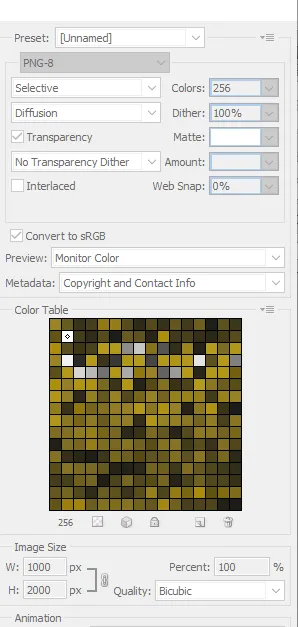
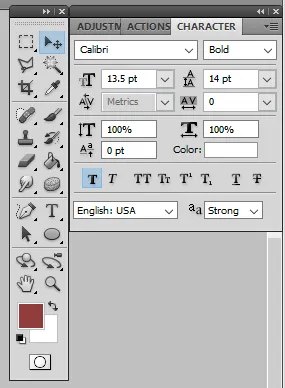
I'll provide the thread design, my font settings as well as my save settings when I save the image in the spoiler below. If you happen to need more information to help me with the text quality, just let me know down below.

Yxdk5GV.png

e0952f749ec267d3a162a074e64805e6.png


52ea64bd3663ec462a6164cceb0d1aae.png
 
Banned forever. Reason: Rules violations

PebbleHost
High performance, consistent uptime and fast support. Minecraft hosting that just works.

Capaldi

Banned
Feedback score
78
Posts
2,359
Reactions
1,661
Resources
0
Experiment with using multiple different font weights in a design. Bold is good for headers while light is good for body text. Also, don't just stick with the default fonts on your PC. Download more from dafont.com or similar.

Changing the weight on the font didn't seem to help put it into good quality. As for the "default font" part, I like the fonts. The only font I used in the design that was already apart of my desktop was the Calibri one, the other two were downloaded from sites.

If you have font suggestions I should use, let me know because I'm unsure of what fonts people would want on a thread design besides the ones I've been using. :p
 
Banned forever. Reason: Rules violations

Capaldi

Banned
Feedback score
78
Posts
2,359
Reactions
1,661
Resources
0
Not all fonts have varying weights. Two of my favorite sans-serif fonts are Avenir and Roboto, which both have a ton of weights.

Thanks, I'll try sans-serif fonts. I downloaded Roboto but can't get Avenir as it's a paid one and I don't have money to just spend, much less on a font for designs I don't sell :p
 
Banned forever. Reason: Rules violations

Status
This thread has been locked.
Top