How to setup a subdomain for your minecraft server (Cloudflare)

Status
This thread has been locked.

LilDev

Server Manager | Configurator | Developer
Banned
Feedback score
4
Posts
133
Reactions
44
Resources
0

Hello guys, Today I am showing the community how to setup their own personal domains/sub domains to a discord server. It is a really quick and fast video so if you do not want to watch a video, Here are the steps

Step #1 - Setting up an A record

Select the DNS tab and Create an A record with the name discord redirecting to the IPv4 Address 8.8.8.8

63a253f1538de71199c55cfc5ae15db3.png


Step #2 - Creating a Page Rule

Select the Page Rules tab and create a new page rule that goes to discord.yourdomain.com or whatever you want the subdomain to be if you want a subdomain. After that you want to click add a setting and scroll all the way down to Forwarding URL and select it. Finally, you click select status code and select 301 - Permanent Redirect.
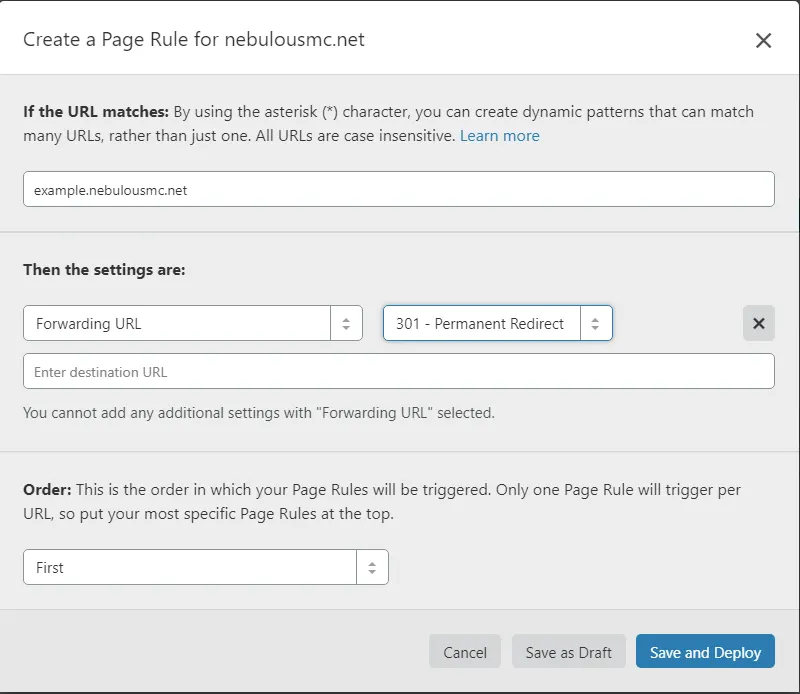
a66fe4c45b4c63629eab846407dc7c9f.png


Step #3 - Encoding your Discord URL

What you want to do is copy your discord URL and paste it into the destination section of your page rule. After you done that you have to replace all the capitols with encoded versions of themselves, which can be found here. After you replace the Capitols it should look something like this; "https://discord.gg/sVKUFqR" (That is an example link and your link will look a little different). Finally, You click "Save and Deploy" once you have encoded the discord URL.

c3297c84892e2cba7006c73ec3904755.gif


Step #4 - Enjoy!

It should now be working and redirect you to your servers discord!

e1de26e74fcdbecfc50491170496afce.gif
 
Banned forever. Reason: Scamming (https://builtbybit.com/threads/lildev-scam-report.525621/)

PebbleHost
High performance, consistent uptime and fast support. Minecraft hosting that just works.

Melonenbubi

Feedback score
0
Posts
9
Reactions
4
Resources
0
Thank you for the tutorial. I am sure there are many people having problems with it like I had some months ago...
 

LilDev

Server Manager | Configurator | Developer
Banned
Feedback score
4
Posts
133
Reactions
44
Resources
0
Thank you for the tutorial. I am sure there are many people having problems with it like I had some months ago...

Yeah, It is a pain in the butt for new server owners that are trying to create a really aesthetically pleasing server that seems professional but dont know anything about DNS or setting up their domain. I legit had to teach myself how to do this and I had such a headache after two hours of trying to figure it out and finally figuring it out, so I decided to spare others from the pain and suffering I went through and made this tutorial. It is short from a professional tutorial but It helps
 
Last edited:
Banned forever. Reason: Scamming (https://builtbybit.com/threads/lildev-scam-report.525621/)

Court

Freelance Developer
Supreme
Feedback score
16
Posts
129
Reactions
103
Resources
0
Why do you need an A record? Doesn't the page rule work anyways?

(Also side note, 1.1.1.1 is faster than 8.8.8.8 )
 

LilDev

Server Manager | Configurator | Developer
Banned
Feedback score
4
Posts
133
Reactions
44
Resources
0
Why do you need an A record? Doesn't the page rule work anyways?

(Also side note, 1.1.1.1 is faster than 8.8.8.8 )
dont know, it wasnt working without the A record for me, and cool fact. Didnt know that. I always just used 8.8.8.8
 
Banned forever. Reason: Scamming (https://builtbybit.com/threads/lildev-scam-report.525621/)

Court

Freelance Developer
Supreme
Feedback score
16
Posts
129
Reactions
103
Resources
0
dont know, it wasnt working without the A record for me, and cool fact. Didnt know that. I always just used 8.8.8.8
8.8.8.8 is from Google. Cloudflare has taken over and created 1.1.1.1. If you look at the website (1.1.1.1) you can see the ping difference.
Anyways, this is a nice thing to do the community, very cool.
 

LilDev

Server Manager | Configurator | Developer
Banned
Feedback score
4
Posts
133
Reactions
44
Resources
0
With Cloudflare page rules, it requires a single A record to anything.
Thank you for that! I didnt know thats why it needed that. I had a general idea because the subdomain didnt exist until you added an A record that points to something and from that A record it redirects the player to the page rule I assume?
 
Banned forever. Reason: Scamming (https://builtbybit.com/threads/lildev-scam-report.525621/)

GRAAPAPA

Feedback score
0
Posts
119
Reactions
18
Resources
0

Hello guys, Today I am showing the community how to setup their own personal domains/sub domains to a discord server. It is a really quick and fast video so if you do not want to watch a video, Here are the steps

Step #1 - Setting up an A record

Select the DNS tab and Create an A record with the name discord redirecting to the IPv4 Address 8.8.8.8
63a253f1538de71199c55cfc5ae15db3.png


Step #2 - Creating a Page Rule

Select the Page Rules tab and create a new page rule that goes to discord.yourdomain.com or whatever you want the subdomain to be if you want a subdomain. After that you want to click add a setting and scroll all the way down to Forwarding URL and select it. Finally, you click select status code and select 301 - Permanent Redirect.
a66fe4c45b4c63629eab846407dc7c9f.png


Step #3 - Encoding your Discord URL

What you want to do is copy your discord URL and paste it into the destination section of your page rule. After you done that you have to replace all the capitols with encoded versions of themselves, which can be found here. After you replace the Capitols it should look something like this; "https://discord.gg/sVKUFqR" (That is an example link and your link will look a little different). Finally, You click "Save and Deploy" once you have encoded the discord URL.
c3297c84892e2cba7006c73ec3904755.gif


Step #4 - Enjoy!

It should now be working and redirect you to your servers discord!
e1de26e74fcdbecfc50491170496afce.gif

+1 mc market should have next forum where we could post all tutorials etc
 

LilDev

Server Manager | Configurator | Developer
Banned
Feedback score
4
Posts
133
Reactions
44
Resources
0
+1 mc market should have next forum where we could post all tutorials etc
Yeah, I didnt know where to post this thing, so I just posted it in general discussion I hope it helps people out and is a good tutorial.
 
Banned forever. Reason: Scamming (https://builtbybit.com/threads/lildev-scam-report.525621/)

GRAAPAPA

Feedback score
0
Posts
119
Reactions
18
Resources
0
Yeah, I didnt know where to post this thing, so I just posted it in general discussion I hope it helps people out and is a good tutorial.
amazing job ye looking too here to have tutorial section
 

LilDev

Server Manager | Configurator | Developer
Banned
Feedback score
4
Posts
133
Reactions
44
Resources
0
Bumpity bump bump
 
Banned forever. Reason: Scamming (https://builtbybit.com/threads/lildev-scam-report.525621/)
Status
This thread has been locked.
Top