

You can download this plugin here: https://www.spigotmc.org/resources/king-of-the-hill-efficient-and-automatic-1-7-1-12.6832/

- 1.7-1.12 support
- Auto start and KOTH Scheduler
- Host multiple KOTHs at one time
- Fully automatic
- Good support
- Has a custom API
- Custom scoreboard
- All messages are customizable
- Very flexible
- Knock delay
- Award players with loot or commands
- Unlimited KOTHs
- Auto broadcast at certain times
- Loot chests
- Updated nearly every single day of the week
- Add a command cool down for certain players
- 15+ commands
- Option to give rewards to the faction leaders
- Vault support
- MassiveCore Factions support
- LegacyFactions support
- FactionsOne support
- FactionsUUID support
- Built-in GUI to host KOTHs

"/" Command
"<>" Required
"[ ]" Optional
- /koth help <PAGE>
- /koth start
- /koth start <KOTH> <SECONDS> [max run time] [anon]
- /koth recreate <KOTH>
- /koth create <KOTH>
- /koth end <KOTH> [anon]
- /koth remove <KOTH>
- /koth bctimes (ADD/REMOVE) <KOTH> <SECONDS>
- /koth bctimes list <KOTH>
- /koth autostart <KOTH> <PLAYERS> <CAPTURETIME>
- /koth setlootlocation
- /koth setloot
- /koth loot
- /koth setreward (INVENTORY/KEY/NONE)
- /koth schedule <KOTH> <DAY_OF_MONTH> <MONTH> <TIME_OF_DAY> <DURATION>
- /koth list
- /koth reload
- /koth daily create <KOTH> <TIME_OF_DAY> <DURATION> [players]
- /koth weekly create <KOTH> <TIME_OF_DAY> <DURATION> <DAY_OF_WEEK> [players]
- /koth times
- /koth removelootlocation
- /koth clearlootlocations
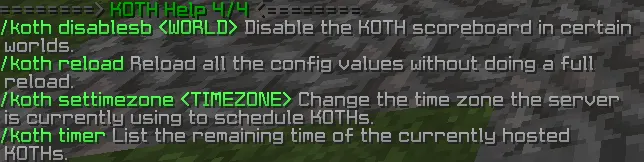
- /koth disablesb <WORLD>
- /koth settimezone <TIMEZONE>
- /koth timer
- /koth tp <KOTH>

- KOTH.* (Access to every command within the plugin).
- KOTH.SETLOOTLOCATION (Sets the loot chest locations).
- KOTH.TIMES (Add or remove a KOTH time to broadcast a message at the specificed time).
- KOTH.VIEWLOOT (View the set loot).
- KOTH.SETLOOT (Sets the KOTH reward loot).
- KOTH.SETKOTH (Set the locations for a KOTH).
- KOTH.REMOVE (Remove a chosen KOTH).
- KOTH.END (End a selected KOTH).
- KOTH.END.ANON (End a KOTH anonymously).
- KOTH.START (Start a chosen KOTH).
- KOTH.START.ANON (Start a KOTH anonymously).
- KOTH.HELP (View the KOTH help command).
- KOTH.REWARDTYPE (Change the current reward type).
- KOTH.AUTOSTART (Set a auto starting KOTH).
- KOTH.SCHEDULER (Schedule a KOTH for a specific date).
- KOTH.LISTKOTHS (View the list of KOTHs).
- KOTH.DAILYSCHEDULE (Schedule daily KOTHs).
- KOTH.WEEKLYSCHEDULE (Schedule weekly KOTHs).
- KOTH.VIEWTIME (View the times of the scheduled KOTHs).
- KOTH.RECREATE (Change the capture zone of an existing KOTH).
- KOTH.COOLDOWNBYPASS (Bypass the cool down feature).
- KOTH.CAPTURE (Capture if this permission is enabled in config).
- KOTH.REMOVELOOTLOCATION (Remove a loot location).
- KOTH.DISABLESCOREBOARD (Disable the scoreboard in a certain world).
- KOTH.CHANGETIME (Use the change timezone command).
- KOTH.TIMER (View all current active KOTHs and the time remaining).
- KOTH.GUI (Use the KOTH gui feature).
- KOTH.TP (Teleport to a KOTH).
http://dev.bukkit.org/bukkit-plugins/worldedit/
This plugin can be linked to FactionsUUID, however, it will require the 2 following plugins which can be downloaded from these links...
https://www.spigotmc.org/resources/factionsuuid.1035/
https://www.spigotmc.org/resources/kothsupport4factions.50216/
This plugin can be linked to MassiveCore and Factions. You can download these plugins from the following link...
https://www.spigotmc.org/resources/massivecore.1901/
https://www.spigotmc.org/resources/factions.1900/
This plugin can be linked to LegacyFactions. You can download this plugin from the following link...
https://www.spigotmc.org/resources/legacyfactions.40122/
This plugin can be linked to FactionsOne. You can download this plugin from the following link...
https://www.spigotmc.org/resources/factionsone.9249/
If you would like to use place holders for any of the plugins listed within this plugins description then you require this plugin on your server...
https://www.spigotmc.org/resources/mvdwplaceholderapi.11182/
List of timezones for this plugins automatic scheduler and daily scheduler...
https://en.wikipedia.org/wiki/List_of_tz_database_time_zones
This plugin now supports Vault and can be used to add money into a player's balance on your economy plugin.
https://www.spigotmc.org/resources/vault.41918/
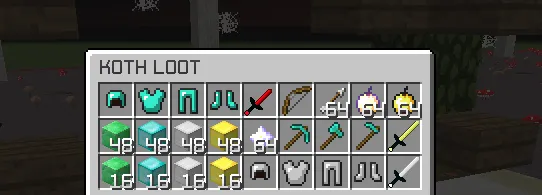
Viewing the loot chest -
Player capturing KOTH -

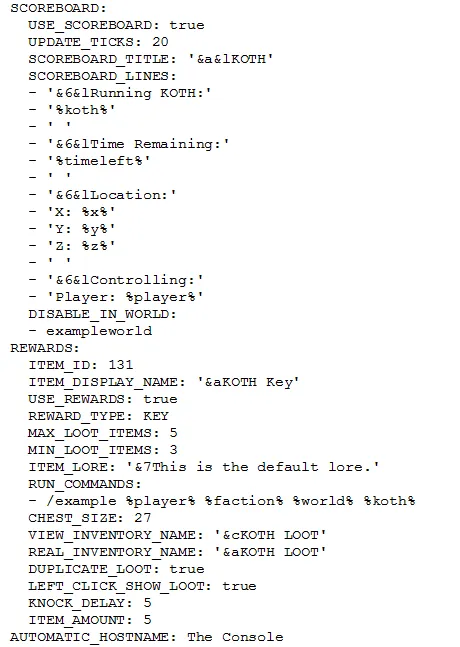
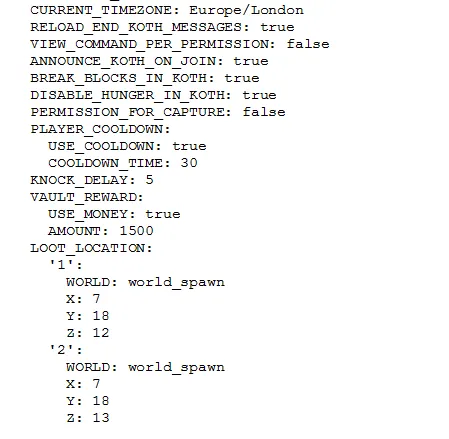
Lang.yml file -
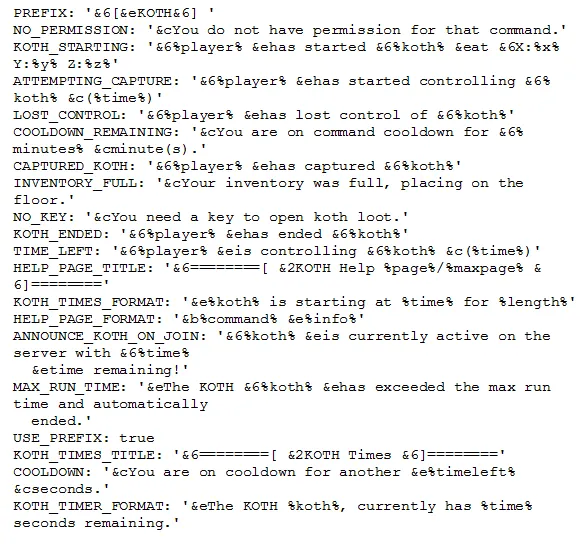
Scoreboard -
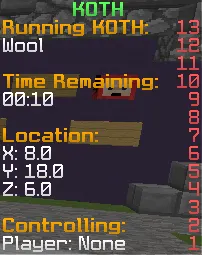
World Edit API -

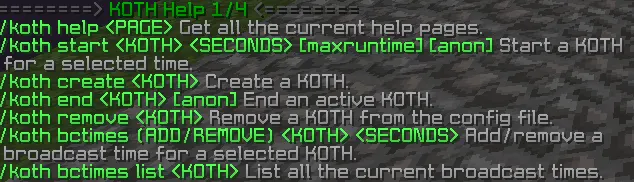
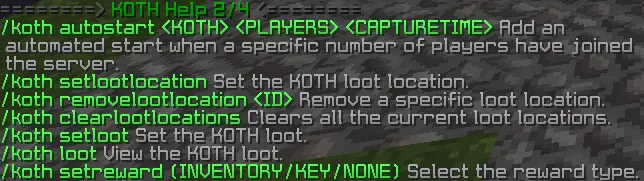
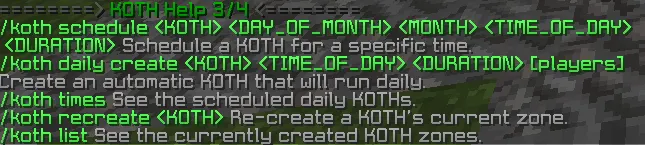
KOTH Scheduler -

KOTH GUI -
Click me to see a GIF
Player capturing KOTH -
Lang.yml file -
Scoreboard -
World Edit API -
KOTH Scheduler -
KOTH GUI -
Click me to see a GIF
Please note all these messages are configurable these are just the default ones.
Upon purchase of this plugin,
1) You do not have permission to resell or give this plugin to other person.
2) This plugin can only be used on your own server.
3) You cannot decompile or modify the source of the plugin without my permission.
4) There are absolutely no refunds.
1) You do not have permission to resell or give this plugin to other person.
2) This plugin can only be used on your own server.
3) You cannot decompile or modify the source of the plugin without my permission.
4) There are absolutely no refunds.
/koth schedule <kothname> <day_of_month> <month> <time_of_day> <koth_duration>
First of all it requires a KOTH name, very simply just enter the name of the KOTH you would like to be scheduled.
Day of month -
Next you would need to enter the day of the month. So if it was the 21st you would need to enter 21 if you wanted it to be that day. If I wanted it to be on the 30th, I would simply enter 30.
Month -
Now you will need to enter the month so for example 8 would be august. Just enter an integer of the month of which you would like the KOTH to be scheduled for.
Time of day -
Then it's the time of the day which is simply the time of day you would like the KOTH to be hosted, this is on a 24 hour clock. So if you would like it to be at 6pm you would have to enter 18:00. If you would like it to be at 6am you would just enter 6:00 and so on.
KOTH duration -
Finally you need to enter the KOTH duration in seconds (how long it would take for a player to capture it).
KOTH name -First of all it requires a KOTH name, very simply just enter the name of the KOTH you would like to be scheduled.
Day of month -
Next you would need to enter the day of the month. So if it was the 21st you would need to enter 21 if you wanted it to be that day. If I wanted it to be on the 30th, I would simply enter 30.
Month -
Now you will need to enter the month so for example 8 would be august. Just enter an integer of the month of which you would like the KOTH to be scheduled for.
Time of day -
Then it's the time of the day which is simply the time of day you would like the KOTH to be hosted, this is on a 24 hour clock. So if you would like it to be at 6pm you would have to enter 18:00. If you would like it to be at 6am you would just enter 6:00 and so on.
KOTH duration -
Finally you need to enter the KOTH duration in seconds (how long it would take for a player to capture it).
If you need any further help, feel free to private message me or put a post in the discussion section.
ElizaPancakes
public void onKOTHStart(KOTHStartEvent e) {
if (e.getPlayer().getName().equalsIgnoreCase("benzimmer123")) {
e.setCancelled(true);
e.getPlayer().sendMessage(ChatColor.RED + "You are currently not allowed to start KOTHs.");
}
}
ElizaPancakes
public void onScoreboardUpdate(ScoreboardUpdateEvent e) {
e.setCancelled(true);
//load custom scoreboard adding methods from this event
}
ActiveKOTHs.getActiveKOTHs();
ActiveKOTHs.getCappers();
ActiveKOTHs.getPlayerCapturing(koth);
ActiveKOTHs.getTimeRemaining(koth);
public void onKOTHStart(KOTHStartEvent e) {
if (e.getPlayer().getName().equalsIgnoreCase("benzimmer123")) {
e.setCancelled(true);
e.getPlayer().sendMessage(ChatColor.RED + "You are currently not allowed to start KOTHs.");
}
}
ElizaPancakes
public void onScoreboardUpdate(ScoreboardUpdateEvent e) {
e.setCancelled(true);
//load custom scoreboard adding methods from this event
}
ActiveKOTHs.getActiveKOTHs();
ActiveKOTHs.getCappers();
ActiveKOTHs.getPlayerCapturing(koth);
ActiveKOTHs.getTimeRemaining(koth);
More KOTH events and methods will be added shortly.
You are not required to have a Factions plugin. This is optional. If you would like to use this plugin without Factions then just remove the %faction% variable in the lang.yml and config.yml files.
This plugin currently only supports MassiveCore Factions, FactionsOne, FactionsUUID and LegacyFactions plugins. In the future I do plan to add support for any other requested Factions plugin. If you have any requests please leave them below.
The %faction% variable can be used when a player gets knocked off the capture zone, starts to capture the KOTH, counting down from the capture and actually captures the KOTH. Additionally it can be used in the Scoreboard to display the Faction of the player capturing.
There is now support to give rewards to the faction leader if this is enabled in the configuration file. Rewards will be given to the leader instead of the player capturing the KOTH.
This plugin currently only supports MassiveCore Factions, FactionsOne, FactionsUUID and LegacyFactions plugins. In the future I do plan to add support for any other requested Factions plugin. If you have any requests please leave them below.
The %faction% variable can be used when a player gets knocked off the capture zone, starts to capture the KOTH, counting down from the capture and actually captures the KOTH. Additionally it can be used in the Scoreboard to display the Faction of the player capturing.
There is now support to give rewards to the faction leader if this is enabled in the configuration file. Rewards will be given to the leader instead of the player capturing the KOTH.
Scoreboard Variables:
- %x% Shows the KOTHs X location.
- %y% Shows the KOTHs Y location.
- %z% Shows the KOTHs Z location.
- %world% Shows the KOTHs world name.
- %timeleft% Shows the time remaining for the KOTH.
- %hoursleft% Shows the hours remaining for the KOTH.
- %minutesleft% Shows the minutes remaining for the KOTH.
- %secondsleft% Shows the seconds remaining for the KOTH.
- %player% Shows the current capper.
- %koth% Shows the active KOTH name.
- %faction% Shows the faction of the player capturing.
- %factionleader% Shows the faction leader of the player capturing.
Total Downloads:
- 5 downloads ✔
- 10 downloads ✔
- 25 downloads ✔
- 50 downloads ✔
- 100 downloads ✔
- 150 downloads ✔
- 300 downloads ✔
- 500 downloads ✖
- %x% Shows the KOTHs X location.
- %y% Shows the KOTHs Y location.
- %z% Shows the KOTHs Z location.
- %world% Shows the KOTHs world name.
- %timeleft% Shows the time remaining for the KOTH.
- %hoursleft% Shows the hours remaining for the KOTH.
- %minutesleft% Shows the minutes remaining for the KOTH.
- %secondsleft% Shows the seconds remaining for the KOTH.
- %player% Shows the current capper.
- %koth% Shows the active KOTH name.
- %faction% Shows the faction of the player capturing.
- %factionleader% Shows the faction leader of the player capturing.
Total Downloads:
- 5 downloads ✔
- 10 downloads ✔
- 25 downloads ✔
- 50 downloads ✔
- 100 downloads ✔
- 150 downloads ✔
- 300 downloads ✔
- 500 downloads ✖
If you are looking to buy the source code for this plugin I will sell it for $19.99. However, this does not mean you have permission to resell at anytime. If you are interested send me a private message.
Last edited:



