
Hello, what's going on? I hope everything is fine, welcome to my thread, this thread will be showcasing my Minecraft server website / resource, that hopefully I am planning to release either exclusively or not as well as explaining each part of the website and how it was made.
// If you want to skip, scroll down to view the website.
How does the website work?
So I wanted a different approach to minecraft server websites, I usually see that the normal minecraft server website includes a forum, I personally looked into the more modern logical way, since discord is more popular than ever, there is no point in having a forum for your server in 2020, that's why I decided to go with the style of a 'news' website, a lot of minecraft servers have decided to go with this approach.
What was used to make the website?
I have decided to start with this part to give people a basic and important idea on how the site is going to be run, how it can be hosted, how optimized it is, and more.
I have decided to go with my usual stack of GatsbyJS and React, GatsbyJS is a static-site generator for React, it has great built-in features, it's very optimized and provides well-known data, as well as it has a really good SEO support.
I then looked for what CMS I would be using, which will be used for the news section, more on that later on, so at first my choice was to go for something with a great built-in markdown editor and also something that is supported by Gatsby, I looked at Ghost and that was my first choice, unfortunately, as good as it's built-in markdown editor, it was quite pricey to host, something along the price of $30/m, plus would add an external hassle for the client, and since this was supposed to be a resource that more people can use, I didn't think it would be a good idea to make the client pay $30/m for hosting, that would drive them off even If that money isn't going into my pockets, so I looked into my second choice, NetlifyCMS.
NetlifyCMS
NetlifyCMS is an opensource CMS made by Netlify, it was completely free to use, as well as having a clean dashboard that can be installed in the backend of the system without external use, so it really interested me, what made it really the perfect choice, was its ability to be hosted via netlify for completely free, and that's of course part of my plan to make the client's job easier.
Design
I wanted to have a clean design, that also looks really good, so I decided to go with the dark theme style, along with custom styles, made from scratch, I first sketched the mockup with Figma and that gave me the initial idea of having boxes or 'containers' for styles.
Layout
So with the layout, I wanted to be very easy for the client to change the color of theme so It can fit with any logo, one color change, will change the colors for every needed text on the site, for example, the original color I chose was orange,

but to change it, it's really simple:
layout.js

Now, the header looks like this:

Now of course this applies to the entire site, but that was an example.
Header
Now, diving into the header itself, you can see the logo, and the you have the logo, two boxes with one having the the player, the ip and the other redirecting to the discord, I have used the hypixel ip as an example, all you have to do is enter the IP in here,

and it will automatically fetch and update the site, all the other info is easily editable, including discord the name of the server, the ip in the dashboard, more on that later on.
Navigation
The navigation, includes the 3 main pages of the site, plus a link to an outside server store, it has quite cool animation when hovered, I will let it speak for itself:
The store link can be easily edited, as well on here:
The navigation is much like the rest of the site, is also very responsive, but this is how it looks:
Animations (Header & Navbar)
This are the animations when you first load the site / go into new page,
Content
Here comes the main part of the website, as I said earlier, this is gonna be a well-compacted 'news' website, at the start, you have the featured card, which will have the latest news post:

So each time you have a new news post, it will automatically be featured here.
The second part, are these two featured posts, these will come after the latest post, for example, the top one will have the latest post, the two after will have the two latest posts (not including the one above),

The last and final part of the first page is is, the main content, these are the cards of the other posts, also arranged based on post date, so It will ignore the already featured posts then show the other posts, a 3 post per-row system is on place,

It has a maximum amount of posts that can be shown.
Footer
The footer is a really nice footer, it has the server logo on the left, copyright, and the navbar.
This of course is all editable easily, more on that later on.

Each one of these require a featured image to be added in the dashboard when posting a new post.
Dashboard
Before we continue and go to different pages, I wanted to talk about the dashboard, and how are all these things are easily editable.
So also hosted on your website, the dashboard where everything editable is available, at first you log your email into Netlify and it will send an email with an invitation to create your account on the site, after that, you will be able to access everything, this being logged on, you will get:

You have 4 collections, one for your news, other for editing the header / footer server info, one for the rules page and vote page, more on that upcoming.
But for now let's talk about the first one, the most important which is the news section, you can add new news and you can also see current ones, when clicking on one this what appears,

You have the path which will be generated on your site, for example I have it set to be /news/[pathyouchoose] but this is of course easily customizable.
Then you have the featured image, which is required, this will show both on your post and on the first page.
The date of the release of the post.
The title.
The body, this is basically your post, with the markdown editor, you can easily add anything just like how you write a thread on here, but better.
Your Server Info
You can easily change your server info, by going into the second section:

Server Vote

You can edit vote links, or add more easily.

Rules
You can easily edit the rules page, already in place, with a live preview, you can edit the title on the page, the content, and the publish date.

That's mostly it for the dashboard, really simple and quite great for the client / server, you can invite users to be able to edit as well, which is great.
Now, let's continue with the pages and the news page.
So, let's say you click on a post on the page, you will be redirected to a newly generated, post page, that will look like this

This has your title, body, and publish date, of course this is all dynamically generated every time you add a new post, and of course the path you specify, will be on the link of the page.
Rules Page
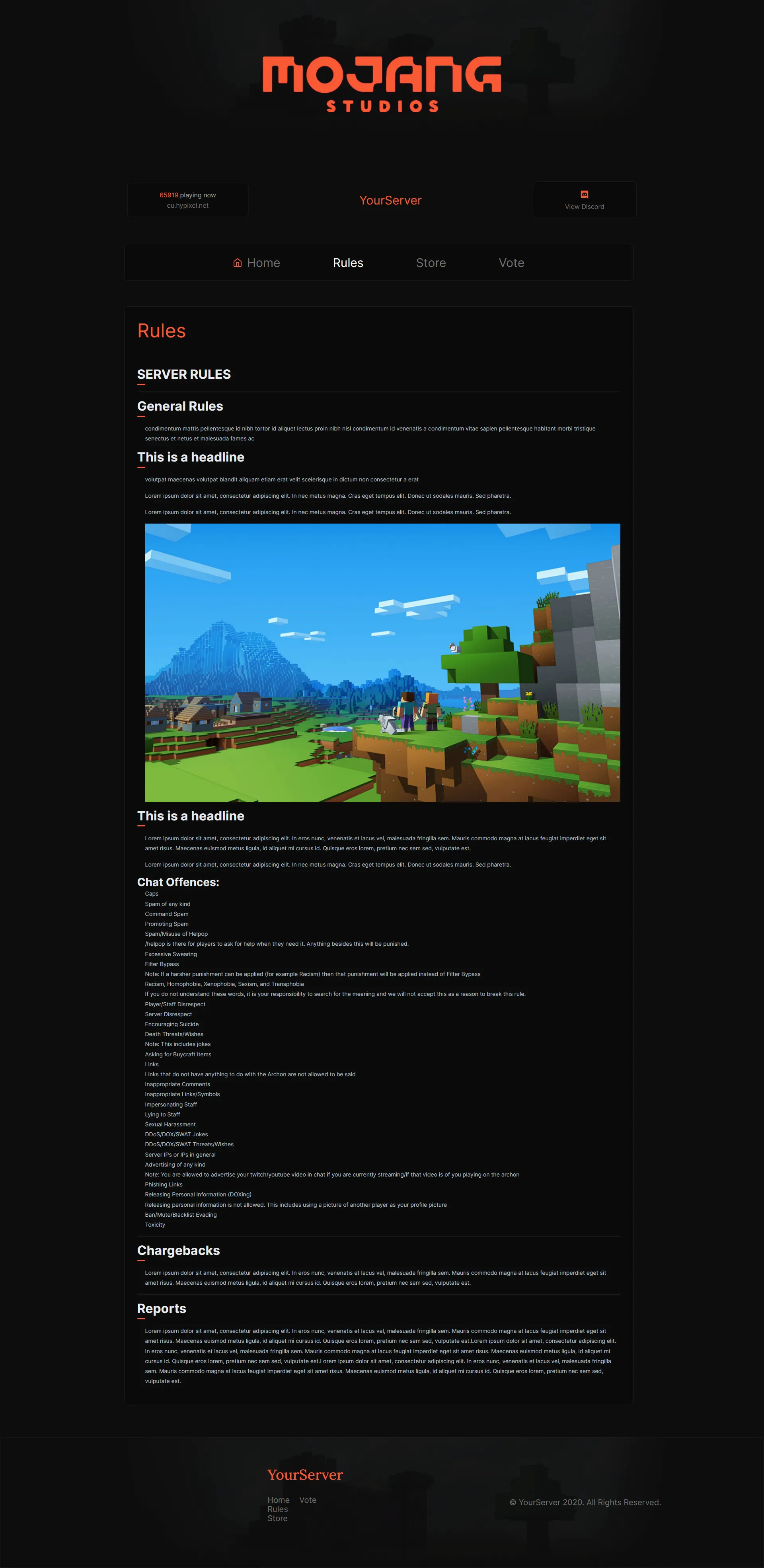
This page, as shown before, will be showcasing your server rules, this how it looks,
*(Zoom in)
This of course is fully editable, as shown before.
Vote Page
The vote page is done, but needs some design tweaks, it can be viewed here:

Other than that this is it, I hope didn't forget anything, and if you made it this far, I appreciate it.
So this was the website, it's fully responsive on all devices, of course, it can be viewed at
https://minecraft.blackag.design/ to have the full experience, and to see all the animations, if you need any other information, just let me know.
Now my question is, do you like the website, how much do you think I should sell this unexclusive and exclusive?
We're available for hire @ blackag.design - [email protected] for inquires.
// If you want to skip, scroll down to view the website.
How does the website work?
So I wanted a different approach to minecraft server websites, I usually see that the normal minecraft server website includes a forum, I personally looked into the more modern logical way, since discord is more popular than ever, there is no point in having a forum for your server in 2020, that's why I decided to go with the style of a 'news' website, a lot of minecraft servers have decided to go with this approach.
What was used to make the website?
I have decided to start with this part to give people a basic and important idea on how the site is going to be run, how it can be hosted, how optimized it is, and more.
I have decided to go with my usual stack of GatsbyJS and React, GatsbyJS is a static-site generator for React, it has great built-in features, it's very optimized and provides well-known data, as well as it has a really good SEO support.
I then looked for what CMS I would be using, which will be used for the news section, more on that later on, so at first my choice was to go for something with a great built-in markdown editor and also something that is supported by Gatsby, I looked at Ghost and that was my first choice, unfortunately, as good as it's built-in markdown editor, it was quite pricey to host, something along the price of $30/m, plus would add an external hassle for the client, and since this was supposed to be a resource that more people can use, I didn't think it would be a good idea to make the client pay $30/m for hosting, that would drive them off even If that money isn't going into my pockets, so I looked into my second choice, NetlifyCMS.
NetlifyCMS
NetlifyCMS is an opensource CMS made by Netlify, it was completely free to use, as well as having a clean dashboard that can be installed in the backend of the system without external use, so it really interested me, what made it really the perfect choice, was its ability to be hosted via netlify for completely free, and that's of course part of my plan to make the client's job easier.
Design
I wanted to have a clean design, that also looks really good, so I decided to go with the dark theme style, along with custom styles, made from scratch, I first sketched the mockup with Figma and that gave me the initial idea of having boxes or 'containers' for styles.
Layout
So with the layout, I wanted to be very easy for the client to change the color of theme so It can fit with any logo, one color change, will change the colors for every needed text on the site, for example, the original color I chose was orange,
but to change it, it's really simple:
layout.js
Now, the header looks like this:
Now of course this applies to the entire site, but that was an example.
Header
Now, diving into the header itself, you can see the logo, and the you have the logo, two boxes with one having the the player, the ip and the other redirecting to the discord, I have used the hypixel ip as an example, all you have to do is enter the IP in here,
and it will automatically fetch and update the site, all the other info is easily editable, including discord the name of the server, the ip in the dashboard, more on that later on.
Navigation
The navigation, includes the 3 main pages of the site, plus a link to an outside server store, it has quite cool animation when hovered, I will let it speak for itself:
The store link can be easily edited, as well on here:
The navigation is much like the rest of the site, is also very responsive, but this is how it looks:
Animations (Header & Navbar)
This are the animations when you first load the site / go into new page,
Content
Here comes the main part of the website, as I said earlier, this is gonna be a well-compacted 'news' website, at the start, you have the featured card, which will have the latest news post:
So each time you have a new news post, it will automatically be featured here.
The second part, are these two featured posts, these will come after the latest post, for example, the top one will have the latest post, the two after will have the two latest posts (not including the one above),
The last and final part of the first page is is, the main content, these are the cards of the other posts, also arranged based on post date, so It will ignore the already featured posts then show the other posts, a 3 post per-row system is on place,
It has a maximum amount of posts that can be shown.
Footer
The footer is a really nice footer, it has the server logo on the left, copyright, and the navbar.
This of course is all editable easily, more on that later on.
Each one of these require a featured image to be added in the dashboard when posting a new post.
Dashboard
Before we continue and go to different pages, I wanted to talk about the dashboard, and how are all these things are easily editable.
So also hosted on your website, the dashboard where everything editable is available, at first you log your email into Netlify and it will send an email with an invitation to create your account on the site, after that, you will be able to access everything, this being logged on, you will get:
You have 4 collections, one for your news, other for editing the header / footer server info, one for the rules page and vote page, more on that upcoming.
But for now let's talk about the first one, the most important which is the news section, you can add new news and you can also see current ones, when clicking on one this what appears,
You have the path which will be generated on your site, for example I have it set to be /news/[pathyouchoose] but this is of course easily customizable.
Then you have the featured image, which is required, this will show both on your post and on the first page.
The date of the release of the post.
The title.
The body, this is basically your post, with the markdown editor, you can easily add anything just like how you write a thread on here, but better.
Your Server Info
You can easily change your server info, by going into the second section:
Server Vote
You can edit vote links, or add more easily.
Rules
You can easily edit the rules page, already in place, with a live preview, you can edit the title on the page, the content, and the publish date.
That's mostly it for the dashboard, really simple and quite great for the client / server, you can invite users to be able to edit as well, which is great.
Now, let's continue with the pages and the news page.
So, let's say you click on a post on the page, you will be redirected to a newly generated, post page, that will look like this
This has your title, body, and publish date, of course this is all dynamically generated every time you add a new post, and of course the path you specify, will be on the link of the page.
Rules Page
This page, as shown before, will be showcasing your server rules, this how it looks,
*(Zoom in)
This of course is fully editable, as shown before.
Vote Page
The vote page is done, but needs some design tweaks, it can be viewed here:
Other than that this is it, I hope didn't forget anything, and if you made it this far, I appreciate it.
So this was the website, it's fully responsive on all devices, of course, it can be viewed at
https://minecraft.blackag.design/ to have the full experience, and to see all the animations, if you need any other information, just let me know.
Now my question is, do you like the website, how much do you think I should sell this unexclusive and exclusive?
We're available for hire @ blackag.design - [email protected] for inquires.
Last edited:



