Multi-monitor advice

Status
This thread has been locked.

Red

Chromatic Polymath
Supreme
Feedback score
34
Posts
1,251
Reactions
632
Resources
0
Yo guys. I wanted to get y'alls opinion on something. See, I want to build a multi-monitor setup, but I have no idea which monitors I should use or which configuration I should go with.

For reference, I currently own an aging Dell 3007WFP (2560x1600), and was wondering if I could somehow incorporate it into the setup. If not, I can likely sell it for around $500 to help pay for new monitors.

Before giving suggestions, understand that I don't just want to slam random monitors next to each other. I want a seamless setup. You know, heights match up, and pixel density is similar. Stuff like that.

Let me know if you have any idea you'd be willing to share. Thanks!

 
PebbleHost
High performance, consistent uptime and fast support. Minecraft hosting that just works.

Red

Chromatic Polymath
Supreme
Feedback score
34
Posts
1,251
Reactions
632
Resources
0

Red

Chromatic Polymath
Supreme
Feedback score
34
Posts
1,251
Reactions
632
Resources
0
just get 2 of the same monitors lol
Dual monitors suck because there's a bezel directly in the center of your field of view.
 

Keenan

Have A Great Day!
Supreme
Feedback score
4
Posts
503
Reactions
105
Resources
0
get a graphics card that has 2 hdmi ports or AVI or DVI or something like that and make sure your monitors have that.
 

Red

Chromatic Polymath
Supreme
Feedback score
34
Posts
1,251
Reactions
632
Resources
0
get a graphics card that has 2 hdmi ports or AVI or DVI or something like that and make sure your monitors have that.
I'll likely be running an SLI setup when I do this, so hardware/port support shouldn't be much of an issue.

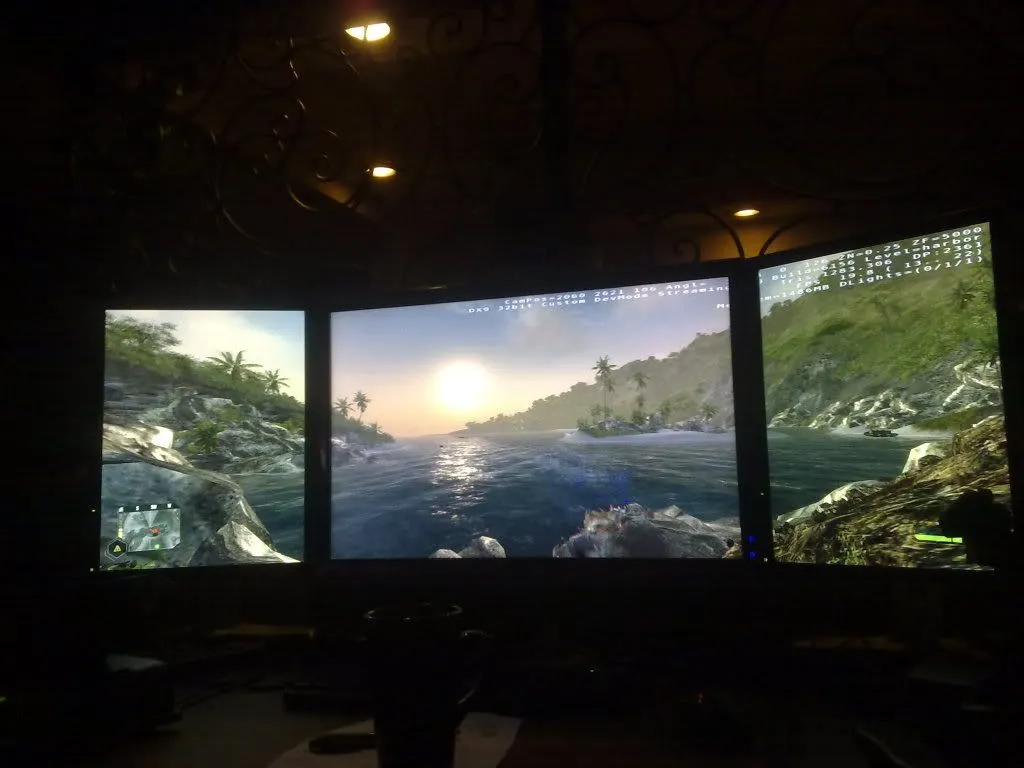
If anyone wants an update, I've decided to keep my Dell 3007WFP (16:10 at 2560x1600) and flank it with 2 separate Dell 2007FP's (4:3 at 1600x1200) monitors in portrait mode. The displays share practically exact height, in terms of both inches and pixels, and are at the same PPI. It's the perfect PLP setup. I'll attach some pics from the internet.

285026f9_IMG_20130314_164418.jpeg

jWfbz.jpg

DQW3J.jpg

112220098260.jpg
 

Red

Chromatic Polymath
Supreme
Feedback score
34
Posts
1,251
Reactions
632
Resources
0
Ok, I gotta give you props here man. I'm looking into other monitors after realizing just how OLD the setup I mentioned in the previous post is. As in, those monitors are both extremely old and their color accuracy/response time is shit.

I gotta thank you, because your list is coming in super handy. Don't know where you got it/how you made it, but I sure do appreciate it.
 

Ajdin

I used to be a big deal on here but now irrelevant
Supreme
Feedback score
12
Posts
2,419
Reactions
3,404
Resources
0
What is your main use for your computer?
 

Red

Chromatic Polymath
Supreme
Feedback score
34
Posts
1,251
Reactions
632
Resources
0
What is your main use for your computer?
That's the thing: it's so diverse that I would be hard pressed to find one panel that does it all (well).

Personal use: Gaming, YouTube, web browsing.

Uni/work use: Auto-Cad, coding, calculations (EE major)

What makes the decision hard is that I started learning Adobe's software and creating basic content in the beginning of HS. I want to resume that as a hobby in college.

I have no idea what monitor could cover BOTH color accuracy for Adobe as well as decent refresh rate/g-sync for gaming.
 

Ajdin

I used to be a big deal on here but now irrelevant
Supreme
Feedback score
12
Posts
2,419
Reactions
3,404
Resources
0
That's the thing: it's so diverse that I would be hard pressed to find one panel that does it all (well).

Personal use: Gaming, YouTube, web browsing.

Uni/work use: Auto-Cad, coding, calculations (EE major)

What makes the decision hard is that I started learning Adobe's software and creating basic content in the beginning of HS. I want to resume that as a hobby in college.

I have no idea what monitor could cover BOTH color accuracy for Adobe as well as decent refresh rate/g-sync for gaming.
Why are you looking for a high refresh rate? 60Hz is usually fine unless you're playing competitive CS:GO a lot. I have 1000 hours in CS:GO and still don't feel like that's enough to spend crazy amounts of money on a +60Hz monitor. Let's also not forget, ultrawide isn't really a advantage for a game like CS:GO

I currently have a LG 29UM58. It's ultrawide, has a normal refresh rte
 

Red

Chromatic Polymath
Supreme
Feedback score
34
Posts
1,251
Reactions
632
Resources
0
Why are you looking for a high refresh rate? 60Hz is usually fine unless you're playing competitive CS:GO a lot. I have 1000 hours in CS:GO and still don't feel like that's enough to spend crazy amounts of money on a +60Hz monitor. Let's also not forget, ultrawide isn't really a advantage for a game like CS:GO

I currently have a LG 29UM58. It's ultrawide, has a normal refresh rte
I DO really like ultrawide, and am considering it for this upcoming Friday sale. However, I don't CS:GO, and must admit that I can agree with you about the refresh rate; I don't really need or care about anything over 60.

But that doesn't change the primary problem, which is that I STILL want G-sync (games) as well as high color range. I'm considering grabbing 3 IPS 2560x1440 w/ g-sync and putting them in portrait.
 

Red

Chromatic Polymath
Supreme
Feedback score
34
Posts
1,251
Reactions
632
Resources
0
You'll regret that. That's way too big.

Also, my monitor isn't really for gaming, it's a normal HDMI output. Just so you know.
Hey, I'm not saying it's for sure. Im just throwing possibilities on screen, to help myself keep track of em" if nothing else. I think it's work noting that my current 2560x1600 Dell 30 inch is pretty huge.

Also worth noting: I'm really trying to stay on a budget of $500 here. I want this to be a temporary solution, as I'll probably upgrade again a year or so later when there are HDR monitors and HDR content is on PC. Thus, I don't necessarily want to get bleeding-edge 4K tech right now.
 
Status
This thread has been locked.
Top