My attempt at recreating win11 in win10

ZekoGaming

Feedback score
0
Posts
63
Reactions
21
Resources
0
upload_2021-6-28_22-37-38.png


Here is my attempt at making windows 11 in win10.

Programs used:

1) TaskBar X (buy)
2) TranslucentTB (get)
3) Wallpaper Engine (buy)

Program Explanation:

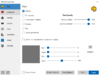
TranslucentTB: Makes your taskbar Translucent!
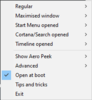
upload_2021-6-28_22-39-9.png


TaskBar X: Centers your apps on the taskbar with additinal configurations.
Screenshot 2021-06-28 224400.png


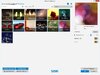
Wallpaper Engine: Allows you to have animated Backgrounds.
wallpaper-engine.jpg


ADDITIONAL:
Cursor Theme: http://www.rw-designer.com/cursor-set/szubidub-s-modern-win10-pack
 

Attachments

  • upload_2021-6-28_22-37-38.png
    upload_2021-6-28_22-37-38.png
    2.7 MB · Views: 101
  • upload_2021-6-28_22-39-9.png
    upload_2021-6-28_22-39-9.png
    6.5 KB · Views: 95
  • Screenshot 2021-06-28 224400.png
    Screenshot 2021-06-28 224400.png
    41.1 KB · Views: 88
  • wallpaper-engine.jpg
    wallpaper-engine.jpg
    88.4 KB · Views: 84
Last edited:
PebbleHost
High performance, consistent uptime and fast support. Minecraft hosting that just works.

Great_Array

Feedback score
0
Posts
127
Reactions
59
Resources
0
Now that looks pretty awesome, but I think you didn't have to use TaskbarX or TranslucentTB since windows 10 already has options to change your icons to the middle and make your taskbar transparent. I also tried doing the same to my windows 10 pc a bit ago, here's my result if you wanna see:
VN9SfPN.png
 

ZekoGaming

Feedback score
0
Posts
63
Reactions
21
Resources
0
Now that looks pretty awesome, but I think you didn't have to use TaskbarX or TranslucentTB since windows 10 already has options to change your icons to the middle and make your taskbar transparent. I also tried doing the same to my windows 10 pc a bit ago, here's my result if you wanna see:
VN9SfPN.png
clean.
 
Top