Navigation
-
-
Standalone Tebex Templates & themes Websites Pterodactyl Themes Addons Eggs NamelessMC Templates Modules XenForo Themes Addons Invision Community Themes Plugins Translations WHMCS Themes Modules Paymenter Themes Extensions Calagopus Themes Extensions Eggs LeaderOS themes Ghost themes Shopify themes Wix themes Squarespace themes Other webstores CraftingStore templates MineStore themes PayNow templates Other
-
-
-
Install the app
More options
You are using an out of date browser. It may not display this or other websites correctly.
You should upgrade or use an alternative browser.
You should upgrade or use an alternative browser.
My Website
- Thread starter Ted
- Start date
- Status
- This thread has been locked.


PebbleHost
High performance, consistent uptime and fast support. Minecraft hosting that just works.

Thanks for the feedback!IMO you should almost never have music on a website. Also some text is unreadable because it's white on white. There's barely anything else to comment on.


Ok so here's my opinions:
IMO this website looks super immature in terms of design (no offense)
1. Remove the particle.js effect. It's super overused and no good website should be using it in 2018. Maybe use a parallax effect for the background instead?
2. The typography is off. In your <h4> where it says "Web designer / developer" the letter spacing is too much. You might want aslo make your main header bold or something. (edit it looks like the header is already bold, but you might wanna test a bit more with the text)
3. You should also probably add a blur or a light background color in the back of the white-border-box that surrounds your content, because it is somewhat hard to read.
4. The icon hover effect also looks somewhat immature. I would increase the transition speed and make it not scale up that much. Good design is always subtle and meaningful.
5. There is a little overflow on the page, you should try to figure out whats causing this, or an easy fix would be adding the following to your CSS:
Lastly, I know you said this is your first website, but in the future if you plan to work as a freelancer, you might want to make some changes;
a) Get a better domain. You can try to freelance small projects to make at least $12 to get a .com or something.
b) add SSL. Some hosting providers provide this for free.
c) Since you did say you are a graphic designer, you might want to take some web design courses, or lurk around dribbble.com etc. for inspiration.
 Good luck!
IMO this website looks super immature in terms of design (no offense)
1. Remove the particle.js effect. It's super overused and no good website should be using it in 2018. Maybe use a parallax effect for the background instead?
2. The typography is off. In your <h4> where it says "Web designer / developer" the letter spacing is too much. You might want aslo make your main header bold or something. (edit it looks like the header is already bold, but you might wanna test a bit more with the text)
3. You should also probably add a blur or a light background color in the back of the white-border-box that surrounds your content, because it is somewhat hard to read.
4. The icon hover effect also looks somewhat immature. I would increase the transition speed and make it not scale up that much. Good design is always subtle and meaningful.
5. There is a little overflow on the page, you should try to figure out whats causing this, or an easy fix would be adding the following to your CSS:
Code:
body {
height: 100vh;
width: 100vw;
overflow: hidden;
}
Lastly, I know you said this is your first website, but in the future if you plan to work as a freelancer, you might want to make some changes;
a) Get a better domain. You can try to freelance small projects to make at least $12 to get a .com or something.
b) add SSL. Some hosting providers provide this for free.
c) Since you did say you are a graphic designer, you might want to take some web design courses, or lurk around dribbble.com etc. for inspiration.
Good luck!
Last edited:
Thanks for the suggestions. But I'm new to web development, and part of this website was brought from other resources. I don't plan to work as a freelancer either. This is just something I made and forgot about itOk so here's my opinions:
IMO this website looks super immature in terms of design (no offense)
1. Remove the particle.js effect. It's super overused and no good website should be using it in 2018. Maybe use a parallax effect for the background instead?
2. The typography is off. In your <h4> where it says "Web designer / developer" the letter spacing is too much. You might want aslo make your main header bold or something. (edit it looks like the header is already bold, but you might wanna test a bit more with the text)
3. You should also probably add a blur or a light background color in the back of the white-border-box that surrounds your content, because it is somewhat hard to read.
4. The icon hover effect also looks somewhat immature. I would increase the transition speed and make it not scale up that much. Good design is always subtle and meaningful.
5. There is a little overflow on the page, you should try to figure out whats causing this, or an easy fix would be adding the following to your CSS:
Code:body { height: 100vh; width: 100vw; overflow: hidden; }
Lastly, I know you said this is your first website, but in the future if you plan to work as a freelancer, you might want to make some changes;
a) Get a better domain. You can try to freelance small projects to make at least $12 to get a .com or something.
b) add SSL. Some hosting providers provide this for free.
c) Since you did say you are a graphic designer, you might want to take some web design courses, or lurk around dribbble.com etc. for inspiration.
However, thank you for this. I will look into web development more into the future.. All of what I've done is self-taught and going from web-web to fix problems or add small things.
Last edited:


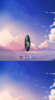
When messing with images, just use height OR width. Not both. Fix this for the mobile view of the site.
 [DOUBLEPOST=1538834230][/DOUBLEPOST]Also for your background use
background-size:cover;
background-repeat: no-repeat;
Mobile desktop view:

Your website is a good starting point but keep learning! You'll discover some neat tricks and ideas.
background-size:cover;
background-repeat: no-repeat;
Mobile desktop view:
Your website is a good starting point but keep learning! You'll discover some neat tricks and ideas.
Attachments

Last edited:


- Status
- This thread has been locked.
