Hot Summer Deals are Here!
Celebrate with up to 99% off on 17,700 resources
01
Days
21
Hours
14
Mins
20
Secs

Need help with 3D Guns Resource Pack

Status
This thread has been locked.

Hitansh16

Feedback score
0
Posts
7
Reactions
0
Resources
0
I have been working on a Texture pack for my 1.7/1.8 server. In the 3D modelling software all models and textures render corectly on the hand, but in game it is turned 90 degrees to the right and doesnt point straight.
If anyone is willing to help me work with this texture pack or give me a solution, please PM me.

In Game:
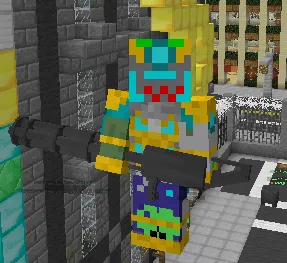
c48863d557a9fc4539cfe115c3f58b7d.png


In model application:
51bc0000057c8ce9e1a44f3a9f40131f.png
 
PebbleHost
High performance, consistent uptime and fast support. Minecraft hosting that just works.

Kraezler

|Artist|Bot Dev|Animator|
Supreme
Feedback score
43
Posts
798
Reactions
246
Resources
0
In the guns .json file you should have something similar to

{
"parent": "WORDS",
"textures": {
"layer0": "WORDS"

Under that add in or edit these values *may not be exactly right you should mess around with the 90's and zeros if it's not
You also might want to play with the scales as I just set as default but sometimes this can appear warped.
The translation is correct in your current one so If i wrote something different you should change ;)

If you already have this data in for first person you can ignore it and it will stay correct
},
"display": {
"thirdperson_righthand": {
"rotation": [ -90, 0, 0 ],
"translation": [ 0, 1, -3 ],
"scale": [1, 1, 1 ]
},
"firstperson_lefthand": {
"rotation": [ 0, -135, 25 ],
"translation": [ 0, 4, 2 ],
"scale": [ 1, 1, 1 ]
}
}
}

Hope this helped if you need anything PM me ;)
 
Last edited:

Hitansh16

Feedback score
0
Posts
7
Reactions
0
Resources
0
In the guns .json file you should have something similar to

{
"parent": "WORDS",
"textures": {
"layer0": "WORDS"

Under that add in or edit these values *may not be exactly right you should mess around with the 90's and zeros if it's not
You also might want to play with the scales as I just set as default but sometimes this can appear warped.
The translation is correct in your current one so If i wrote something different you should change ;)

If you already have this data in for first person you can ignore it and it will stay correct
},
"display": {
"thirdperson_righthand": {
"rotation": [ -90, 0, 0 ],
"translation": [ 0, 1, -3 ],
"scale": [1, 1, 1 ]
},
"firstperson_lefthand": {
"rotation": [ 0, -135, 25 ],
"translation": [ 0, 4, 2 ],
"scale": [ 1, 1, 1 ]
}
}
}

Hope this helped if you need anything PM me ;)
Still nothing, it shows up sideways only... :/
In game it looks the same, but in the modelling software it looks like:
e0cde12cbc13335a13facb4a497af9f5.png
 
Last edited:

Kraezler

|Artist|Bot Dev|Animator|
Supreme
Feedback score
43
Posts
798
Reactions
246
Resources
0
Did you try changing the -90 to 90 180 or 0?

If so would you be ok with sending me the files so I can have a look?
 

Kraezler

|Artist|Bot Dev|Animator|
Supreme
Feedback score
43
Posts
798
Reactions
246
Resources
0

Hitansh16

Feedback score
0
Posts
7
Reactions
0
Resources
0
I am still trying to fix this, Kraezler tried helping but still nothing happened, if anyone else would like to help me please PM me
 
Status
This thread has been locked.
Top