Need Help with setup

Status
This thread has been locked.

xSophie

Banned
Feedback score
4
Posts
137
Reactions
66
Resources
0
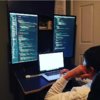
Hey, planning on getting a new setup except I want it in the style of this for my coding layout, any ideas how he done this and what stuff he is using for example. MacBook

f3a64eacc80f3e26b8d8bdb9bcbae344.jpg


Reward will be given for whoever tells me the best answer :)
 

Attachments

  • f3a64eacc80f3e26b8d8bdb9bcbae344.jpg
    f3a64eacc80f3e26b8d8bdb9bcbae344.jpg
    85.1 KB · Views: 49
Last edited:
Banned forever. Reason: Ban Evading (WhyTry)

PebbleHost
High performance, consistent uptime and fast support. Minecraft hosting that just works.

cuz

Premium
Feedback score
1
Posts
64
Reactions
41
Resources
0
he just rotates normal monitors and sets them in portrait. some coders like to do that as they prefer to read from top to bottom rather than left to right.
 

SwagiWagi

Premium
Feedback score
4
Posts
383
Reactions
112
Resources
0
I code using two Samsung curved 24-inch gaming monitors landscape, much more comfortable for me.
 

xSophie

Banned
Feedback score
4
Posts
137
Reactions
66
Resources
0
he just rotates normal monitors and sets them in portrait. some coders like to do that as they prefer to read from top to bottom rather than left to right.
I know why they use them, It's just that I'm getting a new office and I want a new design haha
so im getting

Apple MacBook Pro 13in A1278 (Mid 2012) - Core i7-3520M 2.9GHz CPU - 8GB RAM - 750GB HDD - 13in High Resolution Screen - WIFI - Bluetooth - Sierra (Renewed)

and

2

Dell U2417H-2 Ultra Sharp 24-Inch Infinity Edge LED Monitor - Black
 
Banned forever. Reason: Ban Evading (WhyTry)

Dylan

You can't say pop and forget the smoke
Supreme
Feedback score
0
Posts
400
Reactions
51
Resources
0
Wdym. Just looks like 2 monitors wall mounted with a double display port splitter or such running out of the mac with adapters to run to hdmi.
 

xSophie

Banned
Feedback score
4
Posts
137
Reactions
66
Resources
0
Wdym. Just looks like 2 monitors wall mounted with a double display port splitter or such running out of the mac with adapters to run to hdmi.

yeah the macbook 2012 only had one thunderbird slot so had to extend my budget for a 2014 model
 
Banned forever. Reason: Ban Evading (WhyTry)

..Error404..

404 Page Not Found
Premium
Feedback score
5
Posts
130
Reactions
39
Resources
0
Hey, planning on getting a new setup except I want it in the style of this for my coding layout, any ideas how he done this and what stuff he is using for example. MacBook

View attachment 256005

Reward will be given for whoever tells me the best answer :)


Mainly this is how it works

Order 2 HDMI Splitters for USB-C (To plug into the side and feed 2 HDMI Cables into to Monitors)

Then its pretty simple to follow - https://support.apple.com/en-us/HT202351

Then is down to how you want to configure them to. on the settings.[DOUBLEPOST=1565659174][/DOUBLEPOST][DOUBLEPOST=1565659300][/DOUBLEPOST]If you want any more support I am sure to help you at anytime.
 
Last edited:
Status
This thread has been locked.
Top