Hot Summer Deals are Here!
Celebrate with up to 99% off on 17,500 resources
02
Days
07
Hours
54
Mins
04
Secs

OBS Studio Stuttering Output Video

KyleFurst

Supreme
Feedback score
-1
Posts
185
Reactions
10
Resources
4
Hi, I've noticed that my output video when I record Minecraft comes out stuttering and "glitchy". My settings should be compatible with my graphics, if you know anything on how to fix this please DM me on discord or on here (listed below).


Here is my PC's info:
Intel(R) Core(TM) i7-9700K CPU @ 3.60GHz 3.60 GHz NVIDIA GTX 1080, z390 motherboard

My upload speed is 21.5

Discord: orange#1424

 
PebbleHost
High performance, consistent uptime and fast support. Minecraft hosting that just works.

Leeiuum

Supreme
Feedback score
8
Posts
1,059
Reactions
666
Resources
0
Please upload an OBS log showing this

Help > Log Files > Upload > Current/last so I can see what is going on in the background.

Additionally as standard OBS-Studio should be running as an administrator in Windows. If on Windows - are you running it in admin?

Are you using NVENC (the original, NOT the newer) encoder?
 

KyleFurst

Supreme
Feedback score
-1
Posts
185
Reactions
10
Resources
4
https://obsproject.com/logs/gpudgIRdrJo1YAcm

I am
Please upload an OBS log showing this

Help > Log Files > Upload > Current/last so I can see what is going on in the background.

Additionally as standard OBS-Studio should be running as an administrator in Windows. If on Windows - are you running it in admin?

Are you using NVENC (the original, NOT the newer) encoder?
https://obsproject.com/logs/gpudgIRdrJo1YAc
If you're using the default video software for windows, it'll mess up with higher FPS recordings, try a different video playing software such as Windows Media Player or VLC media player
Still stuttering!!

I am using CQP, in OBS Studio so there is only one option for NVENC which is newer.
 

KyleFurst

Supreme
Feedback score
-1
Posts
185
Reactions
10
Resources
4
If you're using the default video software for windows, it'll mess up with higher FPS recordings, try a different video playing software such as Windows Media Player or VLC media player
Here's a short video I made as an example of what I mean.
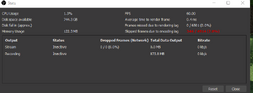
Hey! In the bottom right, is it saying that something is overloaded?
Nope! Heres a screenshot of what the stats look like while i play
 

Attachments

  • Screenshot 2022-07-10 033208.png
    Screenshot 2022-07-10 033208.png
    23.3 KB · Views: 18

Leeiuum

Supreme
Feedback score
8
Posts
1,059
Reactions
666
Resources
0
https://obsproject.com/logs/gpudgIRdrJo1YAcm

I am

https://obsproject.com/logs/gpudgIRdrJo1YAc

Still stuttering!!

I am using CQP, in OBS Studio so there is only one option for NVENC which is newer.
That's probably where you're going wrong.

If your only option is NVENC newer when on a GTX 1080, you're going to have nothing but problems.

newer NVENC is only capable of Turing chip cards, such as the 1650, 1660, the TIs of both, 2000 and 3000 generation cards. If this is your only option then chances are you've either got a corrupt GPU driver installation or a corrupt OBS-Studio installation.
 
Top