

One use items was designed for server owners who would want to give users specially made items to users which would would commands on click but only be used once. In other words a user can be given an item what runs a command let's say to give them a kit once that item is used they user receives the kit or whatever you have it set to do and the item is removed from their inventory.

All the possible commands for the plugin.
This image shows the text that will be shown when a user does /OneUseItem list and there isn't any setup!
These messages are shown when you either sent a OneUseItem to player or your are receiving it.
These are shown when you either give all players online the item or you are receiving it.
These are shown when you either delete or create a OneUseItem
When you create an item this is the default name and lore it has.
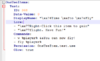
That is what an item's configuration would look like '\xa7' is used for color instead of & so after 7 you would put the color ID like you would if you used &. Commands well they're simple you can use %player% to get the player who used the item.
Now that we changed the items settings within the item config it now looks like this. It glows to

Now that the new commands are set, let's use them. As you can see they did work and the item did get removed from the player's inventory. If they have more than 1 it will just remove 1.

That commands for the plugin are pretty straight forward.
- /OneUseItem to bring up all the possible commands.
- /CreateItem <Name> - Creates a new OneUseIte.
- /RemoveItem <Name> - Removes an already made OneUseItem (Case-Sensitive)
- /set Item <Name> - Sets the item your holding to that OneUseItem's item type.
- /OneUseItem give <Player> <Item> <Amount> - Gives the player that OneUseItem along with the given amount.
- OneUseItem giveall <Item> <Amount> - Gives every online player the specified item along with the given amount.

- OneUseItems.Create - Allows the user to create an item.
- OneUseItems.Set - Allows the user to set the item type to what ever is in their hand.
- OneUseItems.Remove - Allows the user to remove a OneUseItem.
- OneUseItem.Main - Allows the user to use the command /OneUseItem. Having this permission node will allow the user to do /OneUseItem give || giveall
- OneUseItem.List - Allows the user to list all the made OneUseItems.
- Custom node : This is different for each item you create. (Within the OneUseItems.yml the item has a permission you can change it.)

Code:
No-Permission:
  Create: "&cYou do not have permission to create a OneUseItem!"
  Remove: "&cYou do not have permission to remove a OneUseItem!"
  List: "&cYou do not have permission to list all OneUseItems!"
  Give: "&cYou do not have permission to give a OneUseItem!"
  Set: "&cYou do not have permission to set the item of the OneUseItem!"
Messages:
  Created: "&aYou created a OneUseItem called: &6%name%"
  Does-Not-Exist: "&6%item% &cDoes not exist, &a/OneUseItem List"
  Deleted-Item: "&aYou deleted &6%item%&a!"
  Give:
    # %item% => gets the item name the players received or what the sender sent.
    # %amount% => gets the amount of the item.
    # %target% => gets the target's name.
    Item-Does-Not-Exist: "&6%item% &cDoesn't exist!"
    Enter-A-Valid-Number: "&cPlease enter a valid number!"
    Sender: "&aYou gave &d%target% &6x%amount% &aof &b%item%"
    Received: "&aYou received a &fx%amount%&6%item% &afrom &b%sender%"
  Giveall:
    # %item% => gets the item name the players received or what the sender sent.
    # %amount% => gets the amount of the item.
    Sender: "&aYou gave all online players &6x%amount% &aof &b%item%"
    Received: "&aYou received a &fx%amount%&6%item% &afrom &b%sender%"
Display-Items:
  #When using the command /OneUseItem list
  #All the available items will be shown like "item1, item2, item3" and so on.
  Horizontal: true
  #If its false the format below will be used
  #When using the command /OneUseItem list
  #All the available items will be shown like
  #Item 1
  #Item 2
  #Item 3
  #Item 4
  #And so on.
Code:
OneUseItems:
  Test:
    ID: 368
    Data-Value: 0
    DisplayName: "\xa76Time \xa7fto \xa7eFly"
    Lore:
    - "\xa77Right-Click this item to gain"
    - "\xa77flight. Have Fun!"
    Commands:
    - w %player% &aYou can now fly!
    - fly %player%
    Permission: OneUseItem.test.use
    Glow: true
  FlyTest:
    ID: 368
    Data-Value: 0
    DisplayName: "\xa76Replace \xa7eLater"
    Lore:
    - "\xa7aThis is the default item lore"
    - "\xa76You should really change this."
    Commands:
    - broadcast hello world
    - I highly suggest changing these commands!
    Permission: OneUseItem.flytest.use
    Glow: true
  FreeKit:
    ID: 368
    Data-Value: 0
    DisplayName: "\xa76Replace \xa7eLater"
    Lore:
    - "\xa7aThis is the default item lore"
    - "\xa76You should really change this."
    Commands:
    - broadcast hello world
    - I highly suggest changing these commands!
    Permission: OneUseItem.freekit.use
    Glow: true
This plugin was created using Java 8 meaning that this plugin hasn't been tested on any java versions lower than 8. If the plugin will not load check your java version to verify that you are using Java 8.
This plugin has only been testing on 1.8-1.10. There are no guarantees that it will work on 1.7 but it should.
- When changing the name/lore of a item you must use \xa7 instead of &. But when making commands using & for color codes will work.

- You may not decompile this plugin!
- You may not post this plugin under any other website.
- You may not sell nor take credit for this plugin.
- No Refunds / Chargebacks


PRICE: $5 USD
How Do I Buy? You can purchase a copy of this plugin through spigot, once you do purchase it you will have lifetime access to further updates.
Link To Buy: https://www.spigotmc.org/resources/oneuseitems-single-use-items-that-runs-commands.29802/
Attachments
-
 AllCommands.PNG19.6 KB · Views: 88
 -
 NoItemsSetup.PNG6 KB · Views: 82
 -
 givePlayer.PNG9.9 KB · Views: 83
 -
 Giveall.PNG11.7 KB · Views: 79
 -
 TestCreate.PNG4.9 KB · Views: 77
 -
 DeleteTest.PNG2.7 KB · Views: 84
 -
 TestConfig.PNG8.2 KB · Views: 82
 -
 Default.PNG12.6 KB · Views: 81
 -
 NewItem.PNG8.5 KB · Views: 88
 -
 CommandSend.PNG10.7 KB · Views: 85



