Problem using PS4 on Monitor

Status
This thread has been locked.

UckoDucko

Supreme
Feedback score
15
Posts
278
Reactions
146
Resources
0
I recently purchased a monitor (Acer ka210hq, second hand) off a friend to use for my playstation instead of a TV. It is only VGA & DVI, so I am using an adapter (HDMI to VGA) to get signal from my playstation to it.

After setting it up, booting up my ps4, I am stuck with a black screen. It flickers about every 20 seconds. I changed the resolution to 480, still no luck. Only way it works is in safe mode.

Does anyone know what's wrong with it?

 
PebbleHost
High performance, consistent uptime and fast support. Minecraft hosting that just works.

omarhachach

Your Friendly Neighbourhood Snorlax
Supreme
Feedback score
14
Posts
627
Reactions
359
Resources
0
I recently purchased a monitor (Acer ka210hq, second hand) off a friend to use for my playstation instead of a TV. It is only VGA & DVI, so I am using an adapter (HDMI to VGA) to get signal from my playstation to it.

After setting it up, booting up my ps4, I am stuck with a black screen. It flickers about every 20 seconds. I changed the resolution to 480, still no luck. Only way it works is in safe mode.

Does anyone know what's wrong with it?
It is either a problem with the PS, the Cable or the TV.
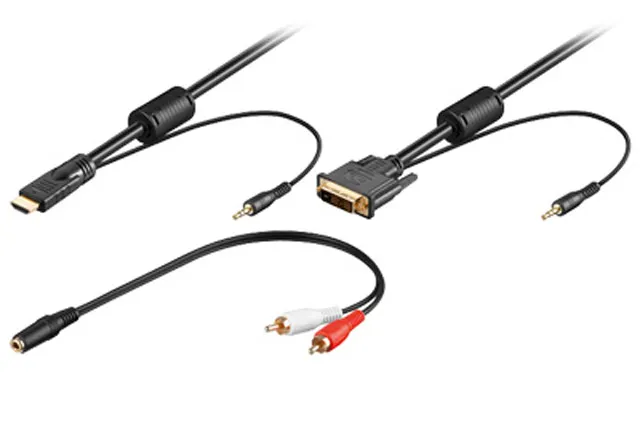
HDMI sends both a sound & video signal, so it can interfere. It would probably be a better bet to get a HDMI to DVI instead of an HDMI to VGA, even though both don't support sound.
And getting one which also splits audio would be an even better bet:
AVimg_7112.jpg

This is all un-tested, so I wouldn't know. This is just what comes to mind when I see this.

I would recommend watching this video, so you understand how they work:


Also check your monitors max resolutions & refresh rate.
 

UckoDucko

Supreme
Feedback score
15
Posts
278
Reactions
146
Resources
0
It is either a problem with the PS, the Cable or the TV.
HDMI sends both a sound & video signal, so it can interfere. It would probably be a better bet to get a HDMI to DVI instead of an HDMI to VGA, even though both don't support sound.
And getting one which also splits audio would be an even better bet:
AVimg_7112.jpg

This is all un-tested, so I wouldn't know. This is just what comes to mind when I see this.

I would recommend watching this video, so you understand how they work:


Also check your monitors max resolutions & refresh rate.


Mine splits audio into a 3.5mm jack. But i've read a lot and I still can't see why it's not working.
 

Walrus

New Member
Supreme
Feedback score
8
Posts
880
Reactions
449
Resources
0
Don't know much about it, but I've heard those HDMI to VGA cables don't work because HDMI is digital and VGA is analog, so a simple cable won't convert it. An HDMI to DVI cable would work most likely, I've used one for a ps3.

Also, you could try disabling HDCP in the settings for your ps4, but I believe some apps require it on.
 

UckoDucko

Supreme
Feedback score
15
Posts
278
Reactions
146
Resources
0
Don't know much about it, but I've heard those HDMI to VGA cables don't work because HDMI is digital and VGA is analog, so a simple cable won't convert it. An HDMI to DVI cable would work most likely, I've used one for a ps3.

Also, you could try disabling HDCP in the settings for your ps4, but I believe some apps require it on.

Yeah, I used the same setup on another monitor with my 360, and it worked fine. I think I read somewhere that Playstation 4 doesn't output analog video, hence why it doesn't work. I was furious when it still didn't work after turning HDCP off, but now I know why it doesn't work. Looks like i'll have to invest in another monitor with hdmi.
 

Walrus

New Member
Supreme
Feedback score
8
Posts
880
Reactions
449
Resources
0
Yeah, I used the same setup on another monitor with my 360, and it worked fine. I think I read somewhere that Playstation 4 doesn't output analog video, hence why it doesn't work. I was furious when it still didn't work after turning HDCP off, but now I know why it doesn't work. Looks like i'll have to invest in another monitor with hdmi.
DVI is digital video, if you want to try that as an option rather than buying another monitor.
 
Status
This thread has been locked.
Top