

View attachment 104622
Installation:
1. Download this plugin as well as PlaceHolderAPI (if not already installed)
2. Drag and drop into plugins folder
3. Restart/reload and you're done!
Introduction:
Hello everyone! I am Infxnty, and for the past few weeks or so I have been working on this little project. I thought of everything that could be possibly useful to a staff member on really any server gamemode. I know these particular plugins are usually used for HCF servers, however this is useful for Factions, or really any SMP/PvP based server out there. I do intend to keep this resource updated (see the to-do list) such as ore-alerts and things. Thanks for taking a look, even if you don't intend to purchase, please feel free to make suggestions so I can improve upon this.
Features:


 Permissions:
Note: If you change the permissions in the config.yml, they are whatever you made them.
Commands:
Have something you want added? Click here to shoot me a PM, or leave a review below.
Think you messed up the plugin, and just need a good old reset? Below is the default configuration file!
Bugs:
Find a bug? I tested this plugin extensively, unfortunately there is no such thing as a perfect program. If you find anything you think should be fixed, please PM me here or add to it on the discussion.
Note: If you'd like the source code for legitimate reasons, just PM me, and we can talk
Installation:
1. Download this plugin as well as PlaceHolderAPI (if not already installed)
2. Drag and drop into plugins folder
3. Restart/reload and you're done!
Introduction:
Hello everyone! I am Infxnty, and for the past few weeks or so I have been working on this little project. I thought of everything that could be possibly useful to a staff member on really any server gamemode. I know these particular plugins are usually used for HCF servers, however this is useful for Factions, or really any SMP/PvP based server out there. I do intend to keep this resource updated (see the to-do list) such as ore-alerts and things. Thanks for taking a look, even if you don't intend to purchase, please feel free to make suggestions so I can improve upon this.
Features:
- 100% Configurable
- Customizable messages, item names, ActionBars, and permissions (so nothing conflicts )
- Random Teleport Tool
- X-ray Catcher Tool (Teleports you to a random player under Y:20 if any)
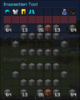
- Inspection Tool (Right-Click a player to bring up their armor, inventory, potion effects, IP, health, and food presented in a convenient GUI)
- WorldEdit Tool (Nothing added from this plugin, just puts it in your inventory)
- Report System (Also prevented in a convenient GUI)
- StaffChat (Ability to toggle, or just message separately)
- LockChat (Admins, or anyone with staffmode.chat.lock can talk)
- ClearChat (Clears chat)
- Players are unable to see you while in StaffMode
Note: If you change the permissions in the config.yml, they are whatever you made them.
- staffmode.inspect
- staffmode.report
- staffmode.freeze
- staffmode.notify
- staffmode.login
- staffmode.use.inspect
- staffmode.use.xray
- staffmode.use.star
- staffmode.use.compass
- staffmode.use
- staffmode.see
- staffmode.chat.clear
- staffmode.chat.lock
- staffmode.chat
Commands:
- /staffmode (Toggles StaffMode)
- /staffmode reload (Reloads the configuration file)
- /chat clear (Clears the chat)
- /chat lock (Locks the chat)
- /chat staff (Puts you into the StaffChat channel)
- /freeze (Freezes any suspected players of hacking and whatnot)
- /report (Allows players to report other players)
- /inspect (Allows you to inspect a player without using the book)
Have something you want added? Click here to shoot me a PM, or leave a review below.
- Slow Chat
- Ore-Alerts
Think you messed up the plugin, and just need a good old reset? Below is the default configuration file!
Code:
# Variables

staffModeLogin: true # If set to true, players with the permission 'staffmode.login' will

                    # automatically be in staff mode


# Commands

frozenLogout: 'ban %player_name% &cLogged out while frozen! -s'


# Messages (Ok to use & color codes)

prefix: '&8[&bStaffMode&8] &7» '

chatPrefix: '&8[&bStaffChat&8] ' # For staffchat only, not global chat

chatClear: '&7Chat has been cleared by &a' # &a will be the color of the player's name.

chatUnlock: '&7Chat has been unlocked by &a'

chatLock: 'Chat has been temporarily locked by &a'

staffchatOn: 'You are now in staffchat.'

staffchatOff: 'You are no longer in staffchat.'

frozen: '&cFREEZE! &7You have been frozen by a staff member. Do &c&nNOT&r&7 log out or you will be banned!'

frozenActionBar: '&fYou are currently: &bFROZEN'

staffModeActionBar: '&fYou are currently in: &aStaffMode'

unFreeze: '&7You are no longer frozen. Sorry for the inconvienence!'

reload: '&7Successfully reloaded the configuration file!'


# GUI-Titles

inspectGUI: '&bInspection Tool'


# Item Names

compass: '&dRandom Teleport Tool'

axe: '&5WorldEdit Tool'

book: '&eInspection Tool'

pick: '&fXRay-Catcher'

star: '&bPlayer Reports'


# Permissions

staffChatPerm: 'staffmode.chat'

lockChatPerm: 'staffmode.chat.lock'

slowChatPerm: 'staffmode.chat.slow'

clearChatPerm: 'staffmode.chat.clear'

freeze: 'staffmode.freeze'

notify: 'staffmode.notify'

inspect: 'staffmode.inspect'

login: 'staffmode.login'

seeVanishedPlayers: 'staffmode.see' # Doesn't hide players in staffmode

reportPerm: 'staffmode.report'

staffMode: 'staffmode.use'

useCompass: 'staffmode.use.compass'

useBook: 'staffmode.use.inspect'

usePick: 'staffmode.use.xray'

useStar: 'staffmode.use.star'
Bugs:
Find a bug? I tested this plugin extensively, unfortunately there is no such thing as a perfect program. If you find anything you think should be fixed, please PM me here or add to it on the discussion.
Note: If you'd like the source code for legitimate reasons, just PM me, and we can talk
Attachments
-
 resource-banner.jpg82.7 KB · Views: 93
 -
 upload_2018-1-5_23-53-47.png93.1 KB · Views: 258
 -
 upload_2018-1-6_0-0-4.png120.4 KB · Views: 221
 -
 Screen Shot 2018-01-06 at 12.37.10 AM.png92.7 KB · Views: 213
 -
 Screen Shot 2018-01-06 at 12.21.48 AM.png26.1 KB · Views: 212
 -
 Screen Shot 2018-01-06 at 12.22.35 AM.png26.4 KB · Views: 215
 -
 Screen Shot 2018-01-06 at 12.24.49 AM.png26.6 KB · Views: 211
Last edited:



