
Today guys i want to show how to make for free host server using NGROK!
- First, you create an account here or you can use your Github Account.
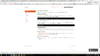
- After that you see this.
- You need to download NGROK here.
- If you have installed NGROK (it is only exe) you place it on desktop.
- You use CMD -> cd Desktop or Git Bash Here.
- In CMD you type ./ngrok authtoken <your token>
- After that you write last command ./ngrok.exe tcp -region eu 25565
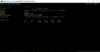
- If you follow all steps you get this.
⤷ Server IP = 0.tcp.eu.ngrok.io:13826
⤷ Every time you run it you need type. ./ngrok.exe tcp -region EU 25565)
* For US users, remove this from the command "-region EU"
⤷ Ofc you don't get the same IP.
⤷ Your clients IP Address is hidden so no problem with this

Note: You need to keep running this window if you want to other people to join your server.
⤷ It can handle max 200-250 players, but I recommend using this only for testing/building with your Team other stuff.
Attachments
Last edited:



