Tips & Advice on Starting Hand Drawn Art

Status
This thread has been locked.

Harrison

Systems & Telecoms Engineer
Banned
Feedback score
45
Posts
1,371
Reactions
672
Resources
0
Hey,

As some of you may or may not know I'm a Web Designer. But I want something fun that I could do in my spare time. So I came up with Hand Drawn Art. I know I can't just be perfect and a pro like TotallyDrawn overnight so that's why I've come here and asked for some Advice & Tips.

I currently have a Huion H610 as my tablet so I first need advice on that. Should I get a new one or is that going to be fine?
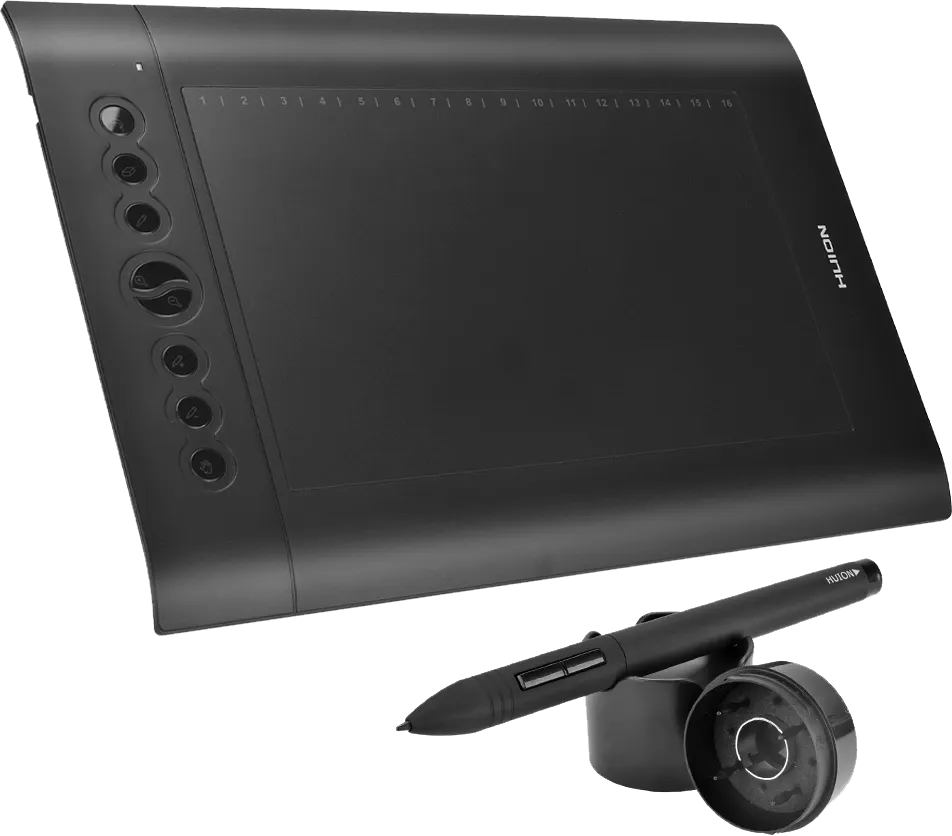
Huion%2B610%2BPro.png


I also currently use Adobe Illustrator which I've been told by many designers that this isn't a very good software to use and I should use others. So I need Advice on which is the best software to use.

Then I just need tips in general. E.G: Straight lines, shading, etc.

If you know any good Hand Drawn Artists on here that could be willing to give me some good Tips & Advice then please tag them in.

Thanks!
TrifleTower
 
Banned forever. Reason: Scamming

PebbleHost
High performance, consistent uptime and fast support. Minecraft hosting that just works.

UGaming

One man Cringe squad
Supreme
Feedback score
31
Posts
1,082
Reactions
684
Resources
3

Sparko

professional amateur
Supreme
Feedback score
82
Posts
1,986
Reactions
959
Resources
0
I'm not good at drawing but I've read lots of threads and from what I've gathered you should start drawing traditionally first, I'm using this to learn. I just finished the first exercise in part 1 of lesson 1 and my goal is to finish the first (and hopefully second) lesson this summer :) I personally use Krita as it's free and I'm poor but there's lots of options that I'm not really familiar with :p
 

Harrison

Systems & Telecoms Engineer
Banned
Feedback score
45
Posts
1,371
Reactions
672
Resources
0
I'm not good at drawing but I've read lots of threads and from what I've gathered you should start drawing traditionally first, I'm using this to learn. I just finished the first exercise in part 1 of lesson 1 and my goal is to finish the first (and hopefully second) lesson this summer :) I personally use Krita as it's free and I'm poor but there's lots of options that I'm not really familiar with :p
Thanks for that! I'll check out that Website and Software tonight!
 
Banned forever. Reason: Scamming

TechBanana

ヾ(⌐■_■)ノ♪
Deactivated
Feedback score
48
Posts
818
Reactions
1,060
Resources
0
You don't necessarily need to learn traditional art first. I can't speak for everyone I personally find drawing digitally much easier (ctrl+z ftw).

A terrific software is clip studio paint. Price is $50ish but sometimes it's on sale for $15. It's great for all skill levels.

Huion tablets are a great choice if you're on a tablet. But note those type of tablets w/o a screen may take some getting use to.

I guess in terms in technique, I'd say the main thing I tell people is to do fast strokes for straight lines. I can't really cover everything in one reply so PM me if you have any questions and I'd be happy to help you out.

GL with everything :p
 

CelestialSatyr

MythicMobs Configurator | Minecraft Partner
Supreme
Feedback score
7
Posts
396
Reactions
208
Resources
0
A Huion H610 Pro will definitly do the job. In fact, I'm using one myself.
To start off, your software, you're currently using Adobe Illustrator, now, that is not a bad choice, though I recommend PaintTool SAI, Photoshop CS6, or Manga Studio 5.
Each of them has their strong points, though they're all a good shot for drawing digitally.

Now onto the drawing itself, you want to start drawing "Hand drawn art".
There are a lot of different types of hand drawn art.
Do you want to start making Minecraft related art?
Or would you rather make realistic style artwork, cartoon style or fantasy related artwork?

If you want to make non-Minecraft related artwork, then I suggest watching "Proko", he has a lot of tutorials on human anatomy.
Even if you'd rather want to make Minecraft related artwork, then I still suggest watching Proko, knowing the human anatomy is always a great skill to have.

A second channel for artwork tutorials, let's draw and character concepts is "Draw with Jazza".
He doesn't only have tutorials for making artwork, photoshop tutorials, but he also has animation tutorials.


A few tips and tricks for you;
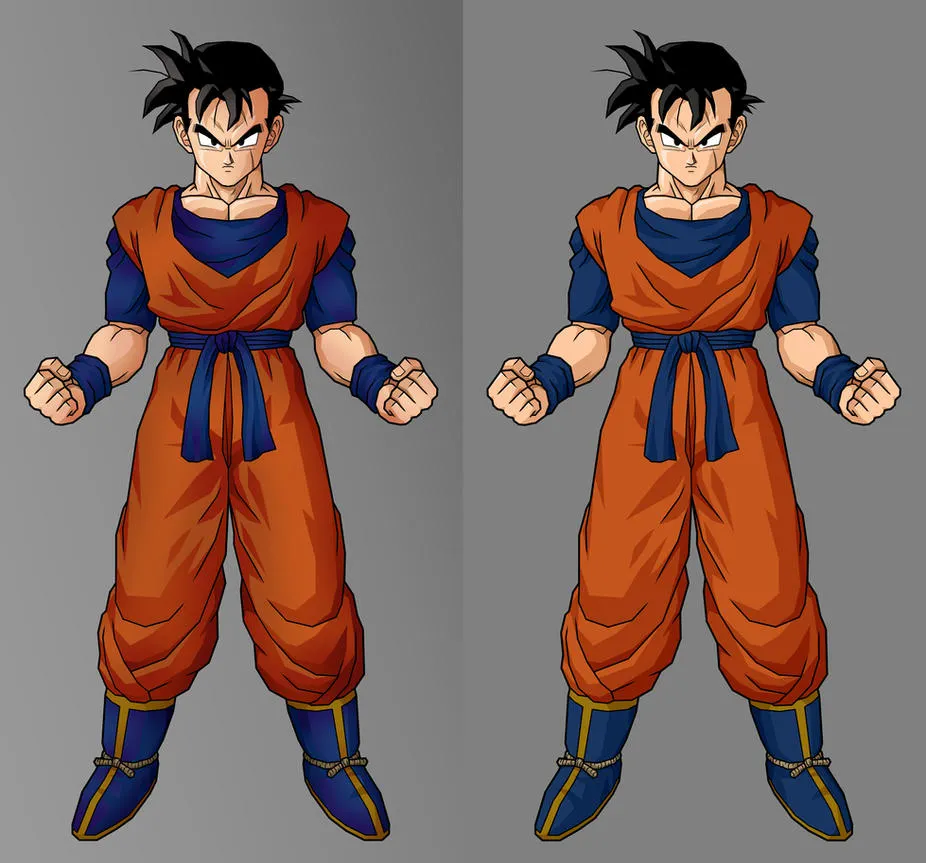
Shading: There are a lot of different styles of shading, such as cell shading, or realistic shading.
For Minecraft related artwork, I suggest cell shading, or cartoon style shading.
future_gohan__adv_cell_shading_by_alessandelpho.jpg

shading-black-white-balls-2.png
As you can see, there's a big difference in the style's of shading.
You can choose what style you'd like to learn / use in your drawings.

For drawing straight lines; there's not really a technique you'd need to learn to draw straight lines.
Usually it's trial and error, getting the lines just perfect so that you're happy with it, if it's not the way you want it to look like, just undo it and do it again.

Another tip I'd like to give you is; just have fun with it, if you don't feel like drawing, then don't do it, don't force yourself to draw something.

A nice trick if you don't know what to draw; there's a nice app in the appstore called "What to Draw".
It's a free app, and it has a lot of random generated sentences to inspire you on what to draw.

There's a better version of this, it also includes a "Color" challenge, "Character design" challenge, and a lot more, such as an "Environment creating" challenge.
It's called the "Arty Games App", and it's available on PC, IOS and Android. It's made by the creator of the "Draw with Jazza" Youtube channel.

If you have any other questions, feel free to PM me and I can probably answer them for you.
Good luck with drawing!
 

Harrison

Systems & Telecoms Engineer
Banned
Feedback score
45
Posts
1,371
Reactions
672
Resources
0
You don't necessarily need to learn traditional art first. I can't speak for everyone I personally find drawing digitally much easier (ctrl+z ftw).

A terrific software is clip studio paint. Price is $50ish but sometimes it's on sale for $15. It's great for all skill levels.

Huion tablets are a great choice if you're on a tablet. But note those type of tablets w/o a screen may take some getting use to.

I guess in terms in technique, I'd say the main thing I tell people is to do fast strokes for straight lines. I can't really cover everything in one reply so PM me if you have any questions and I'd be happy to help you out.

GL with everything :p
Thanks a ton for that advice!

I'll take a look at Clip Studio Paint now![DOUBLEPOST=1490528976][/DOUBLEPOST]
A Huion H610 Pro will definitly do the job. In fact, I'm using one myself.
To start off, your software, you're currently using Adobe Illustrator, now, that is not a bad choice, though I recommend PaintTool SAI, Photoshop CS6, or Manga Studio 5.
Each of them has their strong points, though they're all a good shot for drawing digitally.

Now onto the drawing itself, you want to start drawing "Hand drawn art".
There are a lot of different types of hand drawn art.
Do you want to start making Minecraft related art?
Or would you rather make realistic style artwork, cartoon style or fantasy related artwork?

If you want to make non-Minecraft related artwork, then I suggest watching "Proko", he has a lot of tutorials on human anatomy.
Even if you'd rather want to make Minecraft related artwork, then I still suggest watching Proko, knowing the human anatomy is always a great skill to have.

A second channel for artwork tutorials, let's draw and character concepts is "Draw with Jazza".
He doesn't only have tutorials for making artwork, photoshop tutorials, but he also has animation tutorials.


A few tips and tricks for you;
Shading: There are a lot of different styles of shading, such as cell shading, or realistic shading.
For Minecraft related artwork, I suggest cell shading, or cartoon style shading.
future_gohan__adv_cell_shading_by_alessandelpho.jpg

shading-black-white-balls-2.png
As you can see, there's a big difference in the style's of shading.
You can choose what style you'd like to learn / use in your drawings.

For drawing straight lines; there's not really a technique you'd need to learn to draw straight lines.
Usually it's trial and error, getting the lines just perfect so that you're happy with it, if it's not the way you want it to look like, just undo it and do it again.

Another tip I'd like to give you is; just have fun with it, if you don't feel like drawing, then don't do it, don't force yourself to draw something.

A nice trick if you don't know what to draw; there's a nice app in the appstore called "What to Draw".
It's a free app, and it has a lot of random generated sentences to inspire you on what to draw.

There's a better version of this, it also includes a "Color" challenge, "Character design" challenge, and a lot more, such as an "Environment creating" challenge.
It's called the "Arty Games App", and it's available on PC, IOS and Android. It's made by the creator of the "Draw with Jazza" Youtube channel.

If you have any other questions, feel free to PM me and I can probably answer them for you.
Good luck with drawing!
Wow...

That's a lot. Thank you so much for taking the time to type all of that.

I am looking to draw Minecraft Related art.

I'll read up on all of that and then check out them YouTube Channels that you recommended to me.

Thanks!
TrifleTower
 
Last edited:
Banned forever. Reason: Scamming

CelestialSatyr

MythicMobs Configurator | Minecraft Partner
Supreme
Feedback score
7
Posts
396
Reactions
208
Resources
0
Thanks a ton for that advice!

I'll take a look at Clip Studio Paint now![DOUBLEPOST=1490528976][/DOUBLEPOST]
Wow...

That's a lot. Thank you so much for taking the time to type all of that.

I am looking to draw Minecraft Related art.

I'll read up on all of that and then check out them YouTube Channels that you recommended to me.

Thanks!
TrifleTower
First of all, no problem haha, I love helping others.

And if you want to draw Minecraft related art, I suggest finding your own style.
It won't come overnight, and it'll take a long time to find your style, but it'll be worth it.

I don't really have tips on how to find your own style, as I don't really do Minecraft related art, but I'm sure someone can help you finding it, or you could do a lot of trial and error to find out what you prefer.
 
Status
This thread has been locked.
Top