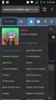
I have created the upgrades, and put my email in but I am still not able to find the "upgrades" button or link?

I'm still unable to find it.It should be on your user options. If you want to display it on the nav bar, you can use NodeAsTabs
I don't see a "user mod" option[DOUBLEPOST=1499059106][/DOUBLEPOST]I'm running version 1.5.12 btw.Click on your user mod and there should account upgrades listed
I don't see a "user mod" option[DOUBLEPOST=1499059106][/DOUBLEPOST]I'm running version 1.5.12 btw.
I'm not sure what to check. That's why I'm here.Check your settings

Yeah, already tried that.Hi,
Make sure that the upgrades you've created are active and you've filled in your PayPal address. If it still isn't showing, then go to yoursite.com/account/upgrades (directly to the page)