Hot Summer Deals are Here!
Celebrate with up to 99% off on 17,800 resources
01
Days
02
Hours
12
Mins
45
Secs

VPS/FileZilla help.

Status
This thread has been locked.

Furex

EnderSetups & Manager of Kirbs!
Premium
Feedback score
0
Posts
1,047
Reactions
269
Resources
0
Hello MCM,
Ive had some problems with FileZilla recently coming up with error messages like:
"Command: put "C:\Users\Josh\AppData\Local\Temp\7zE4A328007\Spawn.schematic" "Spawn.schematic"
Error: local: unable to open C:\Users\Josh\AppData\Local\Temp\7zE4A328007\Spawn.schematic
Error: Critical file transfer error"
When I try and upload a file this happens, is this a VPS error or a FileZilla.
(Please not I have tried to reinstall FileZilla twice before and the same error occurs.)

 
PebbleHost
High performance, consistent uptime and fast support. Minecraft hosting that just works.

Nagi

PM Only - No Skype
Supreme
Feedback score
12
Posts
535
Reactions
679
Resources
0
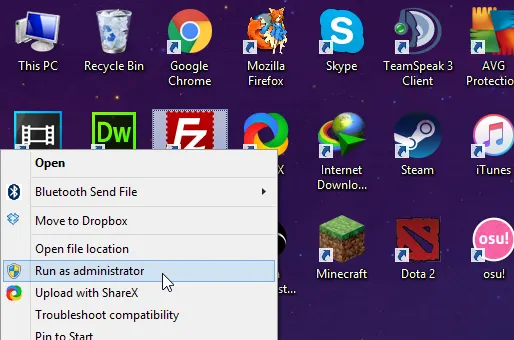
Run FileZilla as Administrator and try again.

Since you're transferring a file through Application Data's temporary storage, you might wanna drag your file to a more permanent location such as your desktop before trying again.
 

Paradoxity

Feedback score
0
Posts
108
Reactions
37
Resources
0
I get this error in my vps from OVH sometimes too. I suggest using a sftp/from client like WinScp I never have any problems with that client. It could also be a permissions issue? Maybe you need to It as admin?
 

repository

Feedback score
0
Posts
4
Reactions
2
Resources
0
Make sure that you have the permissions (root user) to be able to upload the file, and also ensure that your firewall is not blocking the attempt to upload a file.
 

Furex

EnderSetups & Manager of Kirbs!
Premium
Feedback score
0
Posts
1,047
Reactions
269
Resources
0
Make sure that you have the permissions (root user) to be able to upload the file, and also ensure that your firewall is not blocking the attempt to upload a file.
What do you mean by permission?[DOUBLEPOST=1466365293][/DOUBLEPOST]
Did you make sure to download FileZilla CLIENT instead of server?
It was definitely the client.[DOUBLEPOST=1466365326][/DOUBLEPOST]
Run FileZilla as Administrator and try again.

Since you're transferring a file through Application Data's temporary storage, you might wanna drag your file to a more permanent location such as your desktop before trying again.
How do I run as Administrator?
 

Furex

EnderSetups & Manager of Kirbs!
Premium
Feedback score
0
Posts
1,047
Reactions
269
Resources
0

Nagi

PM Only - No Skype
Supreme
Feedback score
12
Posts
535
Reactions
679
Resources
0
I think I am the root user.[DOUBLEPOST=1466365556][/DOUBLEPOST]
It doesnt let me upload files when I run it as Administrator.
Well you should take the file off of whatever it is you have it in (I think you've it zipped or something), and put it onto your Desktop.
Then try uploading it again like I said in the first comment...
 

Furex

EnderSetups & Manager of Kirbs!
Premium
Feedback score
0
Posts
1,047
Reactions
269
Resources
0

Furex

EnderSetups & Manager of Kirbs!
Premium
Feedback score
0
Posts
1,047
Reactions
269
Resources
0
Assuming you're using CentOS,

yum install unrar
(If the package isn't found, you need to install the repo)

cd /filelocation

unrar e filename.rar

EDIT: This is command line by the way.
Do you know a way how to fix this other than, run as admin every time I want to open it?
 

Crixz

Full-time Minecraft Hacker
Premium
Feedback score
0
Posts
40
Reactions
15
Resources
0
I would just suggest using WinScp for file transfers and maybe putting the file / folder in a more permanent place i.e desktop before you start downloading it to the server.
 
Status
This thread has been locked.
Top