Want some advice on how to improve my Twitch channel

Status
This thread has been locked.

Maddy

Proud Gamer
Supreme
Feedback score
87
Posts
1,729
Reactions
1,550
Resources
0
https://twitch.tv/monoddy

I already have emotes, all 6 sub badges, custom panels. I just got a new mic, the HyperX Quadcast and I basically haven't streamed with it yet so don't mind the audio.

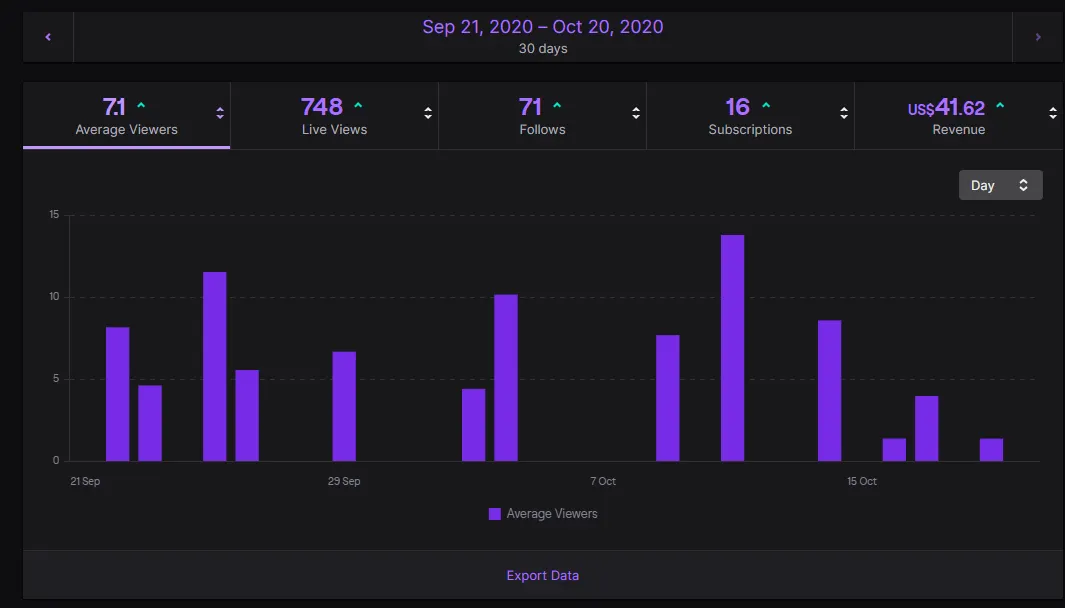
Analytics for the past 30 days:
3e7d83734134564e9b6ee2d95759451b.png
 
PebbleHost
High performance, consistent uptime and fast support. Minecraft hosting that just works.

FelixDev

Typical Developer and Designer
Premium
Feedback score
9
Posts
1,112
Reactions
331
Resources
0
Camera, overlay? Just some small fixes.
Keep up the good work
 

Leeiuum

Supreme
Feedback score
8
Posts
1,059
Reactions
666
Resources
0
I had made an advisement post on the Twitch Subreddit and got a load of upvotes for this single suggestion:

Utilize your overlay well. It is better to show you my comment on that Reddit post which you can find here as it obviously has what I had written but what other people's replies are too.

The pretty simple explanation is not to fill your overlay with too much stuff and make it as minuscule as you can. Most viewers want to see what you're capturing. You can utilize your overlay better at your stream here by making your webcamera smaller (enough to see you, but not too big) and to make that your placeholder for your lobby code. Most of the time the bottom-center is not necessarily viewable to most especially in Among Us because of the many twist and turns. This will allow you to only have one asset for your overlay on stream as a constant (being your webcam) and no longer have a use for your Fall Guys crown logo.

You can see how well it looks for my personal stream here when placing the web-camera in the position I recommended. As a side note thanks for commenting on my own thread about my Twitch channel and asking about analytics.

I would also recommend signing up on Twitter for a secondary account which announces you're live. I have done the same thing, my personal account @GiveBirb but my stream announcer being @Birbln_. This allows one account to have your own comments and Tweets and the other is for people to get notifications if they do not have services such as Discord - Twitch emails are usually very delayed so it's better to use external social media to announce when you're streaming.

I also recommend looking at who you usually watch and advertising your stream in appropriate channels when you do start streaming. Most Discords owned by Twitch streamers or YouTubers have a dedicated channel for self-promotion. Whilst this is mostly a spam-pile, it does get your name a little bit out there and maybe a click or two each time you stream. But at least this is a click or two more considering how empty Twitch's search or viewing system is.

Your room has a lot of reverb (an echo) in your stream. You can fix this by getting a boom arm which would reduce the amount of audio it'll pick up from your desk (and your keyboard) and putting it closer to your mouth. Unfortunately looking at your room the Quadcast wasn't the best functional choice but that's the best way to improve a condenser microphone. Otherwise your playback (volume) and your microphone is well balanced, your microphone just has the amount of reverb identical to a webcamera microphone which could put off some users or viewers. [your experience may be different from audio]

Your statistics are godly though. The amount of views you get for that one bug clip of you losing due to killing yourself, you achieved a really easy start. This explains how you got your analytics quickly. Good job.

Lastly, looking at your previous stream, I want to recommend not to play with viewers. It's a double edged sword on this but the problem is you can't maintain or moderate streams. If you have that one person that joins and says the N word or other discriminatory things, you may get banned. It's unfortunate but it has happened, although you may want to keep the risk and have fun with viewers. I just know that some people are scummy enough to do things like that and streamers pay the consequences.
 

Xeify

System Administrator, Developer & Graphics Artist
Supreme
Feedback score
13
Posts
565
Reactions
193
Resources
1
First, try advertising through media such as: Reddit, Twitter etc... Advertisement will also help, it's essential to getting you're twitch channel out there. I recently have been posting on reddit for my Youtube Channel and have been getting way more attention on my channel. People, are able to find channels and funny content to watch on media outlets. Not only that, but the more people who visit from reddit, and other websites will end up helping your video get recommended and that'll just repeat.
upload_2020-10-20_11-10-3.png

Second, have a leveling system and a point system that matches what you're doing. My friends have already touched on that concept by adding a shop where you can buy stuff to troll him or send a message. I presume you already have this setup, but try adding custom features / items to buy from the shop it'll really help people chat more often in order to unlock that next big reward.

Third, call to action. Call-To-Action is simply telling someone to do something plain and simple. You're analytics already state you have 7 concurrent viewers so, tell them if there enjoying the stream to get some friends or recommend the channel. If it work's on Youtube it'll work on twitch. Hopefully, after this they'll invite others and if not there's another way.

Lastly, discord. Most Youtubers, streamers, everyone big I know in the community usually always has a discord. Why? Because it allow's them to Everyone and bring there community closer. Discord's are an easy way to tell you're fan's hey watch my stream. Not only that, some of you're viewers may stay longer because they feel like they belong. It's something everyone does, but I recommend it as well. A tip with the discord, is to add a command using streamelements / nightbot. Add the command !discord, and other commands such as song requests.

Also, last piece of information. If you start to grow, and get big make sure edit you're twitch channel because things like song requests, and chat are going to be tough to handle. I'd recommend removing song requests overall after getting big, and make sure to add a slow chat at 3 seconds.

Good luck,
Xeify

(my 500th post)
 

Attachments

  • upload_2020-10-20_11-9-55.png
    upload_2020-10-20_11-9-55.png
    1.2 KB · Views: 21
  • upload_2020-10-20_11-10-3.png
    upload_2020-10-20_11-10-3.png
    1.2 KB · Views: 101
  • upload_2020-10-20_11-10-33.jpeg
    upload_2020-10-20_11-10-33.jpeg
    6.4 KB · Views: 15
Last edited:

Kuo

Content Creator & Entrepreneur
Supreme
Feedback score
0
Posts
377
Reactions
150
Resources
0
Honestly, people will tell you loads of things to do. If you like being a bit scuffed than don't bother with a overlay & do some scuffed stuff, if you wan't to be professional, Get a overlay and invest a lot. Honestly a lot of new streamers listen to people like Alpha gaming etc, and while yes he has grown. You aren't him and you should go on your own path. If your happy with how your stream is now then keep on going with that. My only suggestion would be having your mic closer to your mouth so your voice is more dominant than the slight echo behind it. Best of luck
 

Maddy

Proud Gamer
Supreme
Feedback score
87
Posts
1,729
Reactions
1,550
Resources
0
Honestly, people will tell you loads of things to do. If you like being a bit scuffed than don't bother with a overlay & do some scuffed stuff, if you wan't to be professional, Get a overlay and invest a lot. Honestly a lot of new streamers listen to people like Alpha gaming etc, and while yes he has grown. You aren't him and you should go on your own path. If your happy with how your stream is now then keep on going with that. My only suggestion would be having your mic closer to your mouth so your voice is more dominant than the slight echo behind it. Best of luck
Yeah that’s my main idea, I personally very much dislike the idea of an overlay but I’d rather go for nothing else except my webcam, most people don’t like this but I do, just makes it much cleaner

edit: I mentioned it in the original thread but I got a new, much better microphone[DOUBLEPOST=1603222273][/DOUBLEPOST]
First, try advertising through media such as: Reddit, Twitter etc... Advertisement will also help, it's essential to getting you're twitch channel out there. I recently have been posting on reddit for my Youtube Channel and have been getting way more attention on my channel. People, are able to find channels and funny content to watch on media outlets. Not only that, but the more people who visit from reddit, and other websites will end up helping your video get recommended and that'll just repeat.
View attachment 400116
Second, have a leveling system and a point system that matches what you're doing. My friends have already touched on that concept by adding a shop where you can buy stuff to troll him or send a message. I presume you already have this setup, but try adding custom features / items to buy from the shop it'll really help people chat more often in order to unlock that next big reward.

Third, call to action. Call-To-Action is simply telling someone to do something plain and simple. You're analytics already state you have 7 concurrent viewers so, tell them if there enjoying the stream to get some friends or recommend the channel. If it work's on Youtube it'll work on twitch. Hopefully, after this they'll invite others and if not there's another way.

Lastly, discord. Most Youtubers, streamers, everyone big I know in the community usually always has a discord. Why? Because it allow's them to Everyone and bring there community closer. Discord's are an easy way to tell you're fan's hey watch my stream. Not only that, some of you're viewers may stay longer because they feel like they belong. It's something everyone does, but I recommend it as well. A tip with the discord, is to add a command using streamelements / nightbot. Add the command !discord, and other commands such as song requests.

Also, last piece of information. If you start to grow, and get big make sure edit you're twitch channel because things like song requests, and chat are going to be tough to handle. I'd recommend removing song requests overall after getting big, and make sure to add a slow chat at 3 seconds.

Good luck,
Xeify

(my 500th post)
I appreciate the stuff you mentioned but most of the stuff you did mention is stuff I already have / do
 
Last edited:

inferno

Supreme
Feedback score
15
Posts
830
Reactions
310
Resources
2
Personally I see your streams actually look pretty good, maybe make the facecam have some sort of overlay on it and to fix it up to fit nicely ( maybe a green screen if you have the money ) other then that I personally think its a pretty nice streams setup. Maybe make the chat smaller in the live but other then that good luck!
 

Maddy

Proud Gamer
Supreme
Feedback score
87
Posts
1,729
Reactions
1,550
Resources
0
Personally I see your streams actually look pretty good, maybe make the facecam have some sort of overlay on it and to fix it up to fit nicely ( maybe a green screen if you have the money ) other then that I personally think its a pretty nice streams setup. Maybe make the chat smaller in the live but other then that good luck!
A green screen isn’t a bad shout actually, I definitely don’t want an overlay but that’s not a bad idea
 

inferno

Supreme
Feedback score
15
Posts
830
Reactions
310
Resources
2
A green screen isn’t a bad shout actually, I definitely don’t want an overlay but that’s not a bad idea
yea don't get a full overlay though, only put one for your facecam if you don't get a green screen. But get one and do it properly they'll love it
 
Status
This thread has been locked.
Top