
FoJumpPads lets admins create polished launch pads for hubs, parkour routes, minigames, and lobby shortcuts without hardcoding each location. Give a preset item, place it in the world, and the saved block becomes a configurable jump pad with its own launch style, cooldown, effects, and item design.
Features
- Create persistent jump pads by placing preset items; saved pads load again after restarts.
- Start quickly with ready-made
default,high, andforwardpresets. - Tune each preset's horizontal force, vertical force, cooldown, fall-damage immunity, direction mode, sound, and particle.
- Choose player-facing, fixed north/east/south/west, or upward-only launch behavior.
- Use optional path lock to keep players moving cleanly along a chosen launch line.
- Manage pads from chat with list, teleport, and remove tools for quick cleanup.
Admin Editor
- Open an in-game editor for global settings, disabled worlds, and preset management.
- Browse, search, add, edit, and delete jump pad presets without hand-editing every value.
- Copy the block, display name, lore, and custom model data from a held item into a preset.
- Edit sounds and particles through paged selector menus.
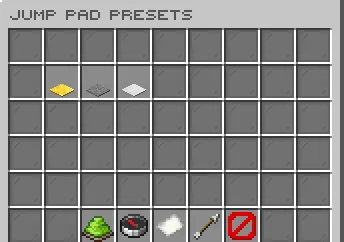
Setup
1. Give an admin a preset item.
2. Place the item where players should launch.
3. Adjust presets and world settings from the editor or config files.
Commands
/fojumppadsadmin editor- Open the admin editor./fojumppadsadmin give <player> <preset> [amount]- Give configured jump pad items./fojumppadsadmin list [page]- List saved jump pads./fojumppadsadmin teleport <list-index>- Teleport to a saved jump pad./fojumppadsadmin remove <radius|world|all> [value]- Remove saved jump pads in bulk./fojumppadsadmin reload- Reload config, messages, GUIs, and dialog text./fojumppadsadmin version- Check the installed version and update status.
Alias:
/jumppadsadminPermissions
-
fojumppads.admin - Allows all FoJumpPads admin commands, editor access, and update notices.

