# NexoraTeams
A modern and highly configurable team-management plugin designed for Minecraft servers running Paper or compatible server software.
Create teams, invite players, customise team colours, complete challenges, manage members through interactive GUIs, and display team identities throughout the server.
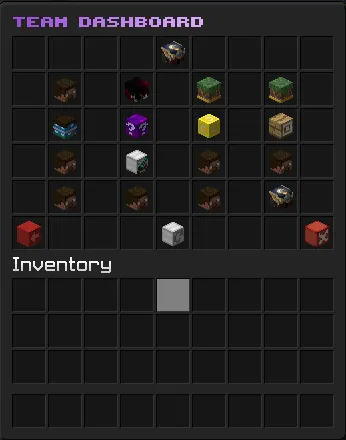
## FEATURES
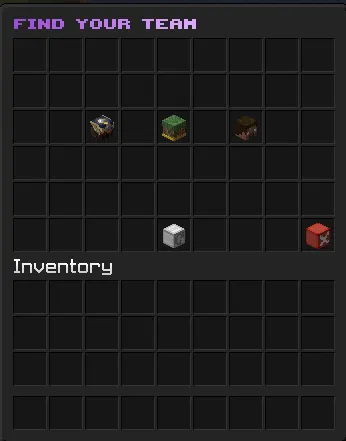
## INSTALLATION
1. Download the plugin JAR.
2. Stop your Minecraft server.
3. Place the JAR inside the server's
4. Start the server.
5. Edit the generated configuration files as needed.
6. Restart the server or use the plugin's supported reload command.
Paper or compatible server software is recommended.
No client-side installation is required.
## BASIC COMMANDS
Commands and permissions may vary depending on configuration and plugin version.
## TEAM COLOURS
Players can select a configurable colour for their team. The chosen colour is displayed in supported team menus, messages, team information, and optional TAB-list prefixes.
The TAB integration is disabled by default and can be enabled in the configuration.
## SUPPORT
When reporting a problem, include:
A modern and highly configurable team-management plugin designed for Minecraft servers running Paper or compatible server software.
Create teams, invite players, customise team colours, complete challenges, manage members through interactive GUIs, and display team identities throughout the server.
## FEATURES
- Create and manage player teams
- Invite, accept, kick, promote, demote, leave, and disband
- Interactive team-management GUI
- Custom team colours
- Team-coloured names in
/team info - Optional team-name prefix in the TAB list
- Configurable spacing between the team name and player name
- Player heads for occupied team slots
- Attractive icons for available slots and actions
- Team challenges and progression
- Team-specific completion titles and subtitles
- Modern hexadecimal colour support
- Configurable messages, menus, titles, and sounds
- Persistent team data across server restarts
- Administrative commands and permissions
- Clean, compact, player-friendly descriptions
## INSTALLATION
1. Download the plugin JAR.
2. Stop your Minecraft server.
3. Place the JAR inside the server's
plugins folder.4. Start the server.
5. Edit the generated configuration files as needed.
6. Restart the server or use the plugin's supported reload command.
Paper or compatible server software is recommended.
No client-side installation is required.
## BASIC COMMANDS
/team create <name>— Create a team/team invite <player>— Invite a player/team accept— Accept an invitation/team info— View team information/team color— Select a team colour/team leave— Leave your current team/team disband— Disband your team/team gui— Open the team interface/team help— View available commands
Commands and permissions may vary depending on configuration and plugin version.
## TEAM COLOURS
Players can select a configurable colour for their team. The chosen colour is displayed in supported team menus, messages, team information, and optional TAB-list prefixes.
The TAB integration is disabled by default and can be enabled in the configuration.
## SUPPORT
When reporting a problem, include:
- Plugin version
- Minecraft version
- Server software and build
- Complete console error
- Installed plugin list
- Steps required to reproduce the issue


