Give your players a clean command menu & keep your plugin list private.
By default, Minecraft sends the entire command tree of your server to every player. This means tab-completion is cluttered with administrative commands, and players (as well as hacked clients like Meteor using command scanners) can easily view your plugins and server configuration.
PL-Hide-Pro lets you take full control of command visibility. You can customize exactly what commands appear in tab-completion, block execution of forbidden commands, and hide your plugin list from curious players.
Note: This plugin does not add any new commands or tab-completions to your server; it only manages, modifies, and hides existing ones.
 Features
Clean & Customizable Tab-Completion
Remove messy or administrative commands from the autocomplete list. You can specify a custom list of commands for each group, keeping the
/ <TAB> menu clean and professional for players.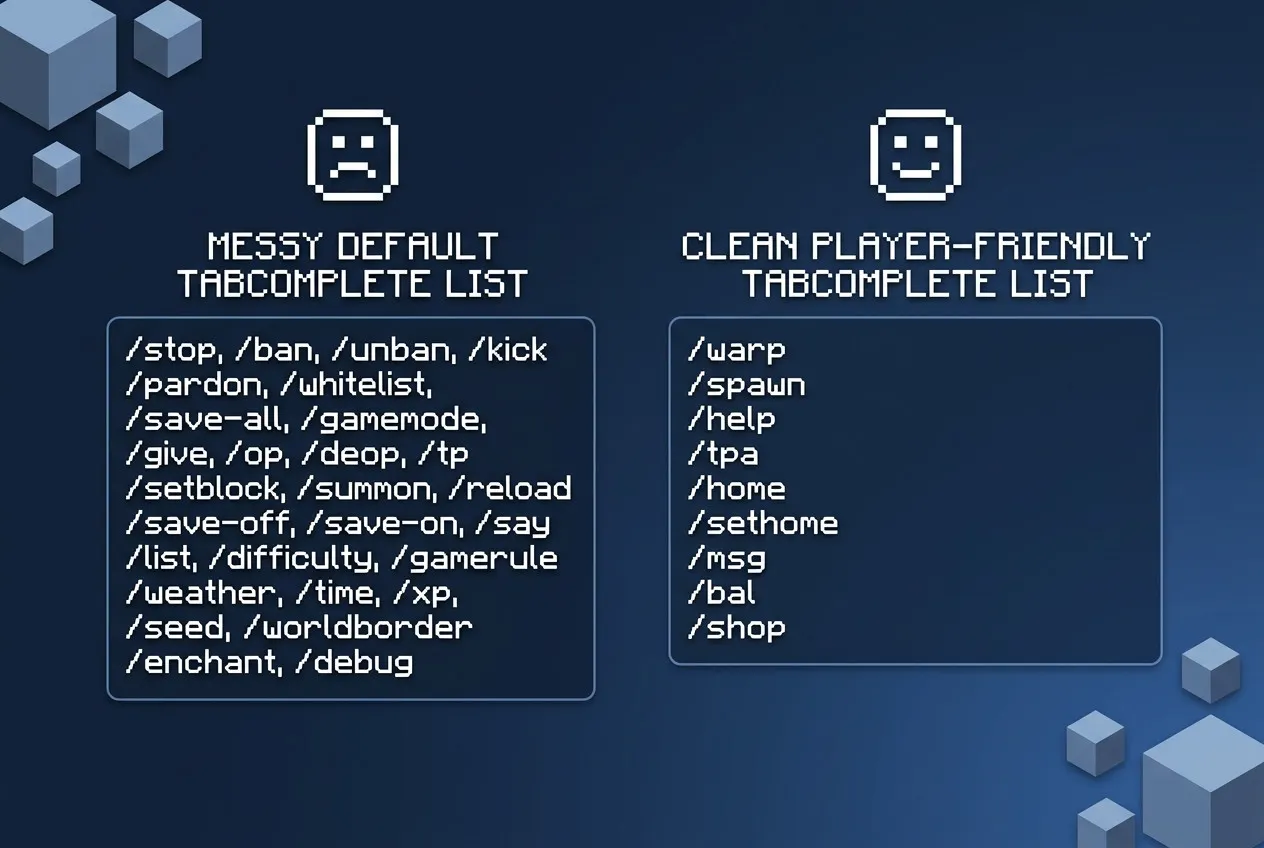
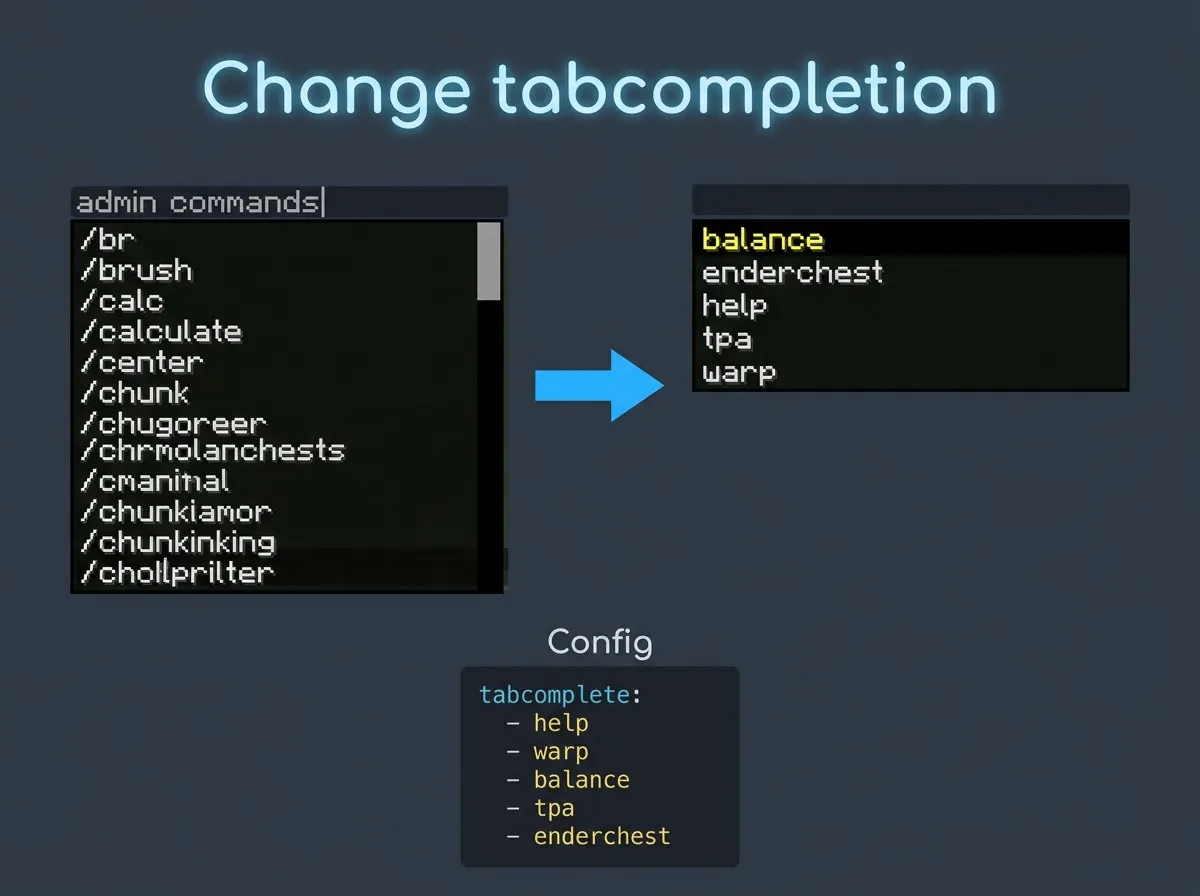
1. General Tab-Completion Customization
Choose exactly which base commands are visible in the autocomplete menu. Strip out setup commands, administrative tools, and other noise so that your players only see the commands that are relevant to their gameplay.
2. Sub-Argument Tab-Completion Customization
Go beyond base commands and filter the arguments that follow them. Customize what appears after commands like
/warp, /home, or /visit so players can only autocomplete destinations or options they actually have access to.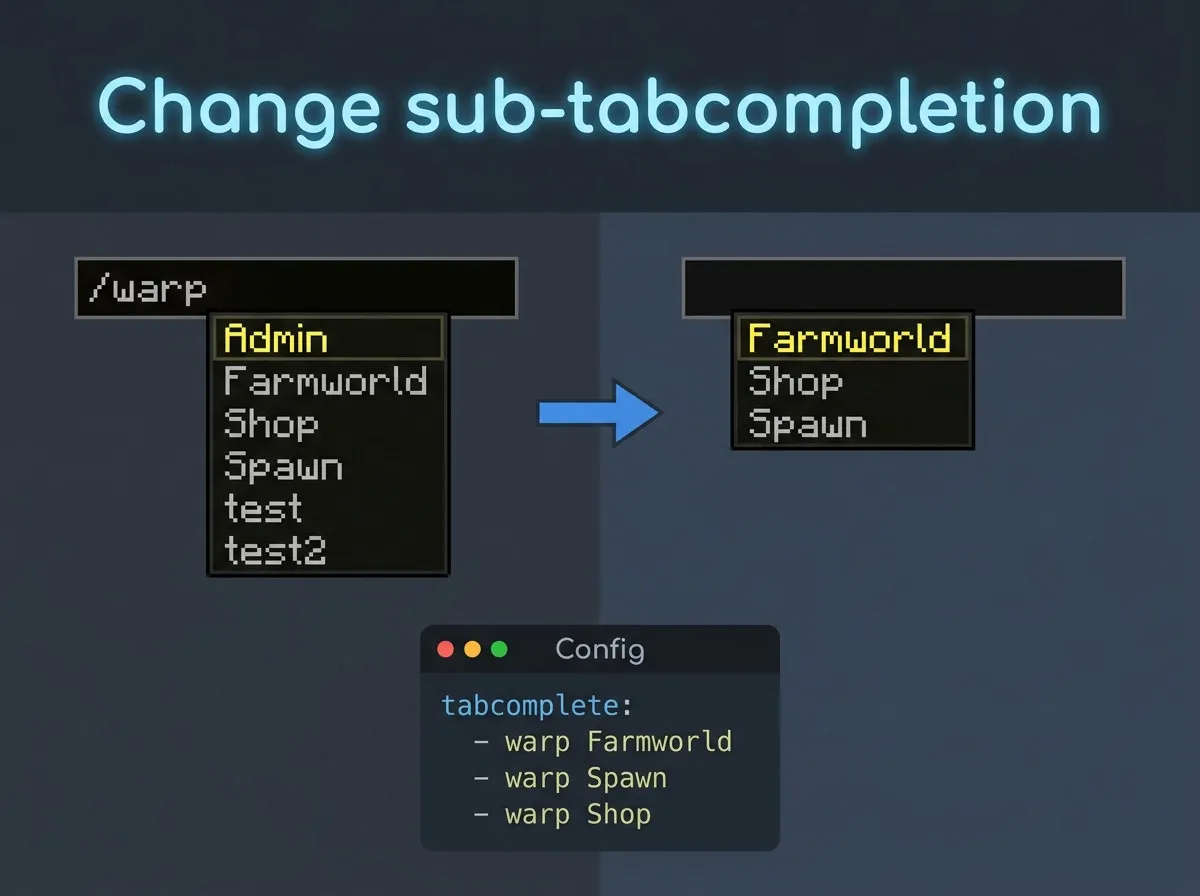
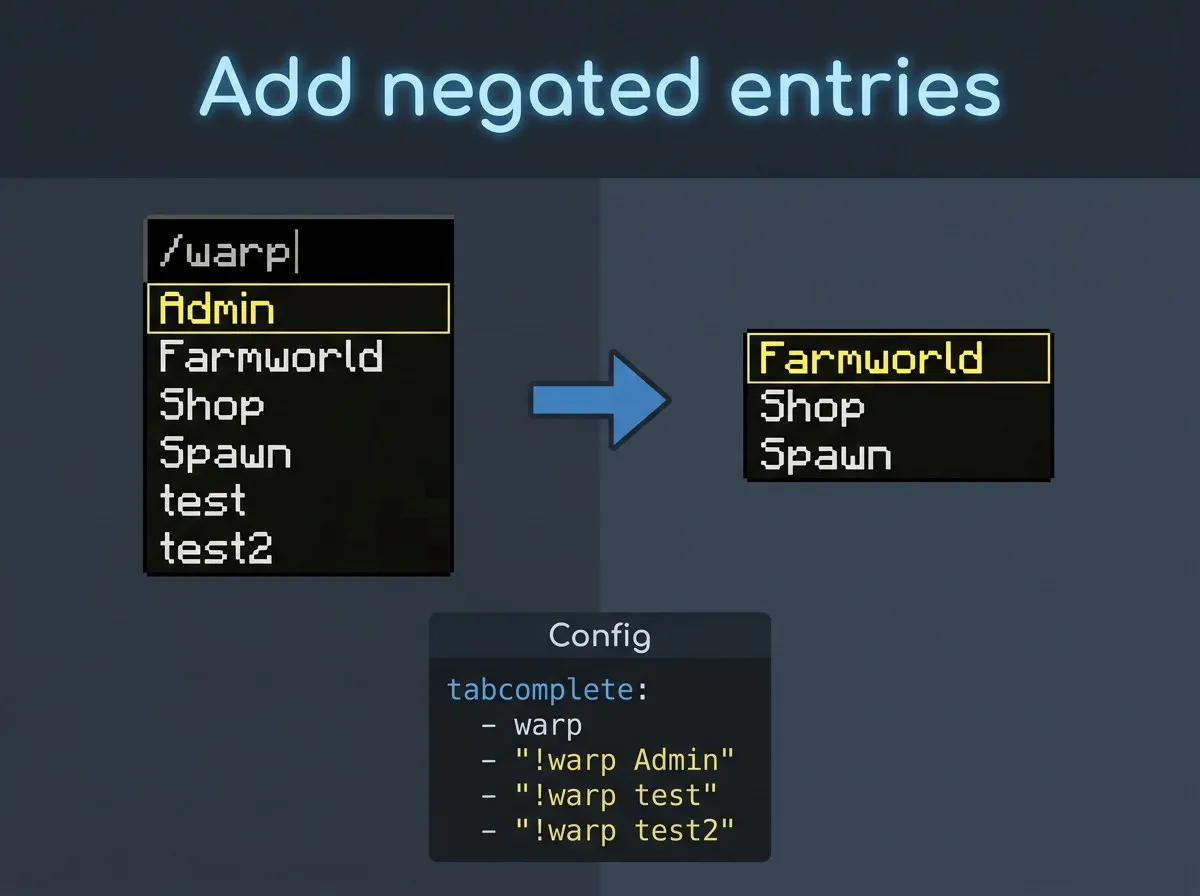
3. Negated Entries & Filtering
Easily exclude specific sub-arguments or commands from being autocompleted by using the negation prefix (!). For example, you can whitelist the base command but blacklist specific options to prevent players from discovering admin destinations.
Additional Tab-Completion Features:
- Bulk Plugin Commands (plugin:): Add or hide all commands registered by a specific plugin with just one single entry (e.g. plugin:Essentials). Note: This feature applies only to Bukkit-registered commands.
- Regex Matching (regex:): Filter commands dynamically using powerful regular expressions (e.g. regex:^/temp.* to match all temp-ban or temp-mute commands).
Command Execution Blocker
Block players from executing unauthorized commands. If a player attempts to run a blocked command, they will see a customizable "Unknown command" message.
- MiniMessage Support (Spigot & Velocity):
- Includes placeholders like {player} and {cmd}.
- Automatically converts mixed-case command inputs (e.g., /WarP -> /warp) to prevent unkown command messages on modern versions.
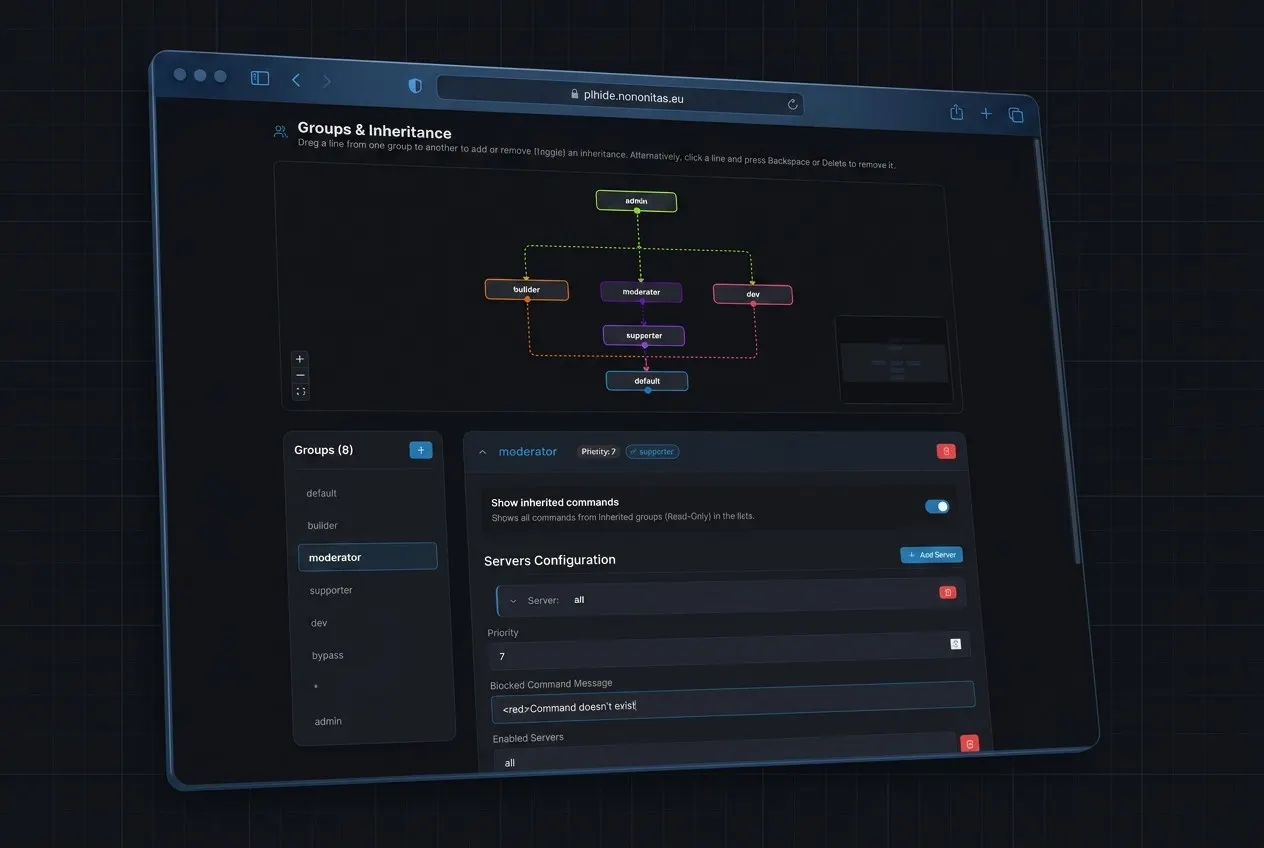
Advanced Group & Inheritance System
Organize command visibility and access using a priority-based group structure.
- Permission-Based Group Assignment: Map players to their respective command groups using permission nodes (e.g. assigning the permission plhide.group.vip maps them to the VIP group).
- Recursive Inheritance: Let higher groups automatically inherit allowed commands from base groups.
- Priority & Merging: If a player has multiple groups, PL-Hide-Pro merges their command trees automatically based on group priorities.
Anti-Plugin Spy & Privacy Measures
Keep your server software and plugin configuration private.
- Spoof /plugins: Replace the
/pluginsand/plmessage with a custom message (e.g.,Plugins (0):) or disable it entirely. - F3 Debug Brand Spoofing: Change the server software brand in the upper-left of the F3 debug screen to a custom text (e.g. replace "Paper" with your network name).
- Hacked Client Command Shield: By filtering commands at the network packet level, the commands are stripped out before reaching the client. This prevents hacked clients (like Meteor or LiquidBounce) from scanning your command lists.
Easy Web Editor
Configure your plugin settings and groups visually using our Web Editor. Upload your YAML file, adjust settings with ease, and save it.
Access the Web Editor here
If you are unsure whether you want to buy the plugin, you can also test my free version with fewer features [click]
Presentation Video (outdated)
by KasaiSora
Important notice:
If you are unsure whether you want to buy the plugin, you can also test my free version with fewer features [click]
Presentation Video (outdated)
by KasaiSora
Important notice:
- The plugin only officially works on Spigot, Paper, Folia, Bungeecord, Waterfall and Velocity. Any other forks might not work, because they are incompatible with packetevents!
- Java 17 or higher is required!
Installation steps:
click here

If you have any questions, you can have a look at the wiki in advance.[click]

If you need support (read the Wiki first!) or found a bug contact me on Discord

Don't leave bad feedback if you have bugs or issues.
Instead, contact me via Discord.


Terms and Conditions:
► As a user of this plugin, you automatically agree to these terms (which are liable to change)click here
If you have any questions, you can have a look at the wiki in advance.[click]
If you need support (read the Wiki first!) or found a bug contact me on Discord
Don't leave bad feedback if you have bugs or issues.
Instead, contact me via Discord.
Terms and Conditions:
► You will not distribute or leak this plugin.
► No refunds, as such a digital item is not eligible for a refund as it was immediately accessible to you and you may have used it
► Not redistribute this plugin, share any part of the code or resell it.
► Not edit any of the plugin's code, decompile the plugin, or take some parts of it.
► You will not post my source code online or offline on any website or in the internet.
► Support can be discontinued at any time. I reserve the right to give support who I want and who I don't


