Good internet speed, but bad download speed.

Status
This thread has been locked.

Joshua C

Web Developer & Designer
Supreme
Feedback score
106
Posts
1,327
Reactions
470
Resources
0
My internet speed is: 30MBps (diamond package as it says)

On downloads, it used to be around: 3MB/s, equivalent to 25MBps average.
However, I did some DNS flush and reset and it never came back to the original speed.
Now I can only top max 1MB/s or even less, the best on average it is is 7Mbps.

I don’t want to know how many bits or bytes the speed is, I only want to know the solution for this.

 
PebbleHost
High performance, consistent uptime and fast support. Minecraft hosting that just works.

Jack

Retired Moderator
Supreme
Feedback score
11
Posts
1,209
Reactions
1,462
Resources
0
Are you doing the speed test over WiFi or Ethernet?
 

Joshua C

Web Developer & Designer
Supreme
Feedback score
106
Posts
1,327
Reactions
470
Resources
0
Are you doing the speed test over WiFi or Ethernet?
Ethernet.
However, on my phones the speed is also the same (30mbps) but download speed is not like the one before, on steam I've downloaded games with 3MB/s.
 

US

I only deal on mcm.
Supreme
Feedback score
38
Posts
245
Reactions
272
Resources
0
Ethernet.
However, on my phones the speed is also the same (30mbps) but download speed is not like the one before, on steam I've downloaded games with 3MB/s.
Winter sale, steam servers bogged from all the downloads, r u sure steam servers aren't the problem
 

Joshua C

Web Developer & Designer
Supreme
Feedback score
106
Posts
1,327
Reactions
470
Resources
0
Winter sale, steam servers bogged from all the downloads, r u sure steam servers aren't the problem
I've also used Internet Download Manager, pinged ISP when downloading, EpicGames testing, Mega download test and much more but still, it's not doing anything.

I'm curious about me doing the DNS flush because a lot of sites stopped working after I did that.
Sites like, Imgur refused to connect to a DNS not sure, a few sites work on proxies but not on my side.
 

Marisa

that one nivia owner
Premium
Feedback score
16
Posts
170
Reactions
366
Resources
0
i don’t thinks a dns flush would cause internet speed to decrease or sites to stop working. did you do anything else? I’d try soft restarting it and maybe giving it an hour
 

Joshua C

Web Developer & Designer
Supreme
Feedback score
106
Posts
1,327
Reactions
470
Resources
0
I don’t think a DNS flush would cause internet speed to decrease or sites to stop working. did you do anything else? I’d try soft restarting it and maybe giving it an hour
Its been doing this since the 21st of December when I reset my DNS.

This is a video I followed doing the DNS flush and all that.


However, as of 2 days ago, I tried
Code:
ipconfig flush/dns
And Imgur just started to work out of nowhere however some sites do not work at all, saying "Refused to connect"
 

ShayPunter

Supreme
Feedback score
2
Posts
81
Reactions
39
Resources
0
Perhaps you could change your DNS settings by going to the ethernet properties then using Cloudflare's 1.1.1.1.

they tell you how to do all of that on the website at the bottom: https://1.1.1.1/dns/

this should help with the site connection issues, as for the broadband speed, might help, though if it doesn't, then perhaps try giving your ISP a call and seeing if they could help
 

Joshua C

Web Developer & Designer
Supreme
Feedback score
106
Posts
1,327
Reactions
470
Resources
0
Perhaps you could change your DNS settings by going to the ethernet properties then using Cloudflare's 1.1.1.1.

they tell you how to do all of that on the website at the bottom: https://1.1.1.1/dns/

this should help with the site connection issues, as for the broadband speed, might help, though if it doesn't, then perhaps try giving your ISP a call and seeing if they could help
If that's Cloudflare's I've already tried that.
 

Joshua C

Web Developer & Designer
Supreme
Feedback score
106
Posts
1,327
Reactions
470
Resources
0
Another thing you could do is to restart your router, take a speed test on your PC to see your speeds afterwards (use fast.com).

You could also try Google's DNS servers if you haven't already
Have done all of this way before the user started to happen.
 

ajl

Premium
Feedback score
0
Posts
288
Reactions
90
Resources
0
Is your pc plugged in with ethernet? If not it can make your internet on your pc a lot slower
 

ajl

Premium
Feedback score
0
Posts
288
Reactions
90
Resources
0
So, as you stated you have/had 30mbps and were getting 3mbps downloads, that is normal atleast for things like steam for me
 

Joshua C

Web Developer & Designer
Supreme
Feedback score
106
Posts
1,327
Reactions
470
Resources
0
So, as you stated you have/had 30mbps and were getting 3mbps downloads, that is normal atleast for things like steam for me
Indeed, but that's not the case, steam is not even giving me the average speed it would.
Neither does anything else.
 

ShayPunter

Supreme
Feedback score
2
Posts
81
Reactions
39
Resources
0

Joshua C

Web Developer & Designer
Supreme
Feedback score
106
Posts
1,327
Reactions
470
Resources
0
https://www.hongkiat.com/blog/5-ways-command-prompt-fix-slow-internet/

this might be of use perhaps, maybe your DNS resolver cache might have some corrupted file in, which could also explain how you cant access some websites at times
I have not tried the 4. or 5. anyhow at any time but if I do that, after running each method do I have to restart my router?
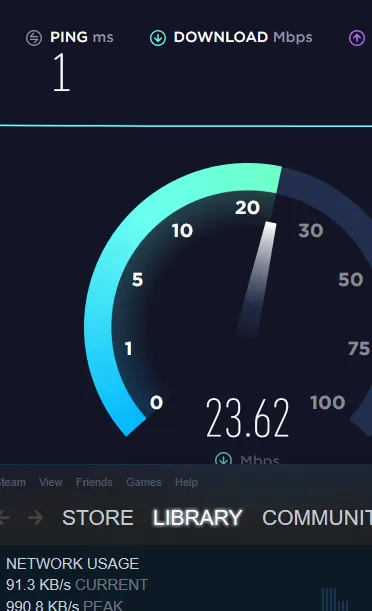
Weeks ago I've tried the commands the person in the video above uses ^[DOUBLEPOST=1577905924][/DOUBLEPOST]These are my current stats.
a6fe4e1bb69fd6e89485d31719923fe0.png

https://gyazo.com/a6fe4e1bb69fd6e89485d31719923fe0
 

Jack

Retired Moderator
Supreme
Feedback score
11
Posts
1,209
Reactions
1,462
Resources
0
I have not tried the 4. or 5. anyhow at any time but if I do that, after running each method do I have to restart my router?
Weeks ago I've tried the commands the person in the video above uses ^[DOUBLEPOST=1577905924][/DOUBLEPOST]These are my current stats.
a6fe4e1bb69fd6e89485d31719923fe0.png

https://gyazo.com/a6fe4e1bb69fd6e89485d31719923fe0
23.5Mbps/30Mbps seems fine to me.
Depending on what programs you have open, you'll still be using a bit of bandwidth on top of the test you're running.

Here's my 100Mbps fiber w/ Ethernet direct to router..
rnRoWO.png


Steam downloads are known to have a lot of issues
 
Last edited:

Joshua C

Web Developer & Designer
Supreme
Feedback score
106
Posts
1,327
Reactions
470
Resources
0
23.5Mbps/30Mbps seems fine to me.
Depending on what programs you have open, you'll still be using a bit of bandwidth on top of the test you're running.

Here's my 100Mbps fiber w/ Ethernet direct to router..
rnRoWO.png


Steam downloads are known to have a lot of issues

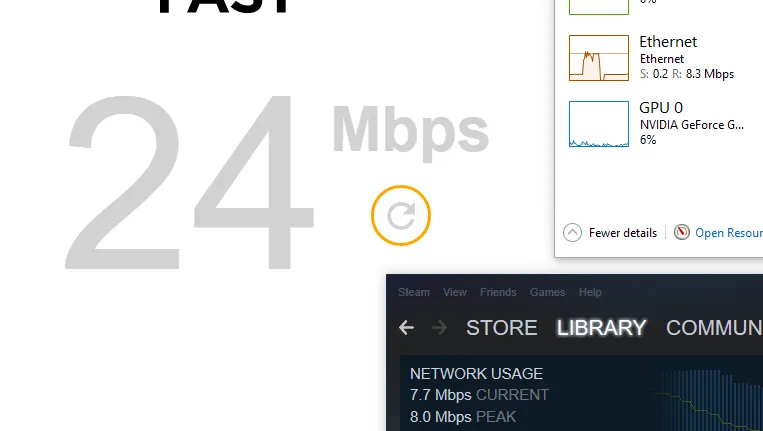
Well, steam is not the issue to me, the issue itself is the DOWNLOAD, like said mega, youtube, Netflix none of those show the capabilities of using a 25MBps average speed internet.
And my maximum speed in this issue is only a maximum of 8mbps, but I've managed to get 25mbps full-on steam, even epic games 3mbps, and everywhere else.

I don't have any programs open when I test stuff, not even a single device connections.

23534c5f4c8e1a9a36d730dd52a7acfc.png


https://www.hongkiat.com/blog/5-ways-command-prompt-fix-slow-internet/

this might be of use perhaps, maybe your DNS resolver cache might have some corrupted file in, which could also explain how you can't access some websites at times

I have tried that and it didn't work, despite the sites I had working again are now gone again.
38133dbe26ba02650ed33cbbf9667e1f.png
 
Status
This thread has been locked.
Top