ADVANCED CHAT SYSTEM
Modern TextChatService tags, team channels, roleplay commands, and robust anti-spam in one config.
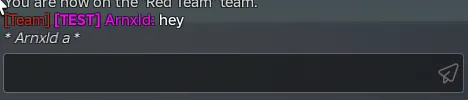
Advanced Chat System is a drop-in chat upgrade for Roblox experiences. Built natively on Roblox's modern TextChatService API, it handles visual styles, team coordination, roleplay, and chat security out of the box. Zero-friction setup lets you customize your entire chat experience in minutes using a single configuration file.
Modern TextChatService tags, team channels, roleplay commands, and robust anti-spam in one config.
Advanced Chat System is a drop-in chat upgrade for Roblox experiences. Built natively on Roblox's modern TextChatService API, it handles visual styles, team coordination, roleplay, and chat security out of the box. Zero-friction setup lets you customize your entire chat experience in minutes using a single configuration file.
Why Advanced Chat System?
- TextChatService Native: Future-proof architecture built on Roblox's modern chat API, ensuring compatibility and stability.
- Single-File Configuration: All features, rank permissions, styles, and anti-spam parameters reside in one central config.
- Server-Side Security: Heavy-duty anti-spam protection that controls TextSource permissions on the server to prevent bypasses.
Features
Chat Tags and Name Colors
- Manual User Tags: Assign specific labels to players by UserId.
- Group Rank Integration: Auto-assign tags based on Roblox group ranks with min/max rank range support.
- Multi-Tag Support: Players can display multiple tags simultaneously (e.g. [Owner] and [VIP]).
- Name Color Overrides: Style usernames in chat based on specific UserIds or group rank tiers.
- Visual Customization: Easily configure bracket characters and separators for tags.
- Studio Testing Toggle: Enable test tags and colors for all players during local playtests without changing IDs.
Team Chat (/team, /t)
- Quick Commands: Use /team or /t to send team-only messages.
- Dynamic Indicators: Displays a [Team] indicator before names, dynamically colored to match the team color.
- Safety Filtering: Full server-side text filtering using Roblox's standard chat filtering service.
- No-Team Feedback: Notifies players if they attempt to use team chat without being assigned to a team.
Action Commands (/me)
- Roleplay Integration: Supports the standard /me command (e.g. /me waves displays as * Username waves *).
- Custom Styling: Renders action text in italics with a configured custom color.
- Server-Side Filtering: Ensures action commands are filtered correctly before replication.
Server-Side Anti-Spam Security
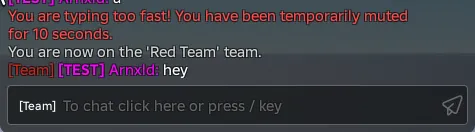
- Cooldown Control: Set the minimum time allowed between consecutive messages.
- Rate Limiting: Define maximum message counts allowed within a moving time window.
- Duplicate Blocking: Block identical consecutive messages sent within a customizable duration.
- Smart Escalation: Repeatedly triggering warnings counts as a violation, escalating to a temporary mute.
- Server-Level Muting: Disables send permissions (CanSend) directly on the Roblox TextSource, preventing client-side exploits.
- Local Echo Suppression: Client-side logic hides local echoes of blocked messages while muted.
Setup Instructions
- Place the AdvancedChatSystem folder inside your Workspace.
- Press Play. The included Installer script automatically deploys components to ReplicatedStorage, ServerScriptService, and StarterPlayerScripts.
- Stop the playtest, delete the installer folder from Workspace, and open ReplicatedStorage.ChatConfig to customize your ranks, tags, and settings.
Requirements
- Roblox Studio
- TextChatService enabled (Default in all new experiences)

