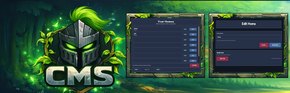
Set Herebutton has been added to the Homes Edit UI. (Set to player location)- Join/Leave messages should be fixed, and configurable.
- MOTD is now a real Message Of The day, no longer a duplicate welcome message.
- WelcomeScreenEvent doesn't show the welcomescreen after switching worlds; if
FIRST-JOINOFF. (Only shows first time connecting now)- Messages Module has been yanked out of the chat module, now standalone in the dashboard.
- Welcome / MOTD Editor Module has been yanked out of the notifications module, now standalone in the dashboard.
- The MOTD module is now fully working with the [MOTD] message
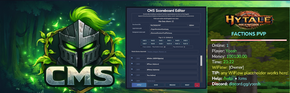
- Scoreboard Editor UI rebuilt to apply the same Yoosh Style.
- Test Welcome has been removed as it caused a crash when hit.
More to come
Chat module rework coming
Notifications module rework coming
If you have ideas/suggestions for these, hmu!
- Kit Editor Update
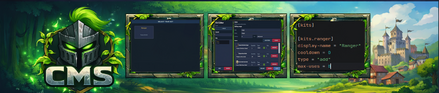
- Equipment Viewer UI added, you can click on each "Head, chest, legs, hands" to set each item to auto-equip for the kit.
- Made UI look clean.
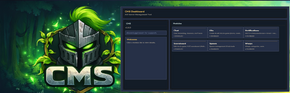
- Dashboard UI reworked to fit same theme as the rest.
- Scoreboard Editor UI reworked
- Spawn Protection now checks if you're in the spawn world, otherwise does not apply protection.
External Asset Pack issues
UI files (like the scoreboard textures) now update automatically every time the server starts.
The plugin now rebuilds its UI pack safely in the background, then applies it without breaking the server’s asset watcher.
That means scoreboard is now seperated from the asset pack, and only uses theConfigManager
FixedrefreshSecondsto properly refresh the scoreboard :fire:
Fixed the issue with ScoreboardRuntime causing a spike in tps
New Commands
/fly- Enable flight. (cms.fly)
/flyspeed- Enable flight speed. (cms.flyspeed)
/v <player>
Thank you all for the support and patience waiting for this update to come out, I truly wanted to impress you all and make sure I showed back my love for how much appreciation I have for you allIf theres any issues, please don't hesitate to reach out.
Make sure to read the README.md in the ZIP for new installation instructions.
1. External Asset Pack
- Huge rework done to how the entire system gets initialized
- No longer need to restart server after first start, and tries to sync it after the files have been fully loaded. however if it doesn't match up. Syncing will happen on restart
- This also means if it's not synced, it won't cause a intentional crash anymore either. Best fix for the meantime
- You no longer have to do multiple restarts to fix the sync.
- You will see the following message once during updates/initialization, but if you forget to restart it will automatically use the pack the next one.
[CMS|P] Yoosh_CMS: registered disk pack at runtime: Yoosh:CMS_Pack -> mods\Yoosh_CMS_Pack [CMS|P] Yoosh_CMS: external textures synced. pack=Yoosh:CMS_Pack folder=Yoosh_CMS_Pack version=1.1.1-f3619a9b-9525514e presentAtBoot=false [CMS|P] Yoosh_CMS: disk pack was CREATED after server startup. If runtime registration is unsupported on this build -> restart required. [CMS|P] Yoosh_CMS: UI assets generated, restart required before using UI this boot.
2. Kit + Kit Editor Fixes:
- Kits now have a | maxUsage = 1 option, if you don't see it. "RELOAD" in the panel, or backup kits file and regenerate a new copy.
- /kit menu displays amount of kits left to use per-player, and tells them when "Used"
- If you don't see the option in the config.toml go into the editor and save the kit once and check. (IMAGE FOR REFERENCE)
3. User interface updated for CMS Dashboard.
- Repositioned the User Interface for a nicer look.
- Changes the window background to be more simple with a blue boarder.
4. Updated the Scoreboard Editor Page User interface.
- - Made the Title larger.
- - Aligned the User Interface so it is not overlaping or cut off.
- - Changed some names to be more clear.
- - Scoreboard configuration now will save to one page only; When saving, it will keep all other 11 pages empty now if settings are set correctly.
- - You can now set the world option per-page in the editor
- - Refreshing scoreboard after applying/saving should be better now.
- - Fixed convention naming for falling back to default-hud, now always using the configuration in the plugin folder.
- - You can now properly set the worlds per page.
- - Doesn't overwrite worlds when the UI binding doesn't send it (null).
5. Integrations added for support.
- - Default placeholder system as fallback
- - WiFlow Placeholder support; automatically looks for expansions, and registers them for you with CMS.
- - Placeholder API support
- - EcoTaleAPI support
- - Vault Unlocked support
- - Keeps {money} priority: VaultUnlocked external → Ecotale → fallback
6. savePlayerData functionality rework
- - Fixes player data synchronization
- - System already had UUID deprecated issues due to Hytale updates, no worries
- - New player data now properly saves into the plugin folder, (/delhome, sethome fix)
7. Homes UI
- - Added a brand new Home UI, with an edit homes option quickly built right into it
- - Once a player has the ability to have more than one home, or has set more than one home, their /home command will turn into the menu.
QoL/Fixes
Use those config settings if you want to use **PAGE 1 only
- Added WiFlowPlaceholderAPI support
- Scoreboard now fully works with all 12 pages, as configuration fully supports default paging now (World-selective WIP)
- Optimized a few things with the way the external asset pack loads
- Scoreboard can now be toggled off in the config (New [scoreboard] section)
- Default placeholder support has been added (ATTEMPTED to integrate Wiflow & Placeholder API - WIP)
{money} {world} {server} {player} {player_name} {online} {time} {tps} {x} {y} {z}
New Commands
/sbtoggle to disable/enable scoreboard (Completely disable/enable inconfig.toml/vor/vanish(cms.vanish) - Vanish mode now added as a command.
- Minor UI fixes and improvements.
- Updated UI builder codecs to use non-deprecated methods.
- Fixed and refined the Message Editor page UI, replacing up and down buttons with a functional scrollbar.
(If you recieve a Welcome.UI error after replacing the png, try restarting the server & if not the png may be invalid)
- DELETE YOOSH_CMS_ASSETS FOLDER!!!!
- Asset Pack Rework + Fix; WelcomeScreen/Scoreboard images now working as should. Replaces mods/textures pngs.
- Deprecated method fixed
For any other issues; please contact me.