What PSU to get?

Status
This thread has been locked.

Badger

Software Developer
Supreme
Feedback score
22
Posts
2,366
Reactions
1,561
Resources
2
I've seen these being used more by LinusTechTips: Link
It's only $20 more than the one you're looking at, plus it offers even more room for expansion if you'd wanted to add another graphics card, or something along those lines.
So this would help with the problems I'm getting currently even more? and only for $20 more?

Appreciate the help btw guys :)
 

JJDAHM

Unregistered Member
Supreme
Feedback score
5
Posts
929
Reactions
570
Resources
0
So this would help with the problems I'm getting currently even more? and only for $20 more?

Appreciate the help btw guys :)
Yes. But before you do anything, you should probably make sure that your system is detecting all of your ram.
That is a common issue I've seen and experienced myself.
 

Badger

Software Developer
Supreme
Feedback score
22
Posts
2,366
Reactions
1,561
Resources
2
Yes. But before you do anything, you should probably make sure that your system is detecting all of your ram.
That is a common issue I've seen and experienced myself.
Any ideas on how to see that?[DOUBLEPOST=1453046880,1453046751][/DOUBLEPOST]
Yes. But before you do anything, you should probably make sure that your system is detecting all of your ram.
That is a common issue I've seen and experienced myself.
91892c7a1fc0fadb47d425391f595aaf.png
 

JJDAHM

Unregistered Member
Supreme
Feedback score
5
Posts
929
Reactions
570
Resources
0
If you're running windows, go to the bottom left corner of your monitor and s
Any ideas on how to see that?[DOUBLEPOST=1453046880,1453046751][/DOUBLEPOST]
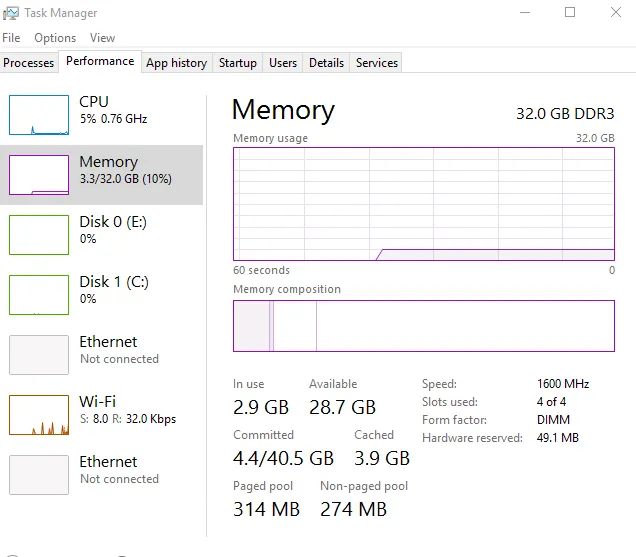
91892c7a1fc0fadb47d425391f595aaf.png

That all looks good. Can you make an attempt to get the message again and keep the memory usage monitor open and tell us what it's at?
 

Badger

Software Developer
Supreme
Feedback score
22
Posts
2,366
Reactions
1,561
Resources
2
If you're running windows, go to the bottom left corner of your monitor and s


That all looks good. Can you make an attempt to get the message again and keep the memory usage monitor open and tell us what it's at?
Don't know when the next time that will be is, but I'll run Sony Vegas later and try to see if I can get the message again or the slowness and take a picture of that stuff and show you it. I think I'm still gonna upgrade my PSU though. 500W is pretty weak I think.
 

thebaum64

Resource Pack Creator, Sneaker Seller & Collector
Supreme
Feedback score
29
Posts
3,150
Reactions
3,129
Resources
0
When you get the PSU make sure you know what pin your motherboard has. Literally 2 days ago I put all new PC parts and everything was hooked up and I hooked all the power supply up and everything was in minus the main pin and I realised, my mother board was a 14 pin not a average 24 pin... So I had to buy an adapter. Just make sure everything will work out ot it will be more of a pain..
 

Jack

Retired Moderator
Supreme
Feedback score
11
Posts
1,209
Reactions
1,462
Resources
0
Any ideas on how to see that?[DOUBLEPOST=1453046880,1453046751][/DOUBLEPOST]
91892c7a1fc0fadb47d425391f595aaf.png

If you're only using 3.3GB / 32GB of your RAM and it's telling you that you're out of memory, that's definitely a problem.

I wouldn't necessarily pin it immediately on the PSU, perhaps you first want to run some RAM checks.

Do you use Chrome? I know I had some faulty RAM and Chrome was constantly crashing with things like "out of memory", but if you haven't had any bluescreens yet it may not be the hardware.

If you want to diagnose your RAM, I would definitely recommend MemTest86.
Essentially you download the bootable USB version, then use a program (such as Rufus) to create a bootable USB.
Plug it into your computer, and in your BIOS set your boot order to load the USB first. It will take a long time since you have 32GB, but if you start seeing errors, you know there's something wrong with your RAM and it should be replaced.
 

JJDAHM

Unregistered Member
Supreme
Feedback score
5
Posts
929
Reactions
570
Resources
0
If you're only using 3.3GB / 32GB of your RAM and it's telling you that you're out of memory, that's definitely a problem.

I wouldn't necessarily pin it immediately on the PSU, perhaps you first want to run some RAM checks.

Do you use Chrome? I know I had some faulty RAM and Chrome was constantly crashing with things like "out of memory", but if you haven't had any bluescreens yet it may not be the hardware.

If you want to diagnose your RAM, I would definitely recommend MemTest86.
Essentially you download the bootable USB version, then use a program (such as Rufus) to create a bootable USB.
Plug it into your computer, and in your BIOS set your boot order to load the USB first. It will take a long time since you have 32GB, but if you start seeing errors, you know there's something wrong with your RAM and it should be replaced.
Agreed. Also try doing this: http://www.kapilarya.com/your-computer-is-low-on-memory-windows-10
Your system could be set up to alert you even when it's not low on ram, it could just be hitting the range the alert notifier is set to.
 

Badger

Software Developer
Supreme
Feedback score
22
Posts
2,366
Reactions
1,561
Resources
2
When you get the PSU make sure you know what pin your motherboard has. Literally 2 days ago I put all new PC parts and everything was hooked up and I hooked all the power supply up and everything was in minus the main pin and I realised, my mother board was a 14 pin not a average 24 pin... So I had to buy an adapter. Just make sure everything will work out ot it will be more of a pain..
Agreed. Also try doing this: http://www.kapilarya.com/your-computer-is-low-on-memory-windows-10
Your system could be set up to alert you even when it's not low on ram, it could just be hitting the range the alert notifier is set to.
That's the exact message I'm getting. What do I do to fix that?[DOUBLEPOST=1453048499,1453048334][/DOUBLEPOST]
Agreed. Also try doing this: http://www.kapilarya.com/your-computer-is-low-on-memory-windows-10
Your system could be set up to alert you even when it's not low on ram, it could just be hitting the range the alert notifier is set to.
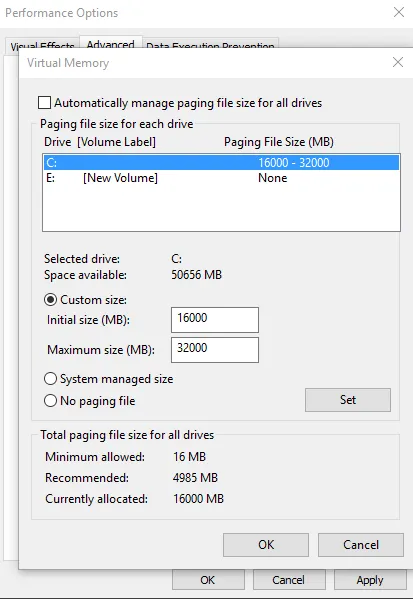
What should I change the paging file to?
Is this good?

5984c215d990f94a01591fcf85ceb88a.png
[DOUBLEPOST=1453049553][/DOUBLEPOST]
If you're only using 3.3GB / 32GB of your RAM and it's telling you that you're out of memory, that's definitely a problem.

I wouldn't necessarily pin it immediately on the PSU, perhaps you first want to run some RAM checks.

Do you use Chrome? I know I had some faulty RAM and Chrome was constantly crashing with things like "out of memory", but if you haven't had any bluescreens yet it may not be the hardware.

If you want to diagnose your RAM, I would definitely recommend MemTest86.
Essentially you download the bootable USB version, then use a program (such as Rufus) to create a bootable USB.
Plug it into your computer, and in your BIOS set your boot order to load the USB first. It will take a long time since you have 32GB, but if you start seeing errors, you know there's something wrong with your RAM and it should be replaced.
Agreed. Also try doing this: http://www.kapilarya.com/your-computer-is-low-on-memory-windows-10
Your system could be set up to alert you even when it's not low on ram, it could just be hitting the range the alert notifier is set to.
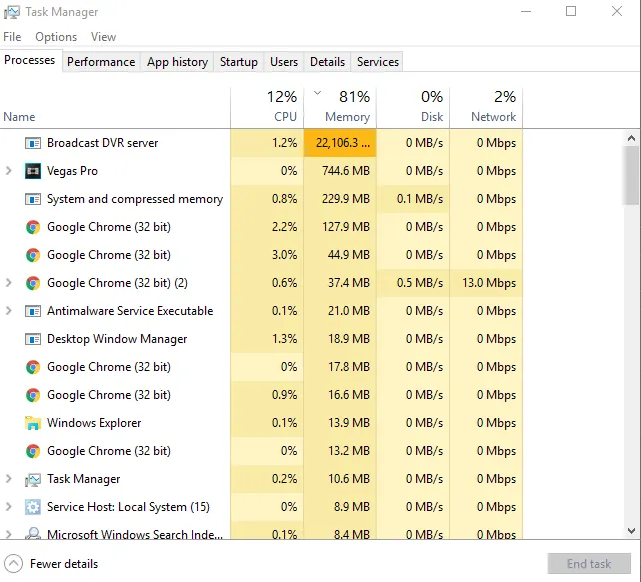
Pretty sure I found the problem...
c5505e914742221e0d8fc771d7957504.png

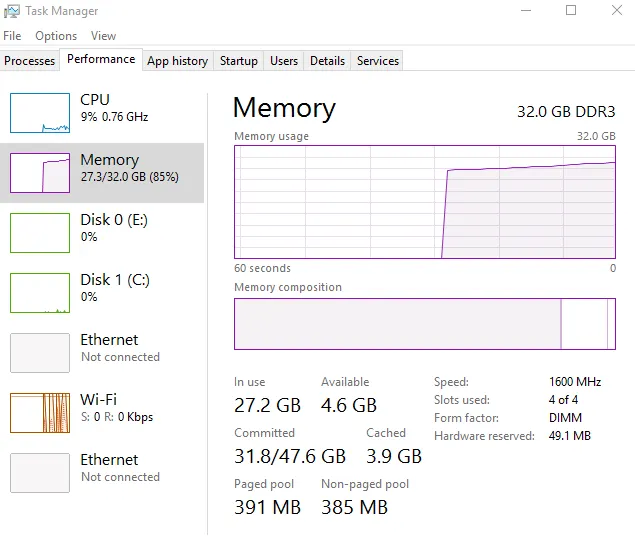
Broadcast DVR server is the problem. It keeps growing and growing, but I keep trying to end it, but then it just starts growing and growing again...
9c2d64d36821a6881f7b9efae2a9e04e.png

Anyone know how to fix that problem? Thank you.
 

JJDAHM

Unregistered Member
Supreme
Feedback score
5
Posts
929
Reactions
570
Resources
0
That's the exact message I'm getting. What do I do to fix that?[DOUBLEPOST=1453048499,1453048334][/DOUBLEPOST]
What should I change the paging file to?
Is this good?

5984c215d990f94a01591fcf85ceb88a.png
[DOUBLEPOST=1453049553][/DOUBLEPOST]

Pretty sure I found the problem...
c5505e914742221e0d8fc771d7957504.png

Broadcast DVR server is the problem. It keeps growing and growing, but I keep trying to end it, but then it just starts growing and growing again...
9c2d64d36821a6881f7b9efae2a9e04e.png

Anyone know how to fix that problem? Thank you.
Is Boradcast DVR server something you installed?
 

Badger

Software Developer
Supreme
Feedback score
22
Posts
2,366
Reactions
1,561
Resources
2
Is Boradcast DVR server something you installed?
After looking it up, it looks like it comes from the Xbox windows app and is a recording software of some sort. What is weird is that I've never used the Xbox application. If I get into the Xbox app I can turn it off for good apparently. I'm guessing this has been my problem all along?[DOUBLEPOST=1453050759,1453050349][/DOUBLEPOST]
Is Boradcast DVR server something you installed?
Wow Broadcast DVR Server is a bitch lmao, make sure you disable, otherwise it will eat your memory like hell. I just disabled, so now it can't eat my memory anymore. That was the problem all along. I just had to disable it... So do you still think I should get a 850W PSU? I can afford the upgrade, so I mean. I could upgrade something else too, just depends on what to do. Upgrading wouldn't be a bad thing.
Jack
 

JJDAHM

Unregistered Member
Supreme
Feedback score
5
Posts
929
Reactions
570
Resources
0
After looking it up, it looks like it comes from the Xbox windows app and is a recording software of some sort. What is weird is that I've never used the Xbox application. If I get into the Xbox app I can turn it off for good apparently. I'm guessing this has been my problem all along?[DOUBLEPOST=1453050759,1453050349][/DOUBLEPOST]
Wow Broadcast DVR Server is a bitch lmao, make sure you disable, otherwise it will eat your memory like hell. I just disabled, so now it can't eat my memory anymore. That was the problem all along. I just had to disable it... So do you still think I should get a 850W PSU? I can afford the upgrade, so I mean. I could upgrade something else too, just depends on what to do. Upgrading wouldn't be a bad thing.
Jack
It's also a common virus ;)
Maybe you should check up on that.
 

Badger

Software Developer
Supreme
Feedback score
22
Posts
2,366
Reactions
1,561
Resources
2
It's also a common virus ;)
Maybe you should check up on that.
Nah it was the xbox app :p Once I disabled it in the xbox app, then it stopped the process completely :) Thanks for all your help though dude! Should I still get the PSU though?
 

Badger

Software Developer
Supreme
Feedback score
22
Posts
2,366
Reactions
1,561
Resources
2
Not unless you're noticing actual power issues (which you shouldn't be with that PSU and those components).
Well I thought I was noticing power issues, but I think it was bc the memory was all eaten up by that background task that kept growing and growing in memory. So now I have $200 to spend considering I don't need to upgrade the PSU. Should I get another graphics card or something?
 

JJDAHM

Unregistered Member
Supreme
Feedback score
5
Posts
929
Reactions
570
Resources
0
Well I thought I was noticing power issues, but I think it was bc the memory was all eaten up by that background task that kept growing and growing in memory. So now I have $200 to spend considering I don't need to upgrade the PSU. Should I get another graphics card or something?
If you wanted to do 2-way SLI, you'd need another PSU. You probably should be able to get $20-30 for your PSU on Reddit though, so you could get both.
 

Badger

Software Developer
Supreme
Feedback score
22
Posts
2,366
Reactions
1,561
Resources
2
If you wanted to do 2-way SLI, you'd need another PSU. You probably should be able to get $20-30 for your PSU on Reddit though, so you could get both.
Example? A PSU for $20-$30 sounds way too cheap...
 

JJDAHM

Unregistered Member
Supreme
Feedback score
5
Posts
929
Reactions
570
Resources
0
Example? A PSU for $20-$30 sounds way too cheap...
What I was trying to say was if you'd wanted another graphics card, you'd need a new PSU. You could sell your current one on reddit.
 

Badger

Software Developer
Supreme
Feedback score
22
Posts
2,366
Reactions
1,561
Resources
2
What I was trying to say was if you'd wanted another graphics card, you'd need a new PSU. You could sell your current one on reddit.
Do you think I should do that or? Like what do you suggest? Do I need to upgrade anything?
 

JJDAHM

Unregistered Member
Supreme
Feedback score
5
Posts
929
Reactions
570
Resources
0
Do you think I should do that or? Like what do you suggest? Do I need to upgrade anything?
I think your rig is perfect for gaming right now. I don't think you'd need anything else unless you're gaming in 4k and doing lots of video rendering.
 
Status
This thread has been locked.
Top