Pixoart Studio is a fully browser-based pixel art tool built for game developers. Drop in any image and convert it to pixel art in seconds — no installation, no account, no server required. Everything runs directly in your browser.
━━━━━━━━━━━━━━━━━━━━━━━━━━━━━━━━━━
WHAT YOU GET AFTER PURCHASE
━━━━━━━━━━━━━━━━━━━━━━━━━━━━━━━━━━
You receive a ZIP containing 4 files:
• index.html — Splash / loading screen
• anasayfa.html — The full application
• script.js — All application logic
• style.css — Stylesheet
Place all 4 files in the same folder and open index.html in any modern browser (Chrome, Firefox, Edge, Safari). That's it — no setup required.
━━━━━━━━━━━━━━━━━━━━━━━━━━━━━━━━━━
FEATURE 1 — PIXEL ART CONVERTER
━━━━━━━━━━━━━━━━━━━━━━━━━━━━━━━━━━
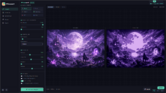
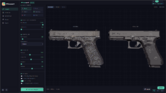
Upload any JPG, PNG, GIF or WebP image (up to 20 MB) and convert it to pixel art using a full set of controls:
Pixel Configuration
▸ Block Size (2–32px) — controls how large each pixel block is
▸ Output Scale (1–8x) — upscales the final image without blurring
Color Processing
▸ Palette Size (2–256 colors) — how many colors the output uses
▸ Quantization Algorithm — choose from K-Means, Octree, Median Cut or Uniform depending on your image type
Filters
▸ Contrast, Saturation, Sharpening, Brightness — all adjustable with sliders
Advanced Toggles
▸ Dithering (Floyd-Steinberg) — smoother color transitions with pixel patterns
▸ Edge Enhancement — sharper outlines between pixel blocks
▸ Anti-Aliasing — smooth downsampling
▸ Transparent Background — removes the background and outputs a clean PNG with alpha
After generating, download your result as PNG, JPG or WebP, or copy it directly to your clipboard.
━━━━━━━━━━━━━━━━━━━━━━━━━━━━━━━━━━
FEATURE 2 — 6 INSTANT PRESETS
━━━━━━━━━━━━━━━━━━━━━━━━━━━━━━━━━━
One click sets every slider for a specific style:
🕹 Classic — 8px blocks, 16 colors. Clean all-purpose output.
 Retro — 12px blocks, 8 colors, dithering on. 80s arcade look.
 Modern — 6px blocks, 64 colors. Detailed, colorful output.
 Game Boy — 10px blocks, authentic 4-color Game Boy palette. Fixed.
 NES — 8px blocks, 16 colors. Classic NES console aesthetic.
 CGA — 8px blocks, authentic 4-color CGA palette. Fixed.
You can fine-tune any preset after applying it.
━━━━━━━━━━━━━━━━━━━━━━━━━━━━━━━━━━
FEATURE 3 — ANIMATION EDITOR
━━━━━━━━━━━━━━━━━━━━━━━━━━━━━━━━━━
Convert animated GIFs or frame sequences into pixel art animations.
Loading frames
▸ Load an animated GIF — frames are extracted automatically
▸ Load multiple PNG/JPG files — each file becomes one frame
▸ Add, remove or reorder frames at any time
Animation Settings
▸ Pixel Size, FPS (1–60), Color Count, Scale, Dithering, Loop toggle
Preview & Playback
▸ Play/pause, step forward/backward, frame counter
Export Options
▸ Animated GIF
▸ Sprite Sheet PNG (horizontal atlas)
▸ Individual PNG frames (numbered, zipped)
▸ Aseprite package — sprite sheet PNG + import JSON + Lua script ready to run in Aseprite
━━━━━━━━━━━━━━━━━━━━━━━━━━━━━━━━━━
FEATURE 4 — SPRITE SHEET GENERATOR
━━━━━━━━━━━━━━━━━━━━━━━━━━━━━━━━━━
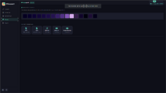
Upload multiple images and combine them into a single texture atlas.
▸ Set column count, frame size, padding between frames and pixel block size
▸ Toggle transparent background and JSON metadata output
▸ Download the atlas as PNG
▸ Download a JSON metadata file with every frame's coordinates and dimensions — compatible with Unity and Godot atlas importers
━━━━━━━━━━━━━━━━━━━━━━━━━━━━━━━━━━
FEATURE 5 — PALETTE ANALYSIS & EXPORT
━━━━━━━━━━━━━━━━━━━━━━━━━━━━━━━━━━
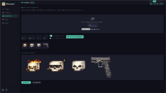
After generating any pixel art, the Palette tab shows every color used. Export it in 5 formats:
▸ .GPL — import directly into GIMP or Aseprite
▸ .ACO — Adobe Photoshop color swatch
▸ HEX List — paste into CSS or any web project
▸ Unity C# — ready-to-paste Color[] array
▸ Godot GDScript — ready-to-paste Color[] array
No more copying hex codes by hand.
━━━━━━━━━━━━━━━━━━━━━━━━━━━━━━━━━━
FEATURE 6 — GAME ENGINE EXPORT
━━━━━━━━━━━━━━━━━━━━━━━━━━━━━━━━━━
The Export tab generates ready-to-use code and settings for your engine:
Unity
▸ Sprite import settings JSON (pixel-perfect camera config included)
▸ C# color palette export
Godot 4
▸ .import file texture settings
▸ GDScript color palette export
Aseprite
▸ .GPL palette file
▸ Import JSON with sprite dimensions and palette
▸ Lua script — run via File > Scripts > Run Script to import your sprite automatically
Generic
▸ JSON export with sprite size, palette and metadata for any custom engine or tool
━━━━━━━━━━━━━━━━━━━━━━━━━━━━━━━━━━
LANGUAGE SUPPORT
━━━━━━━━━━━━━━━━━━━━━━━━━━━━━━━━━━
Full interface available in Turkish (TR) and English (EN). Switch at any time using the button in the top-right corner. Every label, section title and button updates instantly.
━━━━━━━━━━━━━━━━━━━━━━━━━━━━━━━━━━
REQUIREMENTS
━━━━━━━━━━━━━━━━━━━━━━━━━━━━━━━━━━
▸ Any modern browser: Chrome 90+, Firefox 88+, Edge 90+, Safari 15+
▸ No server, no Node.js, no dependencies
▸ All 4 files must be in the same folder
━━━━━━━━━━━━━━━━━━━━━━━━━━━━━━━━━━
SUPPORT & UPDATES
━━━━━━━━━━━━━━━━━━━━━━━━━━━━━━━━━━
Active support is provided through this resource page and the Discord server linked in the sidebar. If something doesn't work as described, reach out and it will be fixed. Updates are pushed as new features and improvements are added.
- JaspersArt Dev.


