Toast Notification System
High-performance, stackable UI alerts with dynamic scaling and spatialized SFX
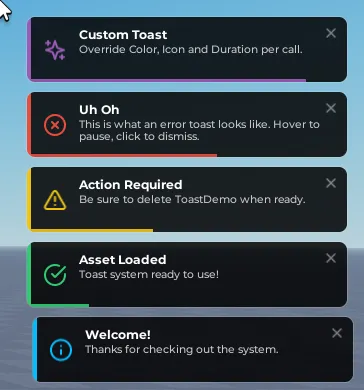
High-performance, stackable UI alerts with dynamic scaling and spatialized SFX
Stop using flat, static notifications that clip text or overlap. This notification system features a modern glassmorphism design, auto-stacking vertical transitions, hover controls, and automatic text-measurement layouts. Trigger styled popup alerts from client or server scripts with a single line of code.
Why CoreShun Toast System?
- Lucide Spritesheet Tinting: Icons are loaded from white SVG-style spritesheets, allowing the script to dynamically recolor them to match the alert's accent color perfectly.
- Pitch-Shifted Audio Engine: Includes built-in ping effects that dynamically shift volume and playback speed depending on the alert severity (e.g. high-pitched pings for success, deep warnings, and low-pitched alerts for errors).
- Zero Text Truncation: Uses dynamic text-measurement bounds to automatically scale individual notification heights from 65px to 160px to fit wrapped text.
- Clean CanvasGroup Rendering: The template uses CanvasGroup to keep background transparency, border strokes, and gradients visually uniform without rendering artifacts.
Features
Aesthetics & Design
- Glassmorphism Visuals: Semi-transparent dark cards (transparency 0.15) with soft white borders, a colored accent stripe, and a dynamic progress bar indicator.
- Hover Physics: Hovering over any notification pauses the countdown timer and freezes the progress bar. It also shifts border opacity and reveals the close button.
- Auto-Stacking Layouts: Older alerts shift up or down to make room. When an alert expires or is dismissed, the stack collapses smoothly.
- Queue Handling: If active notifications exceed your configured limit, excess alerts are held in a queue and slide in automatically as slots clear.
Developer API
- Dismiss Handles: Every notification call returns a handle. You can call
handle:Dismiss()in your scripts to close that specific notification programmatically before its timer ends. - Global Clears: Drop the entire active queue and close all visible toasts instantly with
Toast:Clear(). - Custom Overrides: Override colors, icons, and display duration per-call directly in the parameters.
Client API Reference
Code:
local ReplicatedStorage = game:GetService("ReplicatedStorage")
local Toast = require(ReplicatedStorage:WaitForChild("Toast"):WaitForChild("Toast"))

-- Standard notifications
Toast:Info("Welcome!", "Thanks for checking out the system.")
Toast:Success("Asset Loaded", "Toast system ready to use!")
Toast:Warning("Action Required", "Be sure to delete ToastDemo when ready.")
Toast:Error("Uh Oh", "This is what an error toast looks like.")

-- Overrides on built-in types
Toast:Success("Coins Added!", "+500 Gold", { Duration = 3 })

-- Fully custom styling
local alertHandle = Toast:Custom("Item Found!", "You discovered a rare chest key.", {
    Color = Color3.fromRGB(241, 196, 15),
    Icon = {
        Image = "rbxassetid://16898613777",
        RectOffset = Vector2.new(918, 49),
        RectSize = Vector2.new(48, 48)
    },
    Duration = 10
})

-- Programmatically dismiss after 3 seconds
task.wait(3)
alertHandle:Dismiss()
Server API Reference
Send notifications to clients safely across the server boundary:
Code:
local ServerScriptService = game:GetService("ServerScriptService")
local ToastServer = require(ServerScriptService:WaitForChild("ToastServer"))

-- Send to a specific player
ToastServer:Send(player, {
    Title = "Level Up!",
    Message = "You reached Level 10.",
    Type = "Success"
})

-- Broadcast to the entire server
ToastServer:SendAll({
    Title = "Server Event",
    Message = "Double XP starts now!",
    Type = "Info",
    Duration = 10
})
Real-world Coding Ideas
1. Health Threshold Warning
Warn the player with a persistent warning when health drops, and dismiss it once they are healed:
Code:
-- Client-Side LocalScript
local Players = game:GetService("Players")
local ReplicatedStorage = game:GetService("ReplicatedStorage")
local Toast = require(ReplicatedStorage:WaitForChild("Toast"))

local player = Players.LocalPlayer
local character = player.Character or player.CharacterAdded:Wait()
local humanoid = character:WaitForChild("Humanoid")

local lowHealthWarning = nil

humanoid.HealthChanged:Connect(function(health)
    if health < 30 and health > 0 then
        if not lowHealthWarning then
            lowHealthWarning = Toast:Warning("Critical Health!", "Find cover immediately!", { Duration = 999 })
        end
    elseif health >= 30 and lowHealthWarning then
        lowHealthWarning:Dismiss()
        lowHealthWarning = nil
    end
end)
2. Remote Transaction Status Checks
Display direct feedback on client actions processed by the server:
Code:
-- Client-Side GUI Button Script
local ReplicatedStorage = game:GetService("ReplicatedStorage")
local Toast = require(ReplicatedStorage:WaitForChild("Toast"))
local buyRemote = ReplicatedStorage:WaitForChild("PurchaseRequest")

local function purchaseItem(itemId)
    local purchaseResult = buyRemote:InvokeServer(itemId)

    if purchaseResult.Success then
        Toast:Success("Purchase Successful!", "Item added to inventory.", { Duration = 3 })
    else
        Toast:Error("Purchase Failed", purchaseResult.ErrorMessage or "Network timeout.")
    end
end
3. Server Broadcast Announcements
Alert the entire server of rare map drops:
Code:
-- Server-Side Script
local ServerScriptService = game:GetService("ServerScriptService")
local ToastServer = require(ServerScriptService:WaitForChild("ToastServer"))

local function onLegendaryItemDrop(itemName, player)
    ToastServer:SendAll({
        Title = "Legendary Drop!",
        Message = player.DisplayName .. " has found a " .. itemName .. "!",
        Type = "Custom",
        Color = Color3.fromRGB(155, 89, 182),
        Duration = 7
    })
end
Configuration Options
Every core design, sound, and behavior value can be edited insideToastConfig:
Code:
local ToastConfig = {
    Position = "TopRight", -- TopRight | TopLeft | BottomRight | BottomLeft
    Width = 320, -- Width of card
    MaxToasts = 5, -- Max stacked toasts on-screen
    DefaultDuration = 5, -- Default screen time
    Spacing = 10, -- Pixels between items
    ScreenPadding = 20, -- Padding from edge of viewport

    -- Tweens
    TweenDuration = 0.35,
    EasingStyle = Enum.EasingStyle.Back,
    EasingDirection = Enum.EasingDirection.Out,

    -- Audio settings
    Sounds = {
        Enabled = true,
        Default = { SoundId = "rbxasset://sounds/electronicpingshort.wav", Volume = 0.35, PlaybackSpeed = 1 },
        Success = { SoundId = "rbxasset://sounds/electronicpingshort.wav", Volume = 0.35, PlaybackSpeed = 1.25 },
        Error = { SoundId = "rbxasset://sounds/electronicpingshort.wav", Volume = 0.45, PlaybackSpeed = 0.65 },
    }
}
Setup (Under 2 Minutes)
- Insert the
.rbxmxfile into your Workspace. - Open the Command Bar (View -> Command Bar).
- Paste and run:
require(workspace.CoreShunToastSystem.Installer) - Delete the temporary installer folder from your Workspace.
- Run the game to review the demo.

