
Almost every Bukkit developer asked such a difficult question: “Which utility will be most useful that will simplify the development of something at times?” And the answer was very simple, and I will give an answer to these questions, this is “AtlantAPI”.
I'm new here and you probably don't trust me. Here is the proof that this is my library. Also, I apologize in advance for my English.
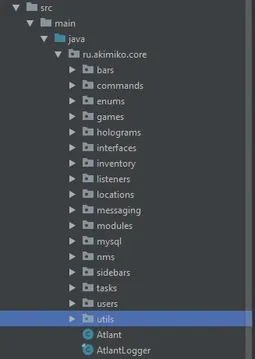
Here is what this library can and simplifies.
1.Wrapper system:
Nowadays, a problem with net.minecraft.server (NMS) is very common among coders, because in each version it has a different name for the package, the class is invitationalized, and so on. But I took care of this by creating my PacketWrapper, with which you can rewrite kernel packages to all versions.
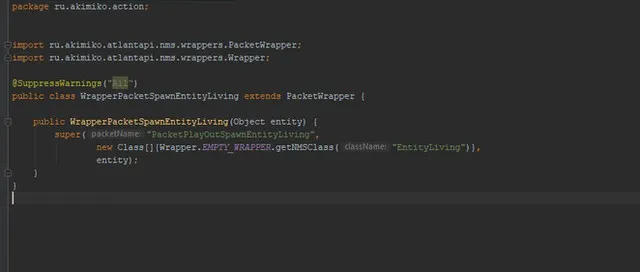
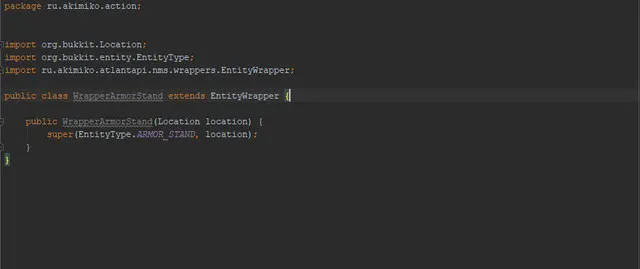
But this is far from all, because Entity or other objects are also present in the kernel, which also depend on the version of net.minecraft.server or org.bukkit.craftbukkit, for which EntityWrapper and CraftWrapper were provided.
2.Connect to MySQL database:
We are all lazy every time to write the same thing, creating only some kind of connection to the MySQL database. But we not only simplified its creation, but also wrote a class responsible for queries, clearing dozens of lines of code!
Class "SQLConnection" - is responsible for connecting to the MySQL database. (Data recording for connecting to the database is implemented through the built-in Builder).
The class "Executor" - is responsible for queries (execute'y) in the database about the creation, deletion, as well as for receiving data from rows, tables and databases.
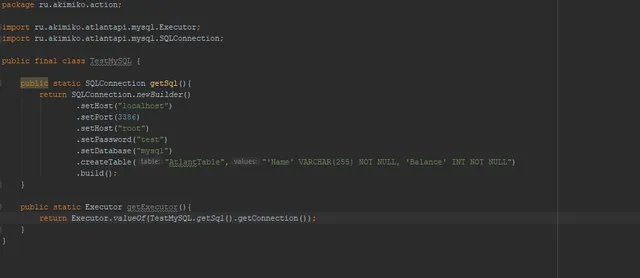
(An example of creating a connection to a MySQL database)
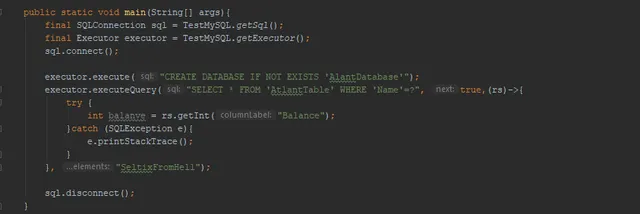
(An example of connecting, working with queries and disconnecting from the database)
3.Unique utilities:
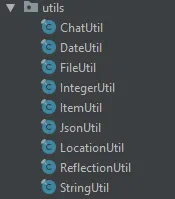
In this development there are only the most necessary utilities, which any developer will certainly be "happy with ears".
ChatUtil - create and send clickable messages to the player’s chat.
DateUtil - date and time output by MSC.
FileUtil - working with InputStream, saving resources from the Jar to its folder.
IntegerUtil - work with numbers. (Competent recording and conversion of seconds to minutes, hours, days, months, and years, elevation to and from the root, competent separation of every third digit).
ItemUtil - convenient creation and design of items (ItemStack), goals for nicknames and textures.
JsonUtil - work with Json. (Writing an object to Json and decrypting it back to the object).
LocationUtil - operations with locations (Reduction in one line and decoding of this line back to the location, comparing the distances between them and the locations themselves).
ReflectionUtil - operations with reflection (Work with class, Object, Field, Method, Constructor, Annotation, etc.)
StringUtil - operations with strings (Converting a string into List and vice versa, replacing characters, getting a translated string from the config of your plugin, building a string from elements into one).
4.Independent Holograms:
Sometimes it is difficult for even the most experienced developer to create holograms himself, and he resorts to HolographicDisplays, which can cause problems for those who will use their plugins. In our case, this is not so!
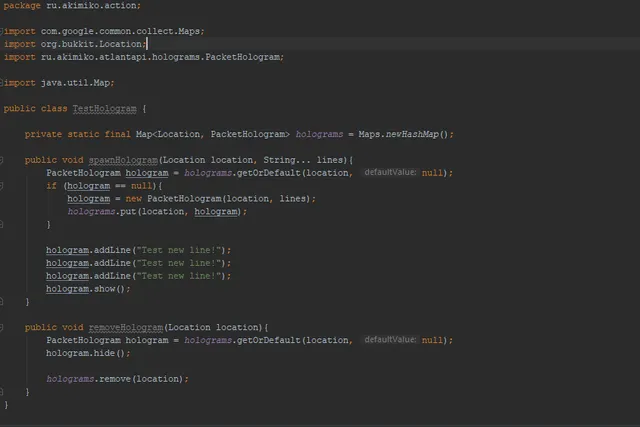
Now the developer will be able to create holograms in just two clicks, regardless of any extraneous plug-ins!
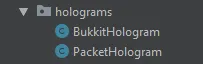
For convenience, I created two types of holograms - “BukkitHologram” and “PacketHologram”, and their names speak for themselves ...
BukkitHologram - holograms written in regular Entity from org.bukkit.entity.
PacketHologram - holograms, writing on CraftEntity from net.minecraft.server, and for complete comfort we implemented this through our EntityWrapper!
5.Clickable Inventories:
In the kernel itself, the inventory system is not very conveniently implemented and sometimes, to write high-quality without extra events and listeners, you have to sweat quite well. But I created an alternative to this, now you can easily and simply create your own inventories!
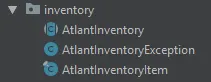
To create the inventory itself, it would be desirable to lay a separate class for it, let's call it TestInventory.class. After that, we must inherit the abstract AtlantInventory class so that when you call your object, the player can open the inventory.
After the actions done, you should get something like this:
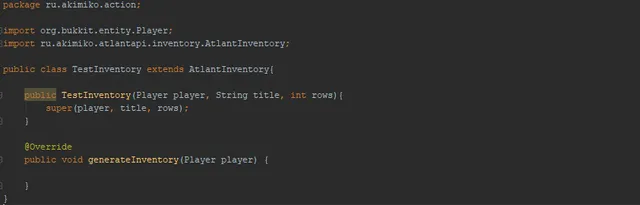
The first step is ready! Just a little bit left ...
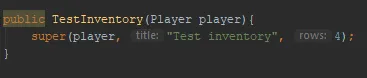
To begin with, let's deal with the constructor of the class and how to configure it: Leave only the Player in the arguments so that other players can call this inventory.
We replace the “title” line with our inventory name, and if it exceeds the character limit, the system itself cuts it off as it needs.
The value "rows" is the number of lines in the inventory, that is, if we write the value 3 (standard), then a chest with 27 slots will be opened in size.
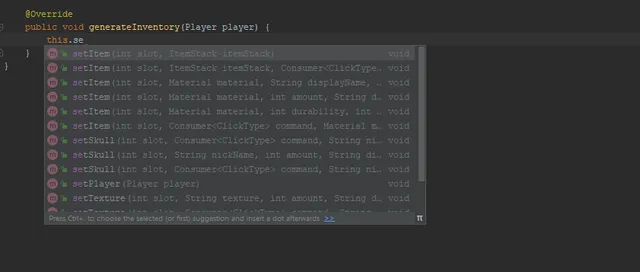
Now one question remains, but how to install items in this inventory? The answer is not so complicated: in the generateInventory method, we carry out all operations with our inventory. The screenshot shows a huge number of options for installing items in inventory. And also, the slots in this system begin with 1, and not with 0 as it is done in the kernel (that is, if you want to set an item on 1 slot, then the value of the slot will be - 1)
Opening occurs through a call to the class object with your inventory, in our case it will be - new TestInventory (player);

6.Minigames for a quick hand:
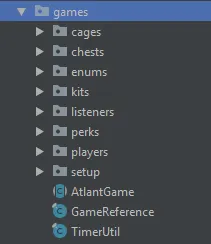
Wow, there’s even a Game API in this development! Just imagine, now you can write your mini-games in almost two counts! After all, all the necessary basis for mini-games is laid in these classes:
7.Commands:
Probably few people like the way registration and team building are implemented in the kernel itself and want something new? I thought it over!
We create a class for the team and inherit AtlantCommand, configure the constructor as we need it, and go to create the team itself:
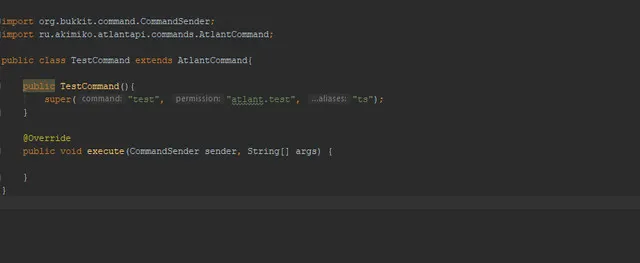
Let's go through the constructor setup ...
The value “command” is the main command, upon entering into the chat an action will be performed, which will be described in the execute method.
The “permission” value is the right that will be needed to use the command. If null, the command will not be authorized.
The value “aliases” is an array of alternative commands that can replace the main command.
Now we will deal with the team itself, and internal checks ...
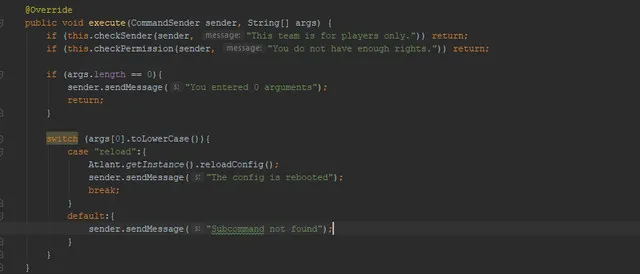
At the beginning of the command, we create checks where we use the checkSender and checkPermission methods, which can be omitted if there is no special need
The checkSender method checks the sender of the team to see if he is a player. If this is not so, then a message is sent to him, which is indicated in the arguments of the method.
The "checkPermission" method checks the sender command for the right that you specified in the constructor. If its value is null, then it’s okay, there will be no error, and the check will be ignored.
Then you can write your team as you wish
8.Scoreboard & Sidebar:
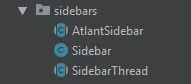
One of the most intricate and difficult things for some developers was to this day Scoreboards, as there were a lot of problems with animation and auto-update of lines, but now you don’t have to suffer like that!
9.BungeeCord Channel & Server pinger:
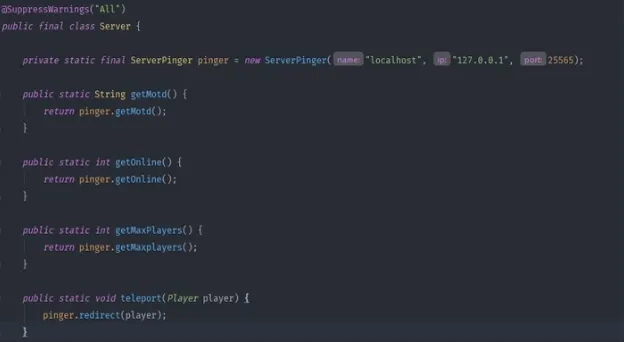
Oh, how long I thought and wondered how to ping a server, get its data, get its Motd, the correct one online, the maximum number of players, and more that could not be done through a regular Messager. Here, get a complete server ping system:
10.From the first location to the second:
Of course, one of the most pressing problems was the area, their allocation and work in them, but now it will not be such a painful problem!
My development “AtlantAPI” added work with regions that are distinguished by two locations, forming a virtual cube where you can do whatever your heart desires: copy, paste, install, delete, break, crush, throw an eraser into the teacher, and much more another ...
This is done very simply:
RegionCuboid cuboid = new RegionCuboid (location1, location2); or
LocationUtil.getCuboid (location1, location2);
11.ActionBar, BossBar, ProgressBar:
Well? Still not satisfied with the scope of functions in this development? There you go! - Work with Bar'ami, their conclusion and creation.
ActionBar is a message that is written on the nine main player slots. absolutely any messages can be displayed there, except clickable, because the structure itself does not allow this, unfortunately:
Creation and output to the player occurs by calling the object:
new ActionBar (Player player, String text);
BossBar - Remember that same boss lane? So, it can now be controlled! You can create your own band by indicating in it any message that will be displayed to a specific player ...
Creation and output to the player occurs by calling the object:
new BossBar (Player player, String text).
We pass to one of the most interesting - ProgressBar - A strip showing the progress of something, let it be the progress of a level, EXP, open perks, sets, gadgets, and more ...
Creation and output occurs by calling the object:
new ProgressBar (double current, double max, int symbolCount); or
new ProgressBar (double current, double max, int symbolCount, String symbolYes, String symbolNo);
Additional methods:
String getProgress () - Get the progress line.
String getPercent () - Get the percentage of progress.
12.Multi-version playback of sounds and effects:
Just imagine, all your problems are solved thanks to my one development, and this is not a fairy tale, this is not a dream, and this is not a fictional story, not folk art and folklore, this is a reality in which you really will feel better with AtlantAPI: D
Enum classes such as ParticleEffect and PlaySound were created in my API, thanks to which you can create batch sounds and effects and send them to players, regardless of the kernel version, because as we know, the creators of Spigot & Bukkit made different names for effects and sounds, having done this by creating more problems for us, they don’t care about your nerves the way I do
Creating and sending effects:
ParticleEffect.EFFECT.display ();
Creating and sending sounds:
PlaySound.SOUND.play ();
13.Threads that everyone needed:
Threads ... One of the most important elements of any programmer. And sometimes, threads need to be stored, because sometimes it is inconvenient to create a new stream every time, are we right?
In such cases, I envisioned this problem and solved it using the BukkitTasks class, where static methods are stored that save, receive, delete and cancel threads (saving occurs by arbitrary name, string).
14.Modules or an independent self-written plug-in system:
A large number of programmers will probably be happy with such a system, because it is not only simple, but also independent!
So we came to an end, the most ambitious, the most important and, perhaps, interesting. In this development, there is a system of modules that completely replaces the system of plug-ins in the bakkit, and also simplifies their creation and writing, because they use my API, but how can I do it without simplification
To begin with, for the modules in the API folder, a subfolder is created called modules, where you need to drop the JAR files of your modules. Now let's move on to creating these modules ...
The main class is indicated by the inheritance of the AtlantModule class, after which you have three methods:
void enableModule ();
void disableModule ();
void reloadModule ();
The methods speak for themselves, and their work is fully tested! Also, you have a constructor where you need to write ONLY arguments from AtlantModule. Otherwise, the module simply will not start.
When the module starts, the main class is detected independently, it does not need to create various files of the plugin.yml type and indicate the path to the main class in them, no, everything is much simpler, it just finds it on its own, yes, you heard right, it’s possibly!
The modules have their own folder and their own config, in which you can write data, and work through actions similar to Bakkit’s ones
Also, a command is provided in the module system with the help of which work will be carried out with the modules, according to the type of output of their information, on, off and reboot. Commands - /module or /modules
Thank you for your time. Once again, sorry for my poor English.
My discord for communication and purchase: AkiMiko#0312
I'm new here and you probably don't trust me. Here is the proof that this is my library. Also, I apologize in advance for my English.
Here is what this library can and simplifies.
1.Wrapper system
:Nowadays, a problem with net.minecraft.server (NMS) is very common among coders, because in each version it has a different name for the package, the class is invitationalized, and so on. But I took care of this by creating my PacketWrapper, with which you can rewrite kernel packages to all versions.
But this is far from all, because Entity or other objects are also present in the kernel, which also depend on the version of net.minecraft.server or org.bukkit.craftbukkit, for which EntityWrapper and CraftWrapper were provided.
2.Connect to MySQL database
:We are all lazy every time to write the same thing, creating only some kind of connection to the MySQL database. But we not only simplified its creation, but also wrote a class responsible for queries, clearing dozens of lines of code!
Class "SQLConnection" - is responsible for connecting to the MySQL database. (Data recording for connecting to the database is implemented through the built-in Builder).
The class "Executor" - is responsible for queries (execute'y) in the database about the creation, deletion, as well as for receiving data from rows, tables and databases.
(An example of creating a connection to a MySQL database)
(An example of connecting, working with queries and disconnecting from the database)
3.Unique utilities
:In this development there are only the most necessary utilities, which any developer will certainly be "happy with ears".
ChatUtil - create and send clickable messages to the player’s chat.
DateUtil - date and time output by MSC.
FileUtil - working with InputStream, saving resources from the Jar to its folder.
IntegerUtil - work with numbers. (Competent recording and conversion of seconds to minutes, hours, days, months, and years, elevation to and from the root, competent separation of every third digit).
ItemUtil - convenient creation and design of items (ItemStack), goals for nicknames and textures.
JsonUtil - work with Json. (Writing an object to Json and decrypting it back to the object).
LocationUtil - operations with locations (Reduction in one line and decoding of this line back to the location, comparing the distances between them and the locations themselves).
ReflectionUtil - operations with reflection (Work with class, Object, Field, Method, Constructor, Annotation, etc.)
StringUtil - operations with strings (Converting a string into List and vice versa, replacing characters, getting a translated string from the config of your plugin, building a string from elements into one).
4.Independent Holograms
:Sometimes it is difficult for even the most experienced developer to create holograms himself, and he resorts to HolographicDisplays, which can cause problems for those who will use their plugins. In our case, this is not so!
Now the developer will be able to create holograms in just two clicks, regardless of any extraneous plug-ins!
For convenience, I created two types of holograms - “BukkitHologram” and “PacketHologram”, and their names speak for themselves ...
BukkitHologram - holograms written in regular Entity from org.bukkit.entity.
PacketHologram - holograms, writing on CraftEntity from net.minecraft.server, and for complete comfort we implemented this through our EntityWrapper!
5.Clickable Inventories
:In the kernel itself, the inventory system is not very conveniently implemented and sometimes, to write high-quality without extra events and listeners, you have to sweat quite well. But I created an alternative to this, now you can easily and simply create your own inventories!
To create the inventory itself, it would be desirable to lay a separate class for it, let's call it TestInventory.class. After that, we must inherit the abstract AtlantInventory class so that when you call your object, the player can open the inventory.
After the actions done, you should get something like this:
The first step is ready! Just a little bit left ...
To begin with, let's deal with the constructor of the class and how to configure it: Leave only the Player in the arguments so that other players can call this inventory.
We replace the “title” line with our inventory name, and if it exceeds the character limit, the system itself cuts it off as it needs.
The value "rows" is the number of lines in the inventory, that is, if we write the value 3 (standard), then a chest with 27 slots will be opened in size.
Now one question remains, but how to install items in this inventory? The answer is not so complicated: in the generateInventory method, we carry out all operations with our inventory. The screenshot shows a huge number of options for installing items in inventory. And also, the slots in this system begin with 1, and not with 0 as it is done in the kernel (that is, if you want to set an item on 1 slot, then the value of the slot will be - 1)
Opening occurs through a call to the class object with your inventory, in our case it will be - new TestInventory (player);
6.Minigames for a quick hand:
Wow, there’s even a Game API in this development! Just imagine, now you can write your mini-games in almost two counts! After all, all the necessary basis for mini-games is laid in these classes:
7.Commands
:Probably few people like the way registration and team building are implemented in the kernel itself and want something new? I thought it over!
We create a class for the team and inherit AtlantCommand, configure the constructor as we need it, and go to create the team itself:
Let's go through the constructor setup ...
The value “command” is the main command, upon entering into the chat an action will be performed, which will be described in the execute method.
The “permission” value is the right that will be needed to use the command. If null, the command will not be authorized.
The value “aliases” is an array of alternative commands that can replace the main command.
Now we will deal with the team itself, and internal checks ...
At the beginning of the command, we create checks where we use the checkSender and checkPermission methods, which can be omitted if there is no special need
The checkSender method checks the sender of the team to see if he is a player. If this is not so, then a message is sent to him, which is indicated in the arguments of the method.
The "checkPermission" method checks the sender command for the right that you specified in the constructor. If its value is null, then it’s okay, there will be no error, and the check will be ignored.
Then you can write your team as you wish
8.Scoreboard & Sidebar
:One of the most intricate and difficult things for some developers was to this day Scoreboards, as there were a lot of problems with animation and auto-update of lines, but now you don’t have to suffer like that!
9.BungeeCord Channel & Server pinger
:Oh, how long I thought and wondered how to ping a server, get its data, get its Motd, the correct one online, the maximum number of players, and more that could not be done through a regular Messager. Here, get a complete server ping system:
10.From the first location to the second
:Of course, one of the most pressing problems was the area, their allocation and work in them, but now it will not be such a painful problem!
My development “AtlantAPI” added work with regions that are distinguished by two locations, forming a virtual cube where you can do whatever your heart desires: copy, paste, install, delete, break, crush, throw an eraser into the teacher, and much more another ...
This is done very simply:
RegionCuboid cuboid = new RegionCuboid (location1, location2); or
LocationUtil.getCuboid (location1, location2);
11.ActionBar, BossBar, ProgressBar
:Well? Still not satisfied with the scope of functions in this development? There you go! - Work with Bar'ami, their conclusion and creation.
ActionBar is a message that is written on the nine main player slots. absolutely any messages can be displayed there, except clickable, because the structure itself does not allow this, unfortunately:
Creation and output to the player occurs by calling the object:
new ActionBar (Player player, String text);
BossBar - Remember that same boss lane? So, it can now be controlled! You can create your own band by indicating in it any message that will be displayed to a specific player ...
Creation and output to the player occurs by calling the object:
new BossBar (Player player, String text).
We pass to one of the most interesting - ProgressBar - A strip showing the progress of something, let it be the progress of a level, EXP, open perks, sets, gadgets, and more ...
Creation and output occurs by calling the object:
new ProgressBar (double current, double max, int symbolCount); or
new ProgressBar (double current, double max, int symbolCount, String symbolYes, String symbolNo);
Additional methods:
String getProgress () - Get the progress line.
String getPercent () - Get the percentage of progress.
12.Multi-version playback of sounds and effects
:Just imagine, all your problems are solved thanks to my one development, and this is not a fairy tale, this is not a dream, and this is not a fictional story, not folk art and folklore, this is a reality in which you really will feel better with AtlantAPI: D
Enum classes such as ParticleEffect and PlaySound were created in my API, thanks to which you can create batch sounds and effects and send them to players, regardless of the kernel version, because as we know, the creators of Spigot & Bukkit made different names for effects and sounds, having done this by creating more problems for us, they don’t care about your nerves the way I do
Creating and sending effects:
ParticleEffect.EFFECT.display ();
Creating and sending sounds:
PlaySound.SOUND.play ();
13.Threads that everyone needed
:Threads ... One of the most important elements of any programmer. And sometimes, threads need to be stored, because sometimes it is inconvenient to create a new stream every time, are we right?
In such cases, I envisioned this problem and solved it using the BukkitTasks class, where static methods are stored that save, receive, delete and cancel threads (saving occurs by arbitrary name, string).
14.Modules or an independent self-written plug-in system
:A large number of programmers will probably be happy with such a system, because it is not only simple, but also independent!
So we came to an end, the most ambitious, the most important and, perhaps, interesting. In this development, there is a system of modules that completely replaces the system of plug-ins in the bakkit, and also simplifies their creation and writing, because they use my API, but how can I do it without simplification
To begin with, for the modules in the API folder, a subfolder is created called modules, where you need to drop the JAR files of your modules. Now let's move on to creating these modules ...
The main class is indicated by the inheritance of the AtlantModule class, after which you have three methods:
void enableModule ();
void disableModule ();
void reloadModule ();
The methods speak for themselves, and their work is fully tested! Also, you have a constructor where you need to write ONLY arguments from AtlantModule. Otherwise, the module simply will not start.
When the module starts, the main class is detected independently, it does not need to create various files of the plugin.yml type and indicate the path to the main class in them, no, everything is much simpler, it just finds it on its own, yes, you heard right, it’s possibly!
The modules have their own folder and their own config, in which you can write data, and work through actions similar to Bakkit’s ones
Also, a command is provided in the module system with the help of which work will be carried out with the modules, according to the type of output of their information, on, off and reboot. Commands - /module or /modules
Thank you for your time. Once again, sorry for my poor English.
My discord for communication and purchase: AkiMiko#0312
