Wondering whats the best anticheat

Status
This thread has been locked.

TBOAbrupt

Feedback score
3
Posts
280
Reactions
114
Resources
0
Hi there im opening my network soon and was wondering what anticheat is the best.
Please give the following details:
- Price
- Features
- How easy it is to bypass
- What makes it better than other anticheats
- Link

P.S NOT BUYING COMPLETELY CUSTOM ANTICHEAT. ONLY ANTICHEATS AVAILABLE TO EVERYONE WITH $

DISCORD: TBOAbrupt#0269

 
PebbleHost
High performance, consistent uptime and fast support. Minecraft hosting that just works.

Eric

Software Engineer
Supreme
Feedback score
14
Posts
1,760
Reactions
1,648
Resources
1
All the anticheats on here are shit, don't make the mistake of thinking a "custom" anticheat is going to make your server a success. Just get NCP and buy a decent config.
you tell 'em beautiful
 

FireFliesMC

Feedback score
5
Posts
125
Reactions
48
Resources
0
Daedalus is a relatively new anticheat. It's currently the best you can buy if you're looking for a both extremely light-weight and powerful anticheat.
The best part about it is the close to daily updates and support. If a bypass or false flag is found, it's patched in the next 48 hours.
 

EliteGamer687

Feedback score
5
Posts
283
Reactions
50
Resources
8
Daedalus is a relatively new anticheat. It's currently the best you can buy if you're looking for a both extremely light-weight and powerful anticheat.
The best part about it is the close to daily updates and support. If a bypass or false flag is found, it's patched in the next 48 hours.
Agree also going through a full recode
 

DroppingYou

Feedback score
3
Posts
23
Reactions
3
Resources
0
Use Deadulas, it has a few experimental checks that send false positives, but has helped my issue with hackers better than ncp, antiaura, pax, and other free things.. Anyways goldluck with your server!
 

jxhdvn

The Visionary
Supreme
Feedback score
30
Posts
2,480
Reactions
1,282
Resources
0
What is the Badlion Client?
The Badlion Client is your ultimate portal to playing and experiencing Minecraft on Badlion. Featuring a client side anticheat which can be used on Badlion Open and Badlion Premium, a custom Minecraft version specifically designed for PvP, extra competitive Minecraft built in features found on Badlion Premium such as PUG Matchmaking, 128 TPS Client/Servers, Low Ping Servers, League/Events, and more, a friend/party/chat system to be able to play and communicate with your friends, it is truly offers the best Minecraft PvP experience possible.

bac-uhc-step-2.png


Minimum Requirements
Java 8 (we download this in the installer if you don't have it or we can't find it)
x64 or x86 Based Windows 7 Service Pack 1 or Higher (Win 8/8.1/10 should all work)
A computer processor from this millennium
2 GB Memory (you need this to run Windows anyways)
2 GB of free space on your computer
An Internet Connection that is newer than dial up

Downloads
The downloader below will automatically download the correct version (either 32-bit or 64-bit) onto your computer.

*insert triggered archybot comment*

# of Downloads: 174077
Common Questions/Problems
Why does this only work on Windows and not Mac/Linux?
The simple answer is the anti-cheat is only programmed for Windows at the moment. The long answer is a lot of the system API's for Windows and Mac/Linux are very different. It is not a simple matter to port the anticheat code from Windows to Mac/Linux. Less than 10% of Badlion's population plays on operating systems other than Windows. This being said it is something we are actively researching the possibility of for a later date but we are making no promises as to whether we will ever be able to port the anticheat over or not. We recommend users who have a Mac use Bootcamp to install Windows on their machine. It is a completely free tool provided by Apple to dual boot your computer with both Mac and Windows. You need a valid Windows license key though. More info can be found here.

Why can I not get OBS to recognize Minecraft?
d9306fa8c6d5ab408d4cd3978b070b47.png

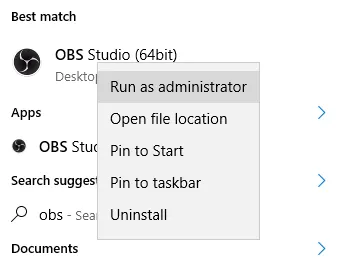
To get OBS to work with the Badlion Client's Minecraft you need to open up OBS in administrator mode. You can right click on OBS to select "Run as Administrator." Then when in OBS the Minecraft game should be attachable to record videos.

I'm trying to install Badlion Client, but my anti-virus (McAfee, NOD32) says it's a trojan or a virus! What's the deal?
Several anti-virus programs will register a false-positive when attempting to install or run Badlion Client. This is caused by some of the security implementations and features that the Badlion Client uses to protect itself. There are absolutely no trojans, viruses, or malware bundled with the Badlion Client and all of your computer files/system are safe while running it.

In order to install Badlion Client on a system that is detecting a false-positive, you will need to temporarily disable your anti-virus completely and install. Normally, simply disabling protection temporarily is sufficient, however if you have a particularly stringent anti-virus software package, you may need to exit the program entirely in order to install Badlion Client. This may involve ending open processes that can be left running by your anti-virus software which may prevent installation. Completely disable your anti-virus software temporarily and the Badlion Client install process will work as expected.

If you are still having issues after installing and trying to run the Badlion Client you might need to add an exception to your anti-virus for the Badlion Client. Every anti-virus has a different way of handling this and you will need to do some quick research online on how to do it for yours.

What is this pop up about protecting my machine?
119d412523049e2288bc75e09b1477b2.png

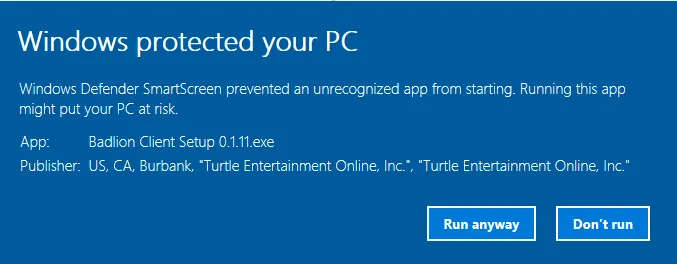
Windows has a new system starting in Windows 8 where they take a bit of time to trust publishers to make this pop up disappear. Our entire application is signed with digital certificates as they should be, but this pop up will still appear for users for the next few days. You simply need to click "More Info" and "Run Anyways". This issue should disappear as more users install it and Windows starts to "trust" this application.

I am having another issue not described here
Please report any and all bugs about the Badlion Client here: we suck ass. Please check if the issue you are reporting has already been reported by other people. Please include log files as well found in your installation directory (C:\Program Files\Badlion Client) such as clientlauncher.log.
 

Kuzni

If you signed up after 2016 don't diss me thx
Supreme
Feedback score
12
Posts
1,688
Reactions
950
Resources
0
What is the Badlion Client?
The Badlion Client is your ultimate portal to playing and experiencing Minecraft on Badlion. Featuring a client side anticheat which can be used on Badlion Open and Badlion Premium, a custom Minecraft version specifically designed for PvP, extra competitive Minecraft built in features found on Badlion Premium such as PUG Matchmaking, 128 TPS Client/Servers, Low Ping Servers, League/Events, and more, a friend/party/chat system to be able to play and communicate with your friends, it is truly offers the best Minecraft PvP experience possible.

bac-uhc-step-2.png


Minimum Requirements
Java 8 (we download this in the installer if you don't have it or we can't find it)
x64 or x86 Based Windows 7 Service Pack 1 or Higher (Win 8/8.1/10 should all work)
A computer processor from this millennium
2 GB Memory (you need this to run Windows anyways)
2 GB of free space on your computer
An Internet Connection that is newer than dial up

Downloads
The downloader below will automatically download the correct version (either 32-bit or 64-bit) onto your computer.

*insert triggered archybot comment*

# of Downloads: 174077
Common Questions/Problems
Why does this only work on Windows and not Mac/Linux?
The simple answer is the anti-cheat is only programmed for Windows at the moment. The long answer is a lot of the system API's for Windows and Mac/Linux are very different. It is not a simple matter to port the anticheat code from Windows to Mac/Linux. Less than 10% of Badlion's population plays on operating systems other than Windows. This being said it is something we are actively researching the possibility of for a later date but we are making no promises as to whether we will ever be able to port the anticheat over or not. We recommend users who have a Mac use Bootcamp to install Windows on their machine. It is a completely free tool provided by Apple to dual boot your computer with both Mac and Windows. You need a valid Windows license key though. More info can be found here.

Why can I not get OBS to recognize Minecraft?
d9306fa8c6d5ab408d4cd3978b070b47.png

To get OBS to work with the Badlion Client's Minecraft you need to open up OBS in administrator mode. You can right click on OBS to select "Run as Administrator." Then when in OBS the Minecraft game should be attachable to record videos.

I'm trying to install Badlion Client, but my anti-virus (McAfee, NOD32) says it's a trojan or a virus! What's the deal?
Several anti-virus programs will register a false-positive when attempting to install or run Badlion Client. This is caused by some of the security implementations and features that the Badlion Client uses to protect itself. There are absolutely no trojans, viruses, or malware bundled with the Badlion Client and all of your computer files/system are safe while running it.

In order to install Badlion Client on a system that is detecting a false-positive, you will need to temporarily disable your anti-virus completely and install. Normally, simply disabling protection temporarily is sufficient, however if you have a particularly stringent anti-virus software package, you may need to exit the program entirely in order to install Badlion Client. This may involve ending open processes that can be left running by your anti-virus software which may prevent installation. Completely disable your anti-virus software temporarily and the Badlion Client install process will work as expected.

If you are still having issues after installing and trying to run the Badlion Client you might need to add an exception to your anti-virus for the Badlion Client. Every anti-virus has a different way of handling this and you will need to do some quick research online on how to do it for yours.

What is this pop up about protecting my machine?
119d412523049e2288bc75e09b1477b2.png

Windows has a new system starting in Windows 8 where they take a bit of time to trust publishers to make this pop up disappear. Our entire application is signed with digital certificates as they should be, but this pop up will still appear for users for the next few days. You simply need to click "More Info" and "Run Anyways". This issue should disappear as more users install it and Windows starts to "trust" this application.

I am having another issue not described here
Please report any and all bugs about the Badlion Client here: we suck ass. Please check if the issue you are reporting has already been reported by other people. Please include log files as well found in your installation directory (C:\Program Files\Badlion Client) such as clientlauncher.log.

Thanks for this?
 

jxhdvn

The Visionary
Supreme
Feedback score
30
Posts
2,480
Reactions
1,282
Resources
0

MarkElf

9+ Year Member
Supreme
Feedback score
27
Posts
1,215
Reactions
1,217
Resources
2
Feel free to check my signature if you haven't done so already.
 
Status
This thread has been locked.
Top