ApexSpawners Update v26.1.7
The "Your Spawners" Feature Drop
We are excited to introduce a completely new way to manage your spawners, alongside a massive visual polish.
New Features & Visuals
- NEW "Your Spawners" Dashboard: Finally here! A brand-new menu that lists all your placed spawners. You can view their stats, remote-upgrade them and teleport to them instantly.
- Seamless Navigation: We added a smart link system. You can now switch between your personal spawner list and the "Mob Shop" with a single click. No commands needed.
- Visual Polish: We standardized the design in all language files (using new color gradients) and swapped out various GUI icons for a cleaner, more premium look. It's recommended to let the language files re-generate by deleting them.
Commands & Permissions
- Command Update: The base command /spawners (or /as) now opens the new dashboard by default. The help menu has been updated to reflect this.
- New Permissions: Added apexspawners.view.own (to access the new dashboard) and apexspawners.teleport (to allow right-click teleporting to spawners).
![]()
ApexSpawners Patch v26.1.6
The "Hide & Seek" Hotfix
We are doing a quick follow-up polish to ensure everything sounds and looks as premium as it feels. Here is what we changed:
Fixes & Tweaks
- The Missing Keys: We found the missing mob-types keys in messages_en.yml. Apparently, they missed the bus for the last update and were playing hide-and-seek. They have been safely escorted back into the config.
- Solo Performance: Fixed an issue where some UI sounds were playing twice simultaneously. We reminded the sound engine that this is a solo performance, not an orchestra. The echo is gone!
Visuals & Audio
- Language Selection UI: We optimized the color coding in the language menu. The active language now stands out clearly with the apex glow. No more guessing games!
- Audio Tuning: General adjustments to various menu sounds for a crisper, more satisfying "click" experience.
ApexSpawners Update v26.1.5
The "Quality of Life" Update
Overview
This update focuses on easier configuration management, visual polish, and a cleaner settings structure. We have also introduced a system to auto-patch language files in the future.
Important Recommendation
For this specific update, we highly recommend deleting your plugins/ApexSpawners/languages/ folder and letting it regenerate on startup.
Why? We have updated existing values (like the new premium mob gradients). Our new Auto-Updater adds missing keys but does not overwrite existing ones (to protect your custom changes). To see the new colors, a fresh generation is required. Future updates will not require this step!
New Features
- Auto-Updating Language Files: The plugin now intelligently detects missing keys in your messages_.yml files and patches them automatically on startup. No more manual copy-pasting after updates!
- General Settings Menu: Introduced a new paginated GUI menu for general plugin settings, future-proofing the plugin for more options.
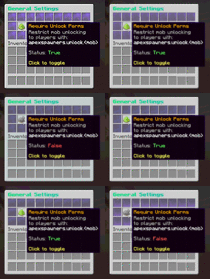
- Unlock Permission Toggle: Added a toggle in the General Settings. You can now decide via GUI if players require the specific permission apexspawners.unlock.<mob> to unlock a mob in the shop.
Visual & UI Changes
- Settings Hub: The old "Global Settings" menu has been restructured into a clean Settings Hub, improving navigation between Language selection and General Settings.
- Premium Mob Gradients: All mob names in the shop and menus now feature beautiful, custom color gradients matching their entity theme (e.g., Blaze is Gold→Red, Enderman is Purple→Black).
Technical & Fixes
- Config Cleanup: Removed legacy upgrade types (DELAY, AMOUNT, etc.) from the internal code to prevent duplicate entries in mobs.yml. The plugin now strictly uses the modern keys (SPAWN_INTERVAL, etc.).
- Code Quality: Implemented a new internal Settings Enum and Settings Hub architecture for safer and cleaner configuration handling.
- Max Level Visuals: Fixed a visual bug where the progress bar would display values >100% if the maximum level in the config was lowered below a spawner's current level.
![]()
![]()
![]()
![]()
ApexSpawners Update v26.1.4
The "Smart Pause & Performance" Update
Overview
This update introduces a quality-of-life feature: "Smart Auto-Pause". Spawners now intelligently freeze when you are out of range and resume seamlessly upon return. We also optimized the math core for instant calculations.
Smart Auto-Pause & Range Logic
We have completely overhauled how spawners handle player distance to ensure a buttery smooth experience.
- Smart Freeze Logic: Spawners now "freeze" their progress exactly where they left off when the owner goes out of range. No more jumping progress bars or instant spawns upon return!
- Visual Feedback: Added a new status line to both the Hologram and the Upgrade Menu. It now clearly displays Owner out of range when the spawner is idle due to player distance.
- Priority System: The status display is smart! It prioritizes critical info like "Hourly Limit Reached" or "Mob Cap Reached" over the range status, so you always know exactly why a spawner isn't spawning.
Performance & Math
Optimizations under the hood to keep your server running at 20 TPS.
- Geometric Calculation: Optimized the CalculateTotalMaxCost method using geometric series formulas. Calculating the cost for "Max Upgrades" is now instant and mathematically precise, even for extremely high levels.
Fixes & Polish
- Localization: Added missing translation keys for the new "Out of Range" status messages across all languages.
- Corrections: Fixed various small color inconsistencies and translation errors in the language files (en/de/fr/es).
- GUI Consistency: The progress bar in the Upgrade Menu now respects the freeze logic and won't visually glitch to 100% when out of range.
ApexSpawners Update v26.1.3
The "Global & Customization" Update
Overview
This update brings ApexSpawners to a global audience! We have added full multi-language support, revamped the visuals with beautiful progress bars, and unlocked 100% configurability for server owners.
Multi-Language Support
ApexSpawners is no longer English-exclusive. We have introduced a robust localization system.
- 4 Supported Languages: The plugin now ships with full translations for:
English
German (Deutsch)
French (Français)
Spanish (Español)
- Auto-Generation: The plugin automatically generates the required language files (messages_de.yml, etc.) on startup.
- New Language GUI: Admins can easily switch language via a new menu, featuring localized item descriptions for better accessibility.
100% Configurability
You now have complete control over the plugin's text and values.
- Everything is editable: Every single message, item name, lore line, and menu title is now located in the configuration files.
- Dynamic Units: Editors and menus now display context-aware units behind values (e.g., 10.0s, 5 Mobs, 16 Blocks).
- Unit Customization: Even the units themselves ("s", "Mobs", etc.) are fully translatable in the config.
Visual & UI Overhaul
- Progress Bars: Upgrade menus now feature stunning, gradient-based progress bars to visualize spawner stats at a glance.
- Admin Gradients: Admin-exclusive tools and buttons now feature a distinct "Royal Crimson" gradient to differentiate them from regular player options.
- Clean Layouts: Adjusted lore spacing and formatting across all menus for a cleaner look.
Admin Quality of Life
- Shop Shortcut: Added a hidden Admin Settings button directly inside the Mob Shop (only visible to admins).
- Quick Access: Instantly jump to Global Settings or Language configurations without typing a single command.
UPDATE NOTICE
Because this update introduces a new file structure for languages:
- The plugin will automatically create the new files (messages_de.yml, etc.).
Images
![]()
![]()
![]()
![]()
![]()
[+] Added a new disabled state to the hologram and the info item in the upgrade GUI.
[Bug] Fixed an issue that caused console spam when disabling spawners in the shop while spawners were already placed in the world.
[Bug] Fixed an issue where globally disabled spawners could not be right-clicked.
![]()