Need help with Litebans. Everyone has the same IP address!!!

Status
This thread has been locked.

Chrono54

Feedback score
3
Posts
64
Reactions
11
Resources
0
When I run /checkalts, it shows all the players running on the same IP address of: 172.18.0.1. This is the same IP I use for my databases!

upload_2021-3-4_15-59-2.png


My network is small, and I know for a fact that 1. This player doesnt have this many alts. 2. Can't play one 5 different accounts at once on a PVP server (5 names on here have been at pvp at once) And 3. That I'm not associated with this player. (My name is in green, Descrate)

If anyone could help it would be greatly appreciated and I may leave a donation! Thank you

 

Attachments

  • upload_2021-3-4_15-59-2.png
    upload_2021-3-4_15-59-2.png
    28.4 KB · Views: 222
PebbleHost
High performance, consistent uptime and fast support. Minecraft hosting that just works.

Exsistory

Supreme
Feedback score
4
Posts
136
Reactions
39
Resources
4
When I run /checkalts, it shows all the players running on the same IP address of: 172.18.0.1. This is the same IP I use for my databases!

View attachment 429659

My network is small, and I know for a fact that 1. This player doesnt have this many alts. 2. Can't play one 5 different accounts at once on a PVP server (5 names on here have been at pvp at once) And 3. That I'm not associated with this player. (My name is in green, Descrate)

If anyone could help it would be greatly appreciated and I may leave a donation! Thank you

It’s possible that your config has a error so I’d try removing it and restarting the server to get a new one (make a backup of the first one though), also another thing to try would be to check that you have the latest version installed.
 

Chrono54

Feedback score
3
Posts
64
Reactions
11
Resources
0
Are you using TCPShield?
Yes I am[DOUBLEPOST=1614906072][/DOUBLEPOST]
It’s possible that your config has a error so I’d try removing it and restarting the server to get a new one (make a backup of the first one though), also another thing to try would be to check that you have the latest version installed.

Yeah I tried that, thanks tho
 

Exsistory

Supreme
Feedback score
4
Posts
136
Reactions
39
Resources
4

Exsistory

Supreme
Feedback score
4
Posts
136
Reactions
39
Resources
4
I'm using a bungeecord network
Do you have IP-forward set to true In your bungee settings along with bungee mode on for your connected servers?

also feel free to dm me here Vurizon#1234, for further assistance and to make things easier for communicating
 

Chrono54

Feedback score
3
Posts
64
Reactions
11
Resources
0
Do you have IP-forward set to true In your bungee settings along with bungee mode on for your connected servers?

also feel free to dm me here Vurizon#1234, for further assistance and to make things easier for communicating

Thank you for assisting me, I really appreciate your time
 

Chrono54

Feedback score
3
Posts
64
Reactions
11
Resources
0
When I run /checkalts, it shows all the players running on the same IP address of: 172.18.0.1. This is the same IP I use for my databases!

View attachment 429659

My network is small, and I know for a fact that 1. This player doesnt have this many alts. 2. Can't play one 5 different accounts at once on a PVP server (5 names on here have been at pvp at once) And 3. That I'm not associated with this player. (My name is in green, Descrate)

If anyone could help it would be greatly appreciated and I may leave a donation! Thank you


This is still unsolved btw
 

Dori

Full Stack Developer
Supreme
Feedback score
28
Posts
459
Reactions
198
Resources
0
It is possible that you have some sort of proxy in the middle the masks IP addresses. This can be caused by either the bungeecord not forwarding the IP addresses correctly, one other plugin, or maybe you just have a proxy.
Would you be able to check what IP address is showing for everyone?[DOUBLEPOST=1615260618][/DOUBLEPOST]Ohh I see it's 172.18.0.1 which is indeed some sort of an internal IP. Just check which server has this IP and you will be able to find your IP masking problem.
 
Last edited:

Chrono54

Feedback score
3
Posts
64
Reactions
11
Resources
0
It is possible that you have some sort of proxy in the middle the masks IP addresses. This can be caused by either the bungeecord not forwarding the IP addresses correctly, one other plugin, or maybe you just have a proxy.
Would you be able to check what IP address is showing for everyone?[DOUBLEPOST=1615260618][/DOUBLEPOST]Ohh I see it's 172.18.0.1 which is indeed some sort of an internal IP. Just check which server has this IP and you will be able to find your IP masking problem.

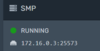
Hey there :) None of the servers have that IP, they run on: 172.18.0.3 rather than 172.18.0.1, 172.18.0.1 is what I use for the databases.

upload_2021-3-8_22-39-39.png
upload_2021-3-8_22-39-55.png
upload_2021-3-8_22-40-4.png


These are their IPs, they are connected to the domain "play.blockitmc.net" They connect to TCP Shield, ddos protection, and get put into the server from my understanding.

When u say some sort of proxy in the middle the masks IP addresses, I'm not so sure what you mean. Also thank you for the reply! It helps a lot to gather info.

upload_2021-3-8_22-43-24.png

upload_2021-3-8_22-43-50.png


Also just letting you know that my experience with running a network is beyond low, I'm pretty new to it, so excuse me if I say something that doesnt make sense :unsure:
 

Attachments

  • upload_2021-3-8_22-39-2.png
    upload_2021-3-8_22-39-2.png
    4 KB · Views: 19
  • upload_2021-3-8_22-39-39.png
    upload_2021-3-8_22-39-39.png
    5.8 KB · Views: 114
  • upload_2021-3-8_22-39-55.png
    upload_2021-3-8_22-39-55.png
    4.9 KB · Views: 116
  • upload_2021-3-8_22-40-4.png
    upload_2021-3-8_22-40-4.png
    5.2 KB · Views: 114
  • upload_2021-3-8_22-43-24.png
    upload_2021-3-8_22-43-24.png
    6.6 KB · Views: 110
  • upload_2021-3-8_22-43-50.png
    upload_2021-3-8_22-43-50.png
    5.5 KB · Views: 114

Dori

Full Stack Developer
Supreme
Feedback score
28
Posts
459
Reactions
198
Resources
0
Take a look at this:
https://gitlab.com/ruany/LiteBans/-/issues/71
It talks about some issues that might be relevant.
Also, from googling a bit about TCPShield, it seems like it doesn't forward the player's IP address, which means it will show the same IP address for everyone.
It might be a good idea to remove it and see if it fixes the issue.
 

Chrono54

Feedback score
3
Posts
64
Reactions
11
Resources
0
Take a look at this:
https://gitlab.com/ruany/LiteBans/-/issues/71
It talks about some issues that might be relevant.
Also, from googling a bit about TCPShield, it seems like it doesn't forward the player's IP address, which means it will show the same IP address for everyone.
It might be a good idea to remove it and see if it fixes the issue.

Hey there! A simple /litebans cleariphistory 172.18.0.1 did the trick, found it in that link u sent me. Thank you for taking time to help!! Is there anything I can do/give in return?
 
Status
This thread has been locked.
Top